2 KVR members have added Undertone 2 to 2 MyKVR groups 2 times.
Download KVR Studio Manager (FREE)
Undertone 2 takes the fuss out of creating effective dialogue fills. Import your audio – ambience or a whole take of original dialogue – and the plugin will resynthesise it into a consistent bed of ambient sound. You can also take things further, generating complex soundscapes using multiple samples and probability weightings.
{See video at top of page}
Import original dialogue audio or recordings of just the ambient background (AudioSuite supported), and Undertone 2 will automatically slice and recombine it to output a bed of sound.
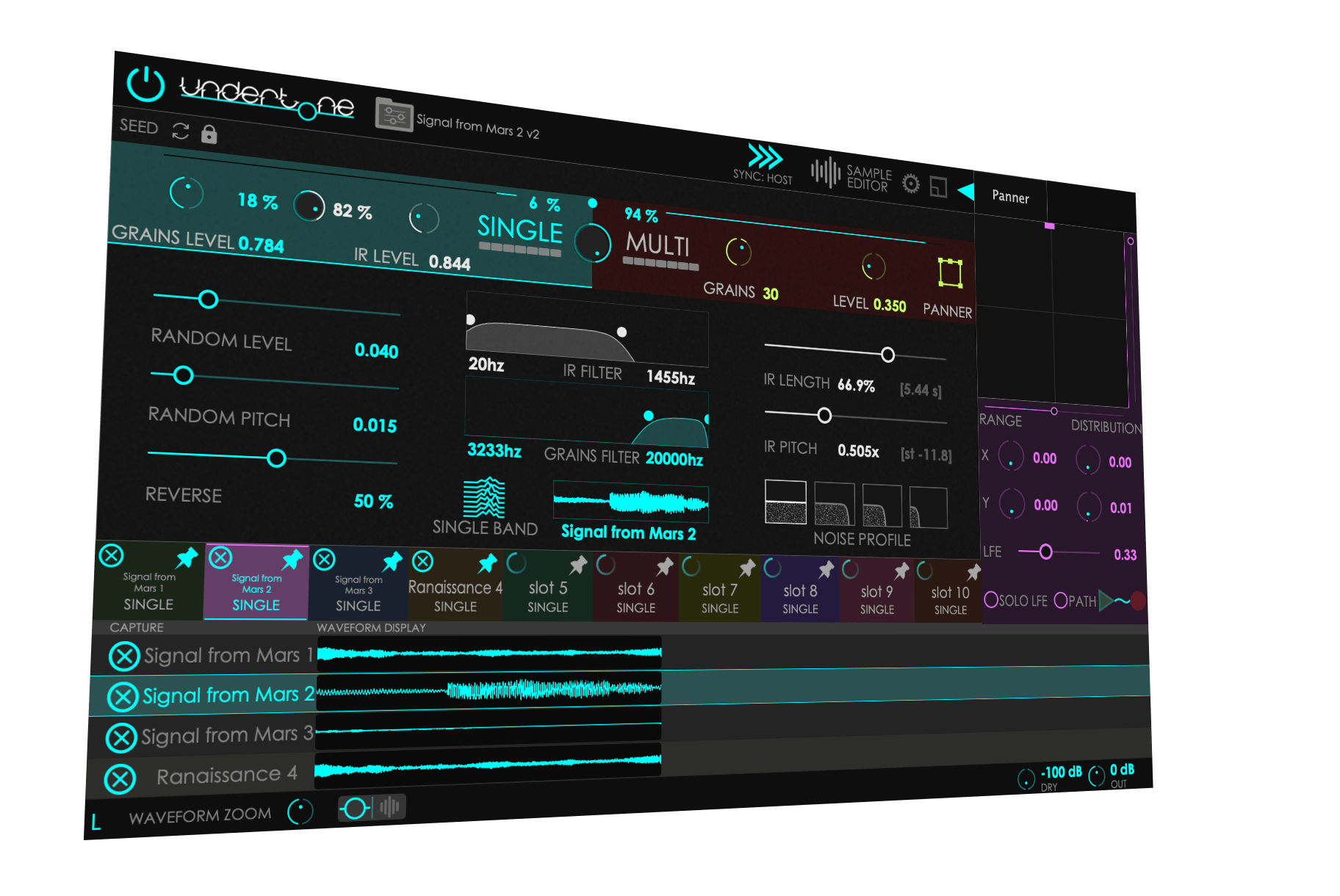
Simulate entire scenes with sample triggering probabilities, edit imported samples, make multichannel granular movement, pitch and filtering, up to 50 grains, random and reverse.
Every sound is different. Undertone 2 has three ways to resynthesize anything from a whirring machine, a real-world ambience or a complex soundscape. Use one or combine them to get the sound you need.
1) Granular Engine
Resynthesises audio by playing back multiple grains of up to 30 seconds each. Randomize grains' Level, Pitch and Reversal. Apply filtering and try Multiband mode. Ideal for ambience that contains 'events' like keyboard clicks or chattering.
2) Convolution
Use the sample as an impulse response. Change the pitch, length, filtering and noise profile. Great for keeping the complexity and character of constant tones like whirring machines and ambient room sounds.
3) Multi Sample
Load up to 10 samples and set their probabilities to trigger. Build everlasting soundscapes from individual samples, conjure dronescapes, and engage the Panner to playback up to 50 grains with individual movement paths.
Granular automatically slices grains of up to 30 seconds from the selected sample, and plays many at once to overlap, similar to traditional slice-and-dice techniques for creating dialogue fills from existing room tone. You can choose the amount of Random Level (variation) between grains, Random Pitch (variation) between grains, what proportion of grains play in Reverse,
The Convolution engine convolves the loaded sample to resynthesis it. You get control over the IR Length and IR Pitch of the impulse response, and can apply a noise profile as a pseudo low-pass effect.
This engine can wield up to ten loaded samples, and can be blended with the Single Engine using another mix control. The engine spawns up to ten grains at once, or up to 50 if using the Panner (see below). Each sample loaded into the Multi Engine can be changed for its Level, Random Level, Pitch, Random Pitch, Reverse, Grain Size and Envelope.
Each sample can also be set in its Probability and Grains Limit. These values together determine the likelihood of a certain grain spawning next. These controls are powerful when constructing a more complex scene in which different samples (drills, hammers, birdsong, car horns?) are triggered more or less frequently and at different pitches.
You can use the power of all three of Undertone's engines at once, should you wish. By blending between the Granular and Convolution engines first, and then mixing the result of this with the Multi engine, you can strike a balance between a simple ambience fill and an entire generative scene.
Trim down a sample to focus on the bits that really matter. Undertone's sample editor means you can drag in any audio file – including one with speech – and isolate the background noise and ambience from within the plugin. Thanks to AI voice recognition, selecting only parts of your file is simple and usually quite instant.
Select a region to trim to, and the sample will act as if this is the only audio data loaded into the slot. The spectrogram view lets you pinpoint and avoid unwanted background sounds. It's a great way to make absolutely sure that the source sound for your fill is working the best it can.
Get up to 50 grains moving from place to place in multichannel setups. Choose a starting point and ending point for your path, and grains will then be created at the start and end playback at the end point. The Panner is great for creating moving ambience and 'directional atmosphere' such as wind that actually moves the way it's portrayed.
From air conditioners to drone armies, we've included it all in Undertone's built-in sounds. Choose starting points or load readymade fills. Undertone 2's preset browser is hugely powerful, with tagged presets helping to narrow down your selection, and user tags helping you to keep even more organised.

Please log in to join the discussion
Submit: News, Plugins, Hosts & Apps | Advertise @ KVR | Developer Account | About KVR / Contact Us | Privacy Statement | Sell @ KVR | KVR Marketplace Terms & Conditions
© KVR Audio, Inc. 2000-2026