38 KVR members have added Utsbox Glitch to 18 MyKVR groups 45 times.
Download KVR Studio Manager (FREE)
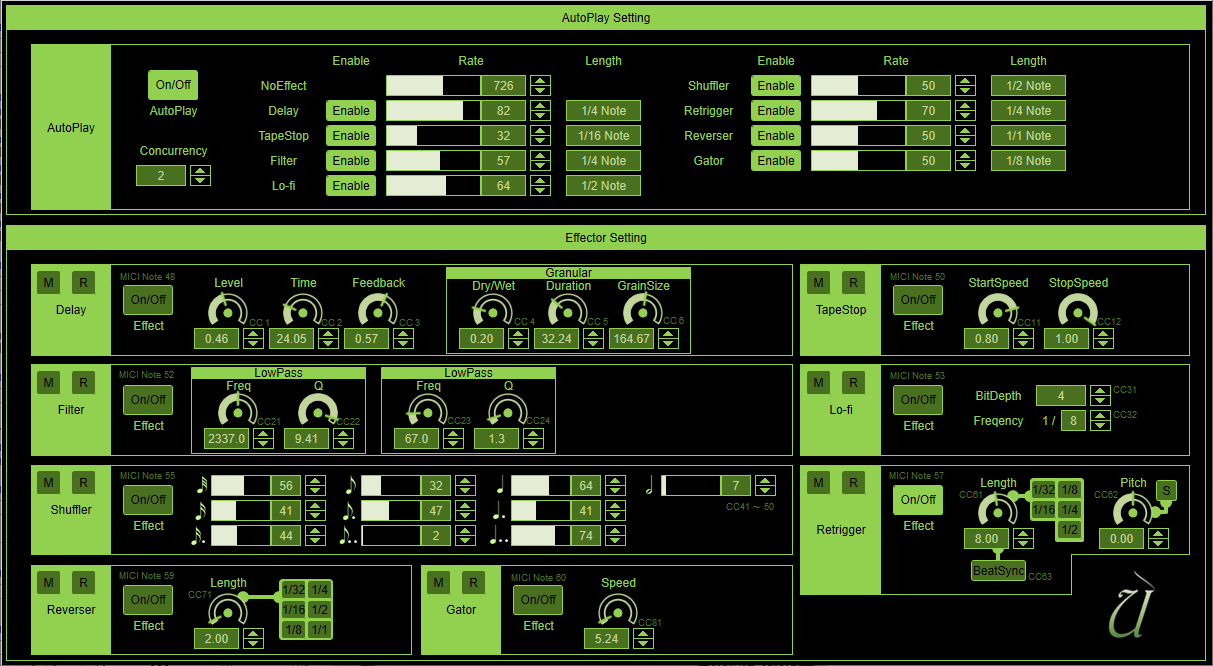
Utsbox Glitch is a glitch effect with multiple built-in effects.
The effects can be controlled via MIDI (Note on/off, CC), or even automatically played.
{See video at top of page}
Features:
The following effects are built in:
Basic Usage:
Enable Utsbox Glitch on the track you want to apply the glitch effect to.
Then, control Utsbox Glitch from a MIDI keyboard or MIDI track.
You can also turn the "AutoPlay" button on to have it play automatically instead of controlling it with a MIDI keyboard or MIDI track.
MIDI note number and effect mapping:
In addition to the above, each parameter is mapped to a MIDI CC.
[note]The MIDI note notation for this VST plug-in is "middle C = C4" (international standard).
Please note that some DAWs (Cubase, Studio One, etc.) use "middle C = C3" (YAMAHA standard).
For example, C2 in Utsbox MIDI Tool2 becomes C1 in Cubase.
How to install:
After unzipping the downloaded zip file, move or copy the folder "UtsboxGlitch.vst3" to the VST3 folder (see below):
If Ableton Live does not recognize the downloaded VST3 plug-in, try renaming the folder from "UtsboxGlitch.vst3" to "UtsboxGlitch."
 $49.00Efx Refract
Please log in to join the discussion
Submit: News, Plugins, Hosts & Apps | Advertise @ KVR | Developer Account | About KVR / Contact Us | Privacy Statement | Sell @ KVR | KVR Marketplace Terms & Conditions
© KVR Audio, Inc. 2000-2026