
16 KVR members have added VeeSTeeExtifier to 4 MyKVR groups 23 times.
Download KVR Studio Manager (FREE)
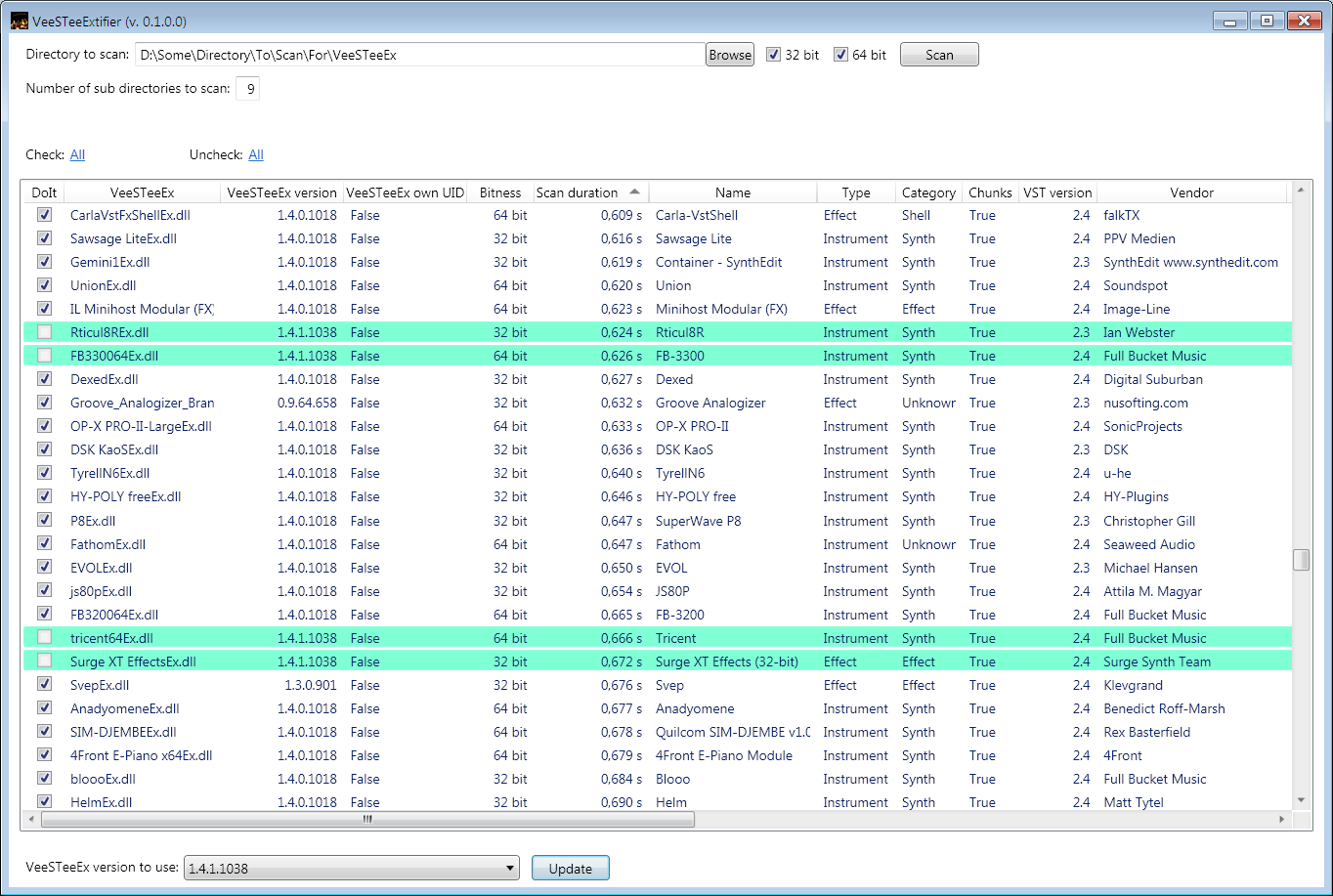
VeeSTeeExtifier is a utility application for Windows which makes updating existing VeeSTeeEx wrappers to a newer version much easier.
Let the application scan your plugin directory for instances of the VeeSTeeEx wrapper.
Found VeeSTeeEx wrappers will be added to a list and marked for update, in case they have a lower version than the one you would like to update to.
Then with one click, all the checked VeeSTeeEx wrappers in the list will be updated to the new version in seconds.
VeeSTeeExtifier with its current functionality is only of interest for people who already have wrapped at least a few VST2 plugins with VeeSTeeEx.
Look out for new version 1.4.1 of VeeSTeeEx to try it out.
Note that this current version is an early beta version.
Even tough so and only tested on Windows 7, I don't expect major problems, especially not if used in intended ways.
How to install:
Extract the downloaded zip package to a directory of your liking.
This then is the 'install' location.
Before you start the application the first time, please read the 'VeeSTeeExtifier-ReadMe.txt'.
Reviewed By TorresBob88 [all]
March 8th, 2025
Version reviewed: 1 on Windows
The companion software to the arguably game changing VeeSteeEx software.
I've added the VeeSteeEx library mod to almost every Vst2 I own that it can be used on.
VeeSTeeExtifier allows you to update every instance of the mod on your computer at the same time,
as Patrik releases upgrades and improvements. Another incredibly useful project from ZonderP.


Hi, thanks for the app, very useful. Unfortunately, the current 0.10 beta is not working for me on a Windows 11 24H2 computer. The scanning process seems fine, but then the resulting list of plugins cannot be edited or checked/unchecked. It also can't find any version of VeeSTeeEx to use, even though I put the updated .dll in the application directory, as stated in the documentation.

Hi Sahul!
Oh, that's bad - and a bit unexpected...
If there is no version to use for the update, then it is well possible, that you cannot check/uncheck items in the list.
Did you put all 4 new variants of the new version into the application directory?
If not, you should do so. And also not rename to anything else than how they are called in the downloaded zip file.
For that dropdown with the version to be filled with entries, it needs both, 32 and 64-bit.
Maybe you only copied 64-bit (or only 32-bit) there? This would be an explanation for this behavior.
Ok, that did the trick. I hadn't copied the 32-bit dlls, as I'm not using any 32-bit plugin. It worked nicely now, thanks a lot.
Great!
And please take care about the 'Reports own unique ID' vs. not.
Good thing though is that in case one would update to the wrong variant by mistake, it's possible to update to the other one.
Please log in to join the discussion
Submit: News, Plugins, Hosts & Apps | Advertise @ KVR | Developer Account | About KVR / Contact Us | Privacy Statement | Sell @ KVR | KVR Marketplace Terms & Conditions
© KVR Audio, Inc. 2000-2026

