Log InCreate An Account
  1. Plugins
  2. »
  3. Patrick Desaulniers
  4. »
  5. Wolf Shaper
  6. »
  7. Details
Wolf Shaper
Wolf Shaper by Patrick Desaulniers is a Virtual Effect Audio Plugin for macOS, Windows and Linux. It functions as a VST 3 Plugin, a LV2 Plugin and a CLAP Plugin.
Product
Version
1.0.2
Product
Version
1.0.2
Product
Version
1.0.2
Effect
Formats

MyKVR: Groups, Versions, ...

100 KVR members have added Wolf Shaper to 77 MyKVR groups 116 times.

Download KVR Studio Manager (FREE)

Not In Your MY KVR Groups
(or group limitation prevents versioning)
+77 in private groups

KVR Rank

Overall: 13065   10156   11469   1020

30-Day: 14198; 7-Day: 14400; Yesterday: 6380

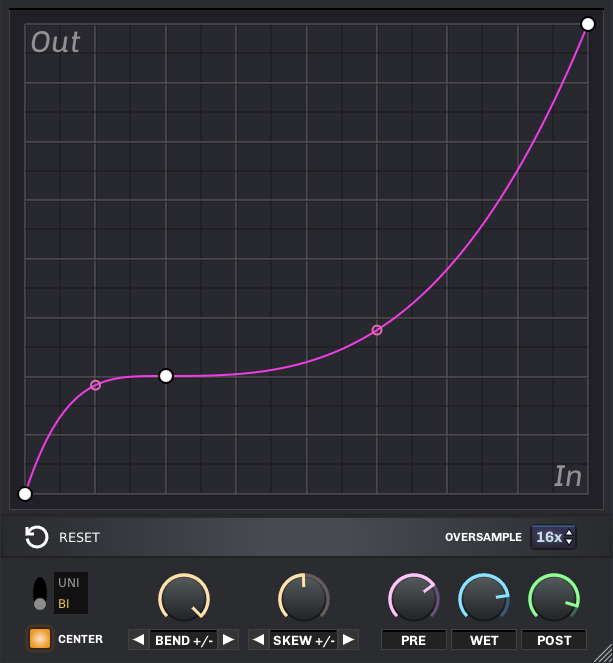
Wolf Shaper is a free VST, LV2 and CLAP distortion plugin. It lets you create your own waveshaping functions using a spline-based graph editor.

Features:

  • Customizable graph – Design your own distortion functions using 4 different curve types.
  • Warp modes – Use warping algorithms to alter the graph dynamically.
  • Uni/Bi modes – Switch between symmetrical and asymmetrical distortion.
  • Up to 16x oversampling – Get rid of aliasing artifacts for a cleaner sound.

Parameters and controls:

  • Pre – Controls the input volume, before any processing has taken place.
  • Wet – Determines the mix between the original and the processed signal in the output. Set this parameter at maximum value to only hear the processed signal.
  • Post – Controls the output volume, after all processing has been done.
  • Center – Removes DC offset from the output. This ensures that the resulting waveform is vertically centered at zero.
  • Oversample – Sets the multiple of the sample rate at which the processing will be done. This allows the plugin to filter out some harmonics that would otherwise cause aliasing artifacts.
  • Uni/Bi switch – Allows switching between symmetrical and asymmetrical waveshaping.
  • Warp knobs - The two yellow knobs in the middle of the UI allow to bend the distortion curve dynamically. These knobs can be automated by the plugin host for interesting effects.
  • Reset button – Puts the graph back at its default state, which is a straight diagonal line.

Graph editing:

  • Add a vertex – Right-click in the graph to add a vertex. Keep holding the right mouse button to position the vertex.
  • Move a vertex – Left-click and drag the vertex.
  • Remove a vertex – Double left-click on the vertex.
  • Tweak the tension of an edge – Left-click and drag vertically the tension handle located at the center of the edge.
  • Change the curve type - Right-click on a vertex, then select the curve type in the context menu.
  • User interface.
  • Resize the window – Left-click and drag the resize handle located at the bottom-right to resize the window.

Latest User Reviews

Average user rating of 5.00 from 1 review
Wolf Shaper

Reviewed By tukapon [all]
March 4th, 2025
Version reviewed: 1 on Linux

good and good i am japanese ultra super composer.

this is good and good plugin. beautiful sound maker. good and good aaaand god.

Read Review

Products similar to Wolf Shaper...

Comments & Discussion for Patrick Desaulniers Wolf Shaper

Discussion
Discussion: Active

THIS POST HAS BEEN REMOVED

diax
diax
13 October 2023 at 1:40pm

I got an alert starting Sound Forge, it scanned my vst3 and windows-security found: "wolf-shaper.vst3" Trojan:Win32/Wacatac.B!ml.

Please log in to join the discussion

Log In To KVR Audio
