


i cant figure out how to record this thing in T2. anybody using the 2 together.
i tried routing the track to another and recording and that didnt work, then i tried to figure out which midi notes are triggering whjich chords and i couldnt figure that out either..any help is greatlly appreciated.
chordspace in Traktion.
-
- KVRian
- 517 posts since 21 Aug, 2003 from so cal
-
- KVRAF
- 6519 posts since 13 Mar, 2002 from UK
I'm afraid I can't help with the T2 routing (don't have a copy) but this may help with the chord triggering...
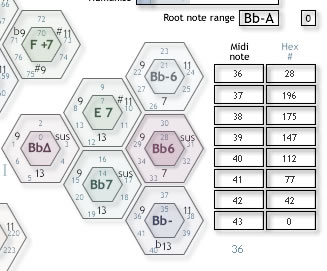
Click the "Hex #" heading and you'll get the overlay as shown.
The blue 36 at the bottom of the column of midi notes is the midi note being played at the time by a keyboard.
Click the "Hex #" heading and you'll get the overlay as shown.
The blue 36 at the bottom of the column of midi notes is the midi note being played at the time by a keyboard.

Now with improved MIDI jitter!
-
- KVRAF
- 6740 posts since 25 Mar, 2002 from sheffield, england
you trying to record MIDI or audio? If you want an audio clip, just select the track and press the render button. If you want a MIDI clip you will need to either export & re-import a MIDI file, or route the MIDI back to an input using something like MIDI yoke so you can record it to a new track.
-
- KVRian
- Topic Starter
- 517 posts since 21 Aug, 2003 from so cal
i want to record the audio, as i trigger the hexagons from my my trigger finger. ive tried to just play the midi then render but its buggy for some reason i get double notes and stuff.