


SKINMAN, the new strike by g200kg (early early alpha)
-
- KVRist
- 452 posts since 8 Jul, 2004
Yep, another Athlon xp here, so no SSE2. Patiently waiting..
-
- KVRAF
- Topic Starter
- 6242 posts since 26 Sep, 2003 from right here, as you can see ...
did i say that i love you?g200kg wrote:I intend to provide SSE (non-SSE2) version (with corner value limitation modified to 1000) later.

regards,
brok landers
BIGTONEsounddesign
gear is as good as the innovation behind it-the man
brok landers
BIGTONEsounddesign
gear is as good as the innovation behind it-the man
-
- KVRer
- 11 posts since 12 Jan, 2008
brok landers wrote:btw, look what i did with exclusively knobman and skinman v.0.82:
skinman/knobman is going to be a bomb!!!


Impressive...any chance to get the skin-file to take a look inside and to learn from your skills
And a smal bug inside the 0.83: the textures dont work!
-
- KVRAF
- Topic Starter
- 6242 posts since 26 Sep, 2003 from right here, as you can see ...
g200kg, feature suggestion to ease up the workflow:
when saving the skinman skin, give the option to save the knobs/images (which mostly come from various different locations on the hd) to the same location where you save the skinfile ... you could do it the following way:
1. file > save as (skinfile only)
2. file > save as (skinfile + used images)
when using option 2, the imagefiles used in skinman are copied to the same location where the skinman file is stored to, and the references for the image files are changed to that location. so when someone moves the whole "project" folder on the hd, where he stored the skinmanfiles+images to, to another location, the imagefiles are not lost and loaded up correctly, as the file-reference is: "skinfile is loaded up from x location, images are to be loaded up from the same location" ...
understand what i mean?
when saving the skinman skin, give the option to save the knobs/images (which mostly come from various different locations on the hd) to the same location where you save the skinfile ... you could do it the following way:
1. file > save as (skinfile only)
2. file > save as (skinfile + used images)
when using option 2, the imagefiles used in skinman are copied to the same location where the skinman file is stored to, and the references for the image files are changed to that location. so when someone moves the whole "project" folder on the hd, where he stored the skinmanfiles+images to, to another location, the imagefiles are not lost and loaded up correctly, as the file-reference is: "skinfile is loaded up from x location, images are to be loaded up from the same location" ...
understand what i mean?
regards,
brok landers
BIGTONEsounddesign
gear is as good as the innovation behind it-the man
brok landers
BIGTONEsounddesign
gear is as good as the innovation behind it-the man
-
- KVRAF
- Topic Starter
- 6242 posts since 26 Sep, 2003 from right here, as you can see ...
sorry, no, it will be in use ... please understand ...deepfish wrote:brok landers wrote:btw, look what i did with exclusively knobman and skinman v.0.82:
skinman/knobman is going to be a bomb!!!
Impressive...any chance to get the skin-file to take a look inside and to learn from your skills
but if i can help on particular issues, just ask me ...
hmmm ... they do work here in 0.83 ...deepfish wrote:And a smal bug inside the 0.83: the textures dont work!
regards,
brok landers
BIGTONEsounddesign
gear is as good as the innovation behind it-the man
brok landers
BIGTONEsounddesign
gear is as good as the innovation behind it-the man
-
- KVRist
- 485 posts since 22 May, 2004 from Yokohama, Japan
ver 0.84 is here
http://www.g200kg.com/en/software/skinman.html
* SSE2 => SSE
* Rectangle Corner Limit =>1000
* TextureZoom Added
just one hint in the current version, if the images not found on original path, SkinMan try to load from the same folder as .skin-file folder. it means SkinMan can load images if .skin+images are placed same folder at least.
http://www.g200kg.com/en/software/skinman.html
* SSE2 => SSE
* Rectangle Corner Limit =>1000
* TextureZoom Added
083.zip file problem. the Texture folder should be under the skinman.exe file. fixed in 0.84.deepfish wrote:And a smal bug inside the 0.83: the textures dont work!
image file location is problem. i think so. i know i should solve in the future.brok landers wrote:1. file > save as (skinfile only)
2. file > save as (skinfile + used images)
just one hint in the current version, if the images not found on original path, SkinMan try to load from the same folder as .skin-file folder. it means SkinMan can load images if .skin+images are placed same folder at least.
-
- KVRist
- 452 posts since 8 Jul, 2004
You rule! 'Problem' solved.g200kg wrote: * SSE2 => SSE
A minor oddness came up when trying to load the demo .skin : skinman looked in its newly made subfolder below 'own documents', not in the home dir where it was unpacked. Far from critical, but slightly weird behaviour. Just so you'd know..
-

- KVRian
- 921 posts since 14 Oct, 2002 from Sweden
Great, this'll probably put me out of business...brok landers wrote:btw, look what i did with exclusively knobman and skinman v.0.82:
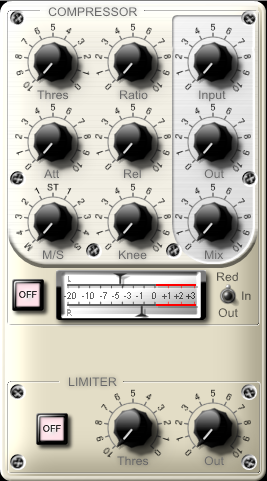

j/k

No seriously, that's excellent stuff Nico !
Carry on.


-
- KVRer
- 15 posts since 7 Apr, 2007
Hi g200kg,
I really enjoyed that you made SkinMan software which is still another excellent tool! I was using inkscape for making a blog layout but with this tool... to hell inkscape (Just to let you know guys that g200kg's softwares are really good for everything from nothing to impossible!)
I was using Knobman and it was really instictively easy to use. I was overlaying multiple layers and I made something that I was absolutely amazed, it looked really realistic! I never believed that I could have been creating something like that!
So, after these testimonials I wanted to give just a little features request to SkinMan:
- Texture Rotation/Direction
- Vertical/Horizontal Mirror
And some bugs I had (Just to let you know that I am actually using a 32-bit O/S):
- After the 1st shape creation, the other shapes creations are not allocated and sized at the targetted spot. I must select the shape in the tree to figure out that the shape is a dot in the upperleft of the screen.
- When I'm using the Shape+ and Shape- feature, there's a maximum range of canvas when I try to move or resize the shape and this makes the shape disappear and cut itself. I must select back Normal to reset the middle of this invisible canvas.
This is it for now
So thanks again for this tool, really neat!
BTW, Sorry for my mediumly bad english...
I really enjoyed that you made SkinMan software which is still another excellent tool! I was using inkscape for making a blog layout but with this tool... to hell inkscape
(Just to let you know guys that g200kg's softwares are really good for everything from nothing to impossible!)I was using Knobman and it was really instictively easy to use. I was overlaying multiple layers and I made something that I was absolutely amazed, it looked really realistic! I never believed that I could have been creating something like that!
So, after these testimonials
I wanted to give just a little features request to SkinMan:- Texture Rotation/Direction
- Vertical/Horizontal Mirror
And some bugs I had (Just to let you know that I am actually using a 32-bit O/S):
- After the 1st shape creation, the other shapes creations are not allocated and sized at the targetted spot. I must select the shape in the tree to figure out that the shape is a dot in the upperleft of the screen.
- When I'm using the Shape+ and Shape- feature, there's a maximum range of canvas when I try to move or resize the shape and this makes the shape disappear and cut itself. I must select back Normal to reset the middle of this invisible canvas.
This is it for now
So thanks again for this tool, really neat!
BTW, Sorry for my mediumly bad english...
Last edited by silverkorn on Tue Jul 22, 2008 12:22 am, edited 1 time in total.
-

- KVRAF
- 19156 posts since 13 Feb, 2003 from Vancouver, Canada
Whoa! I just caught wind of this!brok landers wrote:btw, look what i did with exclusively knobman and skinman v.0.82:
skinman/knobman is going to be a bomb!!!
 That looks amazing, Brok. And of course there's a limiter at the output!
I'll have to check this thing out. Can you use this to skin already-made plugins?
-
- KVRAF
- Topic Starter
- 6242 posts since 26 Sep, 2003 from right here, as you can see ...
doing my best ... but don't thank me, thank g200kg for the superb software ...MaxSynths wrote:Yes, really good :O
thanks here, too ...duncanparsons wrote:very nice brok!
and here ...Hlis93 wrote:
heh, well, before i put you out of your job, there has to go a lot of water down the hill further ... and, btw, what i've learned in graphic works/gui is based a lot on the stuff you did, actually ... the the honour is on your side actually ...nBeat wrote:Great, this'll probably put me out of business...
j/k
No seriously, that's excellent stuff Nico !
Carry on.
hi martin, thanks! especially you saying that makes me proud ...Caco wrote:Looks nice Niko
how's compressive going btw?
why did i know that you're going to say that?bduffy wrote:Whoa! I just caught wind of this!
but thanks, it means a lot to me that pro's also consider my work as good!
no ... it's a graphic app mainly, but specialized on the music/plugin market ... the neat thing is, that it loads the .knobfiles one made with knobman, so you can design a knob (with rotation) in knobman, then simply load up that file into skinman and easily build a gui with it ... but the most positive thing at knobman/skinman is, that it is focussing on what's really needed for designing gui's, you can work with it right away, no need to learn the ammount of photoshop or gimp or whatever ... it's very easy ...bduffy wrote:I'll have to check this thing out. Can you use this to skin already-made plugins?
thanks all again!
regards,
brok landers
BIGTONEsounddesign
gear is as good as the innovation behind it-the man
brok landers
BIGTONEsounddesign
gear is as good as the innovation behind it-the man
-
- KVRAF
- Topic Starter
- 6242 posts since 26 Sep, 2003 from right here, as you can see ...
are you sure this isn't only with .knobman knobs? that's what happens here when i load a knobman knob that is made with an earlier version of knobman, because knobmanfiles did not include the png buildt into it.silverkorn wrote:- After the 1st shape creation, the other shapes creations are not allocated and sized at the targetted spot. I must select the shape in the tree to figure out that the shape is a dot in the upperleft of the screen.
however, if so, just load up your knob in the newest knobman version, resave it, and it'll appear in skinman then ...
confirmed ... happens here, too, sometimes ...silverkorn wrote:- When I'm using the Shape+ and Shape- feature, there's a maximum range of canvas when I try to move or resize the shape and this makes the shape disappear and cut itself. I must select back Normal to reset the middle of this invisible canvas.
regards,
brok landers
BIGTONEsounddesign
gear is as good as the innovation behind it-the man
brok landers
BIGTONEsounddesign
gear is as good as the innovation behind it-the man