MU.LAB 2 Test B

Official support for: mutools.com
Post Reply New Topic
RELATED
PRODUCTS

Post

Oxygenee wrote:What I mean about the instances is that when I put a plugin into a rack (say 'Synthia'), 'remove from rack' it then, add the same plugin just as if the rack had never been filled, then the plugin is inside the rack just as before, but it has a different number (such as 'Synthia(2)').
Ah, understood.

But can't repeat that here :?

"Pull Out Of Rack" + "Put Into Rack" doesn't change the name index.

Is this repeatable? Could you please give me the steps?

Post

Bonteburg wrote:So far as I know, I was just browsing for another sample to add to my snare zone. I was testing velocity layering and I already had a pretty good kick zone with 12 stacked samples playing back on C3. Snares were going on E3, and I was pretty much done with the snare zone. Maybe doing it all during playback made MU.LAB crash.
Mmm, difficult to say at this point, we should further narrow it down.

I'll also keep an eye on it!
We should have some kind of tool to merge parts
On the whishlist.
The possibility to name a sequence when you create it, as in "new part -> sequence part -> name dialogue".
Do others agree?

Disadvantage is that it's an extra step in the workflow.

Not sure what's best here.

Post

Well - seeing as I famously name sequences "qwedfgjhkasd" in the heat of composition it's not that big a deal I guess ... but then I'm not everybody. :)

Post

mutools wrote:Why do you want to scroll in the empty composition while recording?
So I can see the bar line along the top to get a quick rough view of the position without having to read the spinning number of the exact position. :)
mutools wrote:Not sure if this is relevant but pressing in the Composer and Sequence Editor toggles the auto scrolling on/off.
This will probably do fine. Is this setting visible anywhere in the User Interface?
mutools wrote:Just tried recording events when there is no focussed target plugin.
Works fine here.
Okay, no worries: there were so many things I was changing, any one of them could have fixed it!
mutools wrote:What do you mean with "Invert Value 2"?

If a float value has a range 0..1, then inverting means value X becomes 1 - X.
If a controller value has a range 0..127, then inverting means value X becomes 127 - X.

mutools wrote:
Is there an easy way to move Parts between Compositions?


Using Cut, Copy, Paste:

Via the Composition context menu (right-click the composition background, not a part!)

Or with Control + X, C, V

I sort of follow this: you're cutting / pasting a component of the Composition, so it's the Composition's menu. But I feel instinctively that I'm doing something with the Part, so I look on the Part's menu. :?

Post

pljones wrote:This will probably do fine. Is this setting visible anywhere in the User Interface?
No, just implicitly by seeing whether it auto-scrolls or not.

Want to keep the UI light, you know.
If a float value has a range 0..1, then inverting means value X becomes 1 - X.
If a controller value has a range 0..127, then inverting means value X becomes 127 - X.
Added on the whishlist.
mutools wrote:
Is there an easy way to move Parts between Compositions?
Using Cut, Copy, Paste:

Via the Composition context menu (right-click the composition background, not a part!)

Or with Control + X, C, V
I sort of follow this: you're cutting / pasting a component of the Composition, so it's the Composition's menu. But I feel instinctively that I'm doing something with the Part, so I look on the Part's menu. :?
I know. Sometimes intuition and logic seem to conflict.

I prefer to follow the logic here, which is that it is a composition function, not a part function.

Maybe a solution is to add the cut-copy-paste menu also to the part menu, so it's at both places, for user friendliness. Will think about this.

Post

Attention: There is a bug when saving a session with embedded samples.

So please don't save a session using embedded samples with Test B.

Fixed in Test C.

Post

pljones wrote:MULAB still fails to render.
The word 'still' surprises me, didn't know about any previous report.
It got perfectly through about 39 bars. It looks like it's doing the whole thing. However, after that point, only a few notes get rendered.
I can't find a problem with the Mixdown function.

I used your uploaded session to do the test.

(had to rescue your session cause of some new bug i discovered when embedding samples in a project)

Routed "TheSumPLJDrums2" sequence to some VST (not kontakt, don't have it here), did mixdown to file, all seems ok.

Is it repeatable?

Could you make a simple musession that always fails to mixdown properly?

Post

mutools wrote:
Oxygenee wrote:What I mean about the instances is that when I put a plugin into a rack (say 'Synthia'), 'remove from rack' it then, add the same plugin just as if the rack had never been filled, then the plugin is inside the rack just as before, but it has a different number (such as 'Synthia(2)').
Ah, understood.

But can't repeat that here :?

"Pull Out Of Rack" + "Put Into Rack" doesn't change the name index.

Is this repeatable? Could you please give me the steps?
Hi!

I have recorded a movie: http://www.mediafire.com/?t9tgtm2g69z .

As you see, it creates new instances on each insert of the same plugin into the rack after the plugin has been pulled out! - This does not happen if the plugin is deleted instead.
Also, after 'Synthia(2)' comes 'Synthia(4)' - strange!:o

See you! :D

Post

Oxygenee wrote:I have recorded a movie: http://www.mediafire.com/?t9tgtm2g69z .

As you see, it creates new instances on each insert of the same plugin into the rack after the plugin has been pulled out! - This does not happen if the plugin is deleted instead.
Also, after 'Synthia(2)' comes 'Synthia(4)' - strange!:o
Thanks for the movie, this makes it all very clear!

When you pull a plug out of a rack, the plug is not deleted, it's still alive (and kicking) in the session, as you can see in the target plug list and in the MPA.

And so when plugging in a second Synthia in this case, it's perfectly normal that the new Synthia gets a new instance number, as there are 2 Synthias at the same time.

If you want to really delete a plug from the session, the use its "Delete" context menu option instead of "Pull Out Of Rack".

One thing which is not ok is the fact that it goes from Synthia(2) to Synthia(4), which is a little bug to be fixed.

FYI: The numeric index at the end of a name is only appearing in case of equal names. MU.LAB will preserve the index as long as there are equal names i.e. when you have Synthia(1), Synthia(2) and Synthia(3) and you delete Synthia(2), then we stay with Synthia(1) and Synthia(3), though there are only 2 "Synthia"s. Otherwise, when changing Synthia(3) to Synthia(2) in that case, that might be confusing i think.

Post

mutools wrote:
pljones wrote:MULAB still fails to render.
The word 'still' surprises me, didn't know about any previous report.
Sorry Jo -- looks like I didn't copy you on the report to Native Instruments. (At the time I didn't have another host to test in, so I left it with them...)
I can't find a problem with the Mixdown function.
... Routed "TheSumPLJDrums2" sequence to some VST (not kontakt, don't have it here), did mixdown to file, all seems ok.
It's completely repeatable with K2 and ns_kit7. Every session I've ever tried. It seems to be related to the amount of memory being used. However, now I've succeeded in Reaper, I'm concerned it's how the host is handling memory usage, rather than how Kontakt2 is doing it.

Post

Windows - MuLab Beta 2 B

I found a strange occurrence that seems to lock up the Audio Engine.

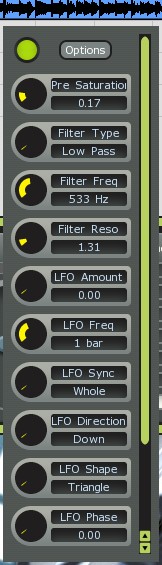
I tried this new filter ..
http://www.studio-qb.com/software
It has no GUI and uses the default Mu-Lab controls. The Filter works fine except for the initial preset which locks up the Audio Engine in MuLab upon first use. The Audio Engine cannot be reset. The only way out is to Quit.

Before using the filter, if you move the pre-saturation parameter off of zero before first use, the filter runs fine.

So there must be a conflict between the initial preset for this filter and how Mu-Lab handles it.

Image
Image

Post

jpumphandle wrote:Windows - MuLab Beta 2 B

I found a strange occurrence that seems to lock up the Audio Engine.
Forgot to mention that this Filter comes in two flavors 1) one that supports SSE hardware and 2) one that supports non-SSE hardware. Both have the same conflict with Mu-Lab with regard to the initial preset.
Image

Post

Yes i hear it too but have no idea why.

Will email the developers.

Post

QB Filter has been updated:

1.01 Improved hosts compatibility - 2008-07-31

Post

Hi jo...

I haven't got any problems actually whit MULAB latest version, only say you make very good job whit your software, congratulations. The new synth sounds very good.
For me, only I miss one vsti drum sampler to are more good package.

cheers

TONi

Post Reply

Return to “MuTools”