


I've readen the manual , but i just dont get it,
can someone do a video and post it on vimeo showing how to use them ?
or maybe just a step by step tuttorial on the mod matrix and the MMIx ?
thanx
How to use the Mod matrix and MMix ?
-
giorgiomartini giorgiomartini https://www.kvraudio.com/forum/memberlist.php?mode=viewprofile&u=161733
- KVRist
- 335 posts since 1 Oct, 2007 from Berlin
-

- u-he
- 30215 posts since 8 Aug, 2002 from Berlin
Here's an example for the Modulation Mixers (MMix):
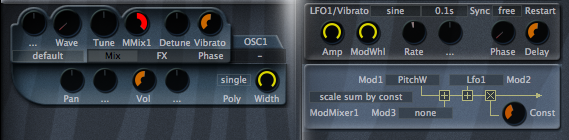
You can see that oscillator tune modulation is done by ModMixer1, fully cranked up.
ModMixer1 consists of the sum of PitchWheel and Lfo1. That means, they're mixed together so that both modulate the oscillator tune at the same time (or any other parameter that's modulated by MMix1).
But there's a further twist: In addition, the output of the ModMixer is multiplied by the Const knob of the ModMixer. Hence not only the Tune Mod knob in the oscillator controls the depth of the modulation but also the knob in the ModMixer. This can be an advantage because you can control the depth of many modulations with just 1 knob.
Does this explain ModMixers a bit better?
#---
Modulation Matrix is a whole different story. The modulation matrix is used to modulate parameters that do not have dedicated modulation slots or that don't have enough for the current patch. The Matrixes can also be used to control one modulator by another (which can also be achieved in the ModMixers).
Look at this example:
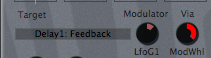
Here you see that the feedback parameter of Delay1 (which otherwise has no menu/knob for modulations) is modulated by LfoG1. The ModWheel is assigned as the (optional) "Via" modulator. That means, the ModWheel controls the intensity of the feedback modulation.
Hence, the ModMatrix is typically used to modulate non-typical parameters. Pretty much every parameter that has a knob can be controlled by the ModMatrix.
Hope this explains it a bit better, too...
 Urs
Urs
P.S.: Video tutorials are still on the list, but currently everyone at u-he is immensely busy... as has been for the last couple of years...
You can see that oscillator tune modulation is done by ModMixer1, fully cranked up.
ModMixer1 consists of the sum of PitchWheel and Lfo1. That means, they're mixed together so that both modulate the oscillator tune at the same time (or any other parameter that's modulated by MMix1).
But there's a further twist: In addition, the output of the ModMixer is multiplied by the Const knob of the ModMixer. Hence not only the Tune Mod knob in the oscillator controls the depth of the modulation but also the knob in the ModMixer. This can be an advantage because you can control the depth of many modulations with just 1 knob.
Does this explain ModMixers a bit better?
#---
Modulation Matrix is a whole different story. The modulation matrix is used to modulate parameters that do not have dedicated modulation slots or that don't have enough for the current patch. The Matrixes can also be used to control one modulator by another (which can also be achieved in the ModMixers).
Look at this example:
Here you see that the feedback parameter of Delay1 (which otherwise has no menu/knob for modulations) is modulated by LfoG1. The ModWheel is assigned as the (optional) "Via" modulator. That means, the ModWheel controls the intensity of the feedback modulation.
Hence, the ModMatrix is typically used to modulate non-typical parameters. Pretty much every parameter that has a knob can be controlled by the ModMatrix.
Hope this explains it a bit better, too...
UrsP.S.: Video tutorials are still on the list, but currently everyone at u-he is immensely busy... as has been for the last couple of years...
-

- KVRAF
- 5948 posts since 19 Jun, 2008 from Melbourne, Australia
Hi,
Here's another take on the topic! It is quite a simple concept, but the results can be extremely complex. A quick explanation is that you can sum or multiply modulation sources together to create interesting new waveforms which can then modulate pitch, or filter cutoff or any other regular modulation target.
For a simple example it's best to start a new patch with a single oscillator. If you were to assign LFO2 to modulate the pitch you would hear it rise and fall with the cycle / shape of the LFO.
A second way to modulate the pitch would be to use the mod matrix to modulate the pitch of OSC1 with LFO2 via LFO3, creating a more complex modulation based on the interaction of LFO2 + LFO3. The MMix modulation source allows you to increase the complexity of the modulation pattern that results from this interaction even more.
An example:
Assign MMix1 to modulate the pitch of a single oscillator (i.e. MMix1 to Osc1 Pitch). Turn up the modulation to +48. That way it's easiest to hear the effect.
In the MMix1 module, assign LFO2 to MOD1, and set the Constant value to 0. The default setting of "sum modulations" is to calculate the output value of the MMix module by summing MOD1 + MOD2 + MOD3 + Constant value. Because there is only 1 LFO assigned at present, the resulting change in pitch will be the same as if you simply assigned LFO2 to modulation the pitch instead of MMix1. If you start increasing the "constant" value, you will notice the modulation value is also changing. This is because the constant value is being added to the value of LFO2.
If you now set MMix1 Mod2 to LFO3, then the output of LFO3 is now summed with LFO2 + the constant value. And the same again if we set MMix1 Mod3 to LFO4. There are now three LFO's + the constant value being summed to produce the modulation value that is sent to any MMix1 modulation targets.
The result can also be based on two other types of calculation besides summing which is probably easier to listen to rather than explain.
One interesting use for this kind of LFO arithmetic is to create new rhythms from LFO output. This can result is some very complex poly-rhythms. Try the following simple example:
As before, use MMix1 to modulate the pitch of OSC1. Set LFO2 to a 1/8 beat saw-up, LFO3 to a 1/1 beat square lo-hi wave and LFO4 to a 1/8 beat saw-down wave. That should result in a relatively interesting rhythmic modulation of the pitch. Try out the different summing types and change the constant value.
If you modify the amplitude of each LFO you will hear quite a significant change in the modulation of the pitch. If you try out different wave forms at different speeds, you can create some really complex rhythms.
But, it can get even stranger One of the REALLY neat things I love about Zebra is that it does not restrict you from modulating a source with itself. For instance you can use the mod matrix to set MMix1 to modulate it's own constant value for some very interesting results. Great for modulating filter cutoff for funky rhythms.
Peace,
Andy.
Here's another take on the topic! It is quite a simple concept, but the results can be extremely complex. A quick explanation is that you can sum or multiply modulation sources together to create interesting new waveforms which can then modulate pitch, or filter cutoff or any other regular modulation target.
For a simple example it's best to start a new patch with a single oscillator. If you were to assign LFO2 to modulate the pitch you would hear it rise and fall with the cycle / shape of the LFO.
A second way to modulate the pitch would be to use the mod matrix to modulate the pitch of OSC1 with LFO2 via LFO3, creating a more complex modulation based on the interaction of LFO2 + LFO3. The MMix modulation source allows you to increase the complexity of the modulation pattern that results from this interaction even more.
An example:
Assign MMix1 to modulate the pitch of a single oscillator (i.e. MMix1 to Osc1 Pitch). Turn up the modulation to +48. That way it's easiest to hear the effect.
In the MMix1 module, assign LFO2 to MOD1, and set the Constant value to 0. The default setting of "sum modulations" is to calculate the output value of the MMix module by summing MOD1 + MOD2 + MOD3 + Constant value. Because there is only 1 LFO assigned at present, the resulting change in pitch will be the same as if you simply assigned LFO2 to modulation the pitch instead of MMix1. If you start increasing the "constant" value, you will notice the modulation value is also changing. This is because the constant value is being added to the value of LFO2.
If you now set MMix1 Mod2 to LFO3, then the output of LFO3 is now summed with LFO2 + the constant value. And the same again if we set MMix1 Mod3 to LFO4. There are now three LFO's + the constant value being summed to produce the modulation value that is sent to any MMix1 modulation targets.
The result can also be based on two other types of calculation besides summing which is probably easier to listen to rather than explain.
One interesting use for this kind of LFO arithmetic is to create new rhythms from LFO output. This can result is some very complex poly-rhythms. Try the following simple example:
As before, use MMix1 to modulate the pitch of OSC1. Set LFO2 to a 1/8 beat saw-up, LFO3 to a 1/1 beat square lo-hi wave and LFO4 to a 1/8 beat saw-down wave. That should result in a relatively interesting rhythmic modulation of the pitch. Try out the different summing types and change the constant value.
If you modify the amplitude of each LFO you will hear quite a significant change in the modulation of the pitch. If you try out different wave forms at different speeds, you can create some really complex rhythms.
But, it can get even stranger
One of the REALLY neat things I love about Zebra is that it does not restrict you from modulating a source with itself. For instance you can use the mod matrix to set MMix1 to modulate it's own constant value for some very interesting results. Great for modulating filter cutoff for funky rhythms.Peace,
Andy.
-
giorgiomartini giorgiomartini https://www.kvraudio.com/forum/memberlist.php?mode=viewprofile&u=161733
- KVRist
- Topic Starter
- 335 posts since 1 Oct, 2007 from Berlin
Thak you so much both of you, im reading...
By the way is there a way to move the pitch bend virtually ? is there a knob in zebra for that ?
Or i must have a keybord connected ?
By the way is there a way to move the pitch bend virtually ? is there a knob in zebra for that ?
Or i must have a keybord connected ?
-
- u-he
- 30215 posts since 8 Aug, 2002 from Berlin
Zebra doesn't (yet) have any "visual controls" such as keyboards or wheels. Which is because I simply wanted to save screen estate and I didn't expect people to use it without any minimal keyboard. Some hosts have this built-in though (i.e. SaviHost on Win).
I might add that at some point though, but no, it isn't in there right now...
I might add that at some point though, but no, it isn't in there right now...
-
- KVRian
- 527 posts since 12 Dec, 2007 from Belgium
You can always use trollo virtual midi keyboard, i think you can assign CC's and even use midi learn, but i haven't tried it yet.
http://www.dontcrack.com/freeware/downl ... re/Trollo/
http://www.dontcrack.com/freeware/downl ... re/Trollo/