


I need a simple sinewave.
But the default is a sawwave, and in the osc presets there is no sinewave, also i guess there i no normal square , how do i get this in zebra ?
How to make or get a Sinewave in zebra2 ?
-
giorgiomartini giorgiomartini https://www.kvraudio.com/forum/memberlist.php?mode=viewprofile&u=161733
- KVRist
- 335 posts since 1 Oct, 2007 from Berlin
-
- Banned
- 18651 posts since 2 Oct, 2001 from England
draw them yourself 
im in the process of doing my own OSC shaea at the moment, good fun
also, check out Zebra Science, good OSC stuff in there, all the shapes you need (and great sounds too)
im in the process of doing my own OSC shaea at the moment, good fun
also, check out Zebra Science, good OSC stuff in there, all the shapes you need (and great sounds too)
-

- KVRAF
- 5948 posts since 19 Jun, 2008 from Melbourne, Australia
This kind of bugged me at first too, but with Zebra there is always a way of doing <whatever you want>  I can't believe how good it is (yeah new user). It makes me laugh sometimes, which is more than I can say for most other soft synths.
For a pure sine wave don't forget you could also use an FM module if you have one spare.
BTW: it would be really nice if there was a grid on the waveform display so that the exact centre could be aligned more easily among other things. Just an idea.
Peace,
Andy.
I can't believe how good it is (yeah new user). It makes me laugh sometimes, which is more than I can say for most other soft synths.For a pure sine wave don't forget you could also use an FM module if you have one spare.
BTW: it would be really nice if there was a grid on the waveform display so that the exact centre could be aligned more easily among other things. Just an idea.
Peace,
Andy.
-
- Banned
- 18651 posts since 2 Oct, 2001 from England
ZenPunkHippy wrote: BTW: it would be really nice if there was a grid on the waveform display so that the exact centre could be aligned more easily among other things. Just an idea.
+1
-
- KVRian
- 527 posts since 12 Dec, 2007 from Belgium
I think there is a sine wave in the osc presets, it's called "sine tree".
-

- u-he
- 30215 posts since 8 Aug, 2002 from Berlin
There are various ways to do a sine in Zebra 
The quickest and most logical way is adding an FMO to the Grid.
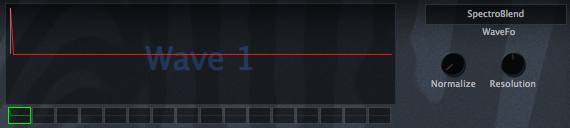
If you want it in a normal oscillator, set the oscillator to "SpectroBlend" and draw just the fundamental:
But you can also just use a sawtooth (or any other wave) and add the "Filter" OscFX, which you turn to the left until only the fundamental sine is left.
Another possibility is using a script as described in the GeekZone http://www.u-he.net/scripting/?page_id=3 to populate a GeoBlend wavetable with a sine wave.
Next, the XMF filter can be put to self oscillation by cranking up the resonance. This results in a sine as well.
Further methods include Comb filters, but these might not be pure sines.
However, you don't need to draw them...
Later,
Urs
The quickest and most logical way is adding an FMO to the Grid.
If you want it in a normal oscillator, set the oscillator to "SpectroBlend" and draw just the fundamental:
But you can also just use a sawtooth (or any other wave) and add the "Filter" OscFX, which you turn to the left until only the fundamental sine is left.
Another possibility is using a script as described in the GeekZone http://www.u-he.net/scripting/?page_id=3 to populate a GeoBlend wavetable with a sine wave.
Next, the XMF filter can be put to self oscillation by cranking up the resonance. This results in a sine as well.
Further methods include Comb filters, but these might not be pure sines.
However, you don't need to draw them...
Later,
Urs-
giorgiomartini giorgiomartini https://www.kvraudio.com/forum/memberlist.php?mode=viewprofile&u=161733
- KVRist
- Topic Starter
- 335 posts since 1 Oct, 2007 from Berlin
awesome urs !
The osc fx is great to start with a sine and turn it into any other complex waveform.
Great tips !
thanx
The osc fx is great to start with a sine and turn it into any other complex waveform.
Great tips !
thanx
-

- KVRAF
- 19852 posts since 16 Sep, 2001 from Las Vegas,USA
Ok I've got to ask...............what's an OSC shaea?Kriminal wrote:im in the process of doing my own OSC shaea at the moment

None are so hopelessly enslaved as those who falsely believe they are free. Johann Wolfgang von Goethe

-
- KVRAF
- 1529 posts since 12 Jun, 2004 from Portland, OR
If you load any of the free Zebra CM patches here in the forum (or the ones that come with Z CM) into Zebra, you will see that the oscs have a nice starting set of waveforms that you can then save to an osc preset for future use.
-
- KVRAF
- 19852 posts since 16 Sep, 2001 from Las Vegas,USA
Ahhh Ok, I thought it might be a secret weapon.Kriminal wrote:i took me a good 5 minutes to work it out myself.....shapes of course

None are so hopelessly enslaved as those who falsely believe they are free. Johann Wolfgang von Goethe
-
- KVRian
- 595 posts since 20 Jan, 2006
The only way to keep it secret is to call it "shapes" whenever someone asks.Teksonik wrote:Ahhh Ok, I thought it might be a secret weapon.Kriminal wrote:i took me a good 5 minutes to work it out myself.....shapes of course
Bill
-
- KVRian
- 527 posts since 12 Dec, 2007 from Belgium
OSC fx FTW! Yesterday i used OSC effect "turbulence" to microwave my dinner
-
- KVRAF
- 19852 posts since 16 Sep, 2001 from Las Vegas,USA
I'm rather fond of "Expander".
None are so hopelessly enslaved as those who falsely believe they are free. Johann Wolfgang von Goethe
-
- KVRist
- 493 posts since 20 Apr, 2004 from hki-fi
Excellent tips, much obliged! So far I've only been using FM osc sine, because, at least in my rig, it seems to produce less aliasing than the OSC-approach.Urs wrote:There are various ways to do a sine in Zebra
But now I have to try all of your suggested methods to see if FM sine is still the king..