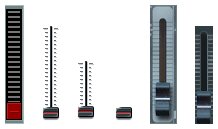
KnobMan/SkinMan Examples

DSP, Plugin and Host development discussion.
Post Reply New Topic
RELATED
PRODUCTS

Post

Well, I think your stuff is coming along nicely. As for some general feedback on this piece:
1.it looks a bit like a Mondrian the way the lines run through it.
2. The lcd frames are inconsistent - I like the top green one, inset. The lower ones are a bit portly and raised.
3. Some times I think in a plug like this, if you got rid of the ridge separating the voice from the rest of the signal path for 2 big black areas (even 1) and just used rounded square lines to group things- as if the lines were painted on, it would be more cohesive?
4. maybe some knob variations or slider for volume?
anyways, just some quick hits to honor your request :)
..what goes around comes around..

Post

Hi
So, here are the critiques :

- THe overall impression is quite good, as said Ourobouros, things are getting better and better.
However, I'd advise, as you're developing very quickly nice graphic skills that you try to find a unique identity, a visual leitmotiv making your stuff being "sanfordesque", instead of "just" mimicing late 80's gear : i think it is a very good way to practice, as you have some hardware reference/guidelines to compare and judge the emulation result. However, if the purpose can be to make people nostalgic from that era's gear, i don't think that it was the best period for ergonomics and that the design of these gear was mainly dictated by the need of it to be cheap and robust. Now that it is only 0 and 1 displayed by our computers's graphic card, i'd recommend that you only take the best out of it and the "vibe" of it ( = what can make people nostalgic about it), but if something maes wasting space, you are free to make it smaller or get rid of it.
Don't get me wrong, it really is only my very own opinion, and i don't try to tell you in a disguised way that i don't like it or that your choices of making something look like 80's hardware is bad, but i am rather convinced that that stuff could be at least 20% smaller AND keep it being usable and easy to read.
I think there are too much space wasted on screws, borders, shadows, and borders of borders, etc (and i think it is what's wrong with the blue LCD, which are small parts of the gui BUT have BOTH borders, textures and shadows : maybe it is a bit too much ?).
From the same perspective, i think the LFO row is quite big while it is not really a need : the top led is very far from the "LFO" text, and also, from the left side, you have : light grey, shadow, deep grey which take at least 35pix before finding a needed parameter. And the separation between lfo and the mod part is also quite wide (too wide ?).
Maybe you can try to make the text above the knobs 5 pixels closer to the knob ?

So, my main advice woudl be : make it more compact ! :)
And also : since now you have nothing to prove with "hardware mimicing" (you're doing it well ;) ), feel free to make your very own thing, without caring as much with "should i take a 14mm screw and a chinese 4,3 cm blue lcd, or a SIngapure green LCD" ).
In order to give it more character, i'd also suggest to focus a bit more on the combo font/color/texture/intention for the name. Brushed metal is ok, round font is ok, oblique line is ok, but all together ?

(sorry about the very bad english, it is quite techy so the words are rather hard to find).

Post

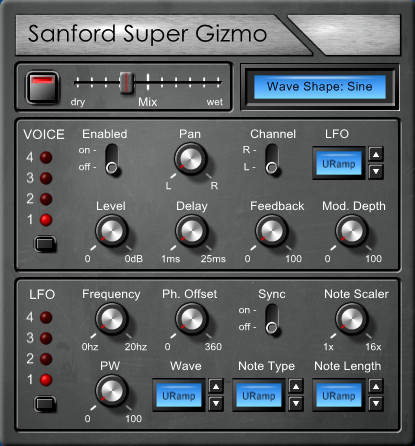
New version:

Image

More compact overall and a slight change to the blue LCDs (not sure it's enough).

I'll take a few other approaches and post them later.
Last edited by Leslie Sanford on Fri Dec 05, 2008 8:46 pm, edited 1 time in total.

Post

Leslie Sanford wrote:

1) The red button is the bypass switch. That needs to be changed to something else. Maybe a LED button of some type, i.e. it needs a way to indicate when the effect is in On mode and when it is in Bypass mode.
maybe a rectangular button with a red LED in the top/centre ...? The one you have looks too big for the space it occupies
Leslie Sanford wrote:
2) While I like the main green LCD, I'm not sure about the blue LCD boxes. They don't look right.
i actually think the blue suits the overall look much more than the green, personally i'd make them all blue.
Leslie Sanford wrote:
4) The Mix slider thumb looks too flat.
maybe make it look more like a typical hardware/desk slider?

Image

second in from the right....?

Post

New version:

Image

The bypass switch needs improvement.

Post

i think the white indicator lines on the knobs could be red, apart from that looks better

Post

Kriminal wrote:
maybe a rectangular button with a red LED in the top/centre ...? The one you have looks too big for the space it occupies
something like this maybe?

Image

sorry about the graphics :hihi:

Post

Leslie Sanford wrote:Critique Request
Image
There are things I don't like about it:
1) The red button is the bypass switch. That needs to be changed to something else. Maybe a LED button of some type, i.e. it needs a way to indicate when the effect is in On mode and when it is in Bypass mode.
Maybe the button should have colour change (red/green)?
2) While I like the main green LCD, I'm not sure about the blue LCD boxes. They don't look right.
I like the blue more, because both are not looking like an LCD anyway.
3) I'm not sure about the position of all of my labels.
I thinks its OK. The knobs could have a circle of dots around them, and the marker on the knob be a little longer.
4) The Mix slider thumb looks too flat.
It could be a little brighter and have a black shadow left from the white line to make it look engraved.
Nice work so far.
ImageImage

Post

Kriminal wrote:
Kriminal wrote:
maybe a rectangular button with a red LED in the top/centre ...? The one you have looks too big for the space it occupies
something like this maybe?

Image

sorry about the graphics :hihi:
Image

Not so sure about the red indicator marks on the knobs.

Post

Leslie Sanford wrote:
Kriminal wrote:
Kriminal wrote:
maybe a rectangular button with a red LED in the top/centre ...? The one you have looks too big for the space it occupies
something like this maybe?

Image

sorry about the graphics :hihi:
Image

Not so sure about the red indicator marks on the knobs.
YEAH 8)

i think white looks better having seen the two, so im with you on that...


apart from that, keep changing it till i say stop and well have winner :hihi:

seriously tho, looks good :wink:

Post

sinkmusic wrote: However, I'd advise, as you're developing very quickly nice graphic skills that you try to find a unique identity, a visual leitmotiv making your stuff being "sanfordesque", instead of "just" mimicing late 80's gear : i think it is a very good way to practice, as you have some hardware reference/guidelines to compare and judge the emulation result.
Part of it for me at this time is coming up with something that doesn't just out right suck. When I'm playing with SkinMan/KnobMan, most of what I do doesn't turn out very well. So when I stumble on something that's halfway decent, I run with it. In other words, at this time I'm not consciously choosing a style. If I do something that I can say, "Hey, that doesn't suck!" then I'm happy... For now. :)

It so happens that what I come up with turns out to be 80ish, I guess? That's when I cut my teeth on hardware synths (I'm older than I look ;)), so the influence from that era may be unconscious.

You make a good point, though, in that I should try to evolve towards a distinctive style. If feels like learning an instrument. I need to get my chops up to a certain level before I can consider expressing myself more creatively.
I think there are too much space wasted on screws, borders, shadows, and borders of borders, etc (and i think it is what's wrong with the blue LCD, which are small parts of the gui BUT have BOTH borders, textures and shadows : maybe it is a bit too much ?).
From the same perspective, i think the LFO row is quite big while it is not really a need : the top led is very far from the "LFO" text, and also, from the left side, you have : light grey, shadow, deep grey which take at least 35pix before finding a needed parameter. And the separation between lfo and the mod part is also quite wide (too wide ?).
Maybe you can try to make the text above the knobs 5 pixels closer to the knob ?
I agree. The original was too big. This seems to be a common pitfall for noob GUI designers (making them too big). I've tightened it up a bit in the later versions.
(sorry about the very bad english, it is quite techy so the words are rather hard to find).
You did a great job of communicating your point, and I really appreciate it, thanks. It's why I keep coming back here for feedback. The input I get makes me better than I would have been without it. You can't put a price tag on that.

Post

Kriminal wrote: apart from that, keep changing it till i say stop and well have winner :hihi:
:lol:
seriously tho, looks good :wink:
Thanks! :D

Here's the latest. I've tweaked a few things. The biggest change is that I changed the Up/Down controls to drop down boxes. Also, I exchanged the Note Scaler knob with the Note Type drop down just to break things up.

Image

Post

That looks 100% better! :)
..what goes around comes around..

Post

Leslie,

Its looking very nice. The only critique that I would have is with the blue rectangle buttons. To me they look out of context with the rest.

Maybe its just the lighting angle
* The lighting direction on the buttons appear to be from 12 o'clock where the lighting for the knobs and the rest of the items is from 10:30.

...Steven
ImageCakewalk/Sonar Plugin Management Tools

Post

TheSteven wrote:Its looking very nice. The only critique that I would have is with the blue rectangle buttons. To me they look out of context with the rest.
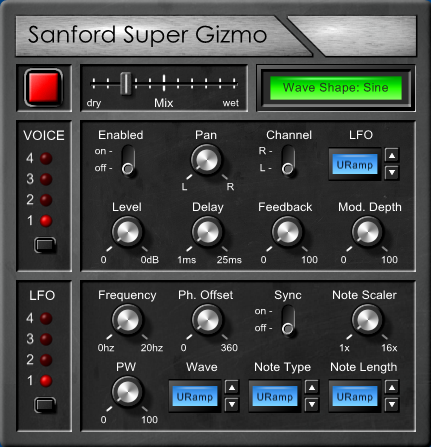
Here's a different approach:

Image

Post Reply

Return to “DSP and Plugin Development”