


Yeah !
It rocks

LtZ

Might be some little issue with the Mac installer left. This will vanish when copying settings from Zebra's latest installer.rexlapin wrote:Urs,
I installed Uhbik on my desktop ( Intel iMac 1.83 GHZ w/1GB RAM OSX 10.4.11)
with no problem, but when I tried to do so on my laptop (Intel Macbook 2.0GHZ
w/500MB RAM OSX 10.4.11) I get a message that there were errors installing the
software. I tried both the link from this thread as well as the one from my order
confirmation, but got the same results.
Any thoughts?
Cheers,
Scott
I would really find it difficult to sell them separately. It's too much hassle, and I couldn't justify selling any of these below $50, and I'd need to manage different licensing schemes - while I'll happily give away 9, 10 or even 11 plugs in a $199 bundle. VST2 is the only format left where they live as separate beings, in AU, RTAS and VST3 they're all *one*. I find that logical. Also, I think they'll go retail next year which is only worth doing within the bundle option.SWAN808 wrote:Urs - do you know if you will be
a - selling these separately
b - Adding a triggered envelope into the Runciter plugin? (its VERY nice )
And - how long is the beta price for?
 Urs
Urs


Thanks Urs.Urs wrote:I would really find it difficult to sell them separately. It's too much hassle, and I couldn't justify selling any of these below $50, and I'd need to manage different licensing schemes - while I'll happily give away 9, 10 or even 11 plugs in a $199 bundle. VST2 is the only format left where they live as separate beings, in AU, RTAS and VST3 they're all *one*. I find that logical. Also, I think they'll go retail next year which is only worth doing within the bundle option.SWAN808 wrote:Urs - do you know if you will be
a - selling these separately
b - Adding a triggered envelope into the Runciter plugin? (its VERY nice )
And - how long is the beta price for?
Runciter of course has a triggered envelope, but it's just a decay phase (which covers 95% of needs). Triggered envelopes (Midi, transients) of complexer nature (ADSR?) will be available in Ubhik-X.
Beta price will be about a week or so. Maybe longer, can't say for sure. It'll go up to $149 till late January ($99 for existing customers of Zebra/MFM/Filterscape) and then switch to $199 final price.
Cheers,

In Logic you instanciate Runciter as a Midi Controled Effect on an *Instrument* Channel. There you choose the actual audio input as the sidechain.SWAN808 wrote:In the absence of a manual atm - if you have a minute - would you be able to give me a few hints on setting up a trigger for the Runciter via MIDI in Logic?
Or maybe some one else can help me out with that?
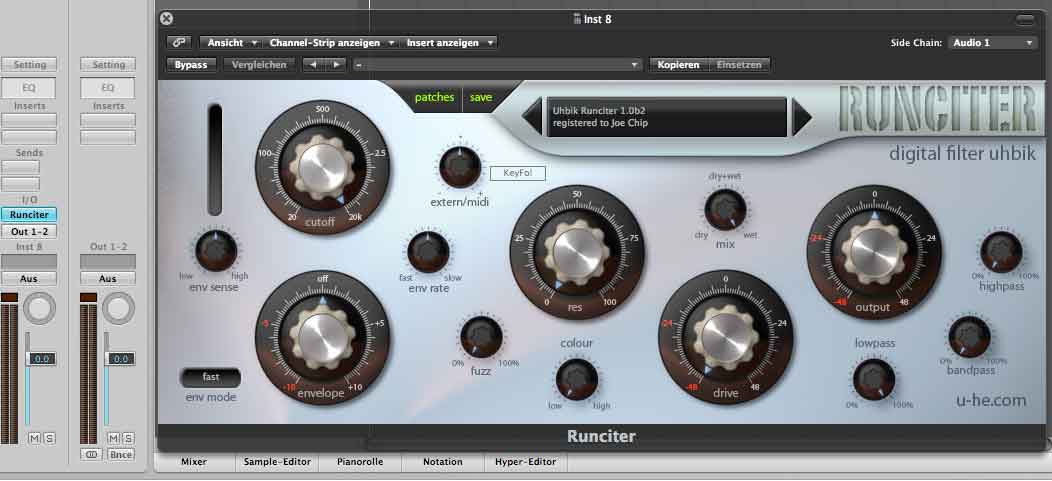 Urs
Urs Oh... which ones?taoyoyo wrote:Am enjoying these more the more i play with them...
Just wanted to let you know (and I know these are demo still so you've probably already got this on the list)...
I automapped them to use with my Novation Remote SL Zero and some of the knobs don't turn yet... so far they all seem to alter the sound but some do not alter the GUI.
The knobs that do move look very pretty when they move though
Thanks,justin3am wrote:Most plug-ins don't pass midi through... if you have two plug-ins that receive midi on the same channel in Live, you must create a dummy channel and loop the data back to the effect or whatever. Create an empty midi channel, set the input so that it receives midi from your instrument and then set the output to the same track and select the uhbik effect.alexfalcao wrote:I found that the MIDI learn woks when I insert Uhbik alone (Only Uhbik on an empty track), but IF I insert an Instrument or a clip, it stops working.alexfalcao wrote:Thanks Urs,Urs wrote:I guess in Live you have to set up Live's internal MidiCC assignments. I think to remember that Live doesn't give us all MidiCCs by default. Or some such thing.alexfalcao wrote:The MIDI Learn Option doesn't work on LIVE 7.12.
One addition that I had planned was an indicator light for Midi and channel activity. This would be a spiffy control sitting below the text in the display area (hence the slightly larger area than in my other plugs). I need a fully working surround setup though (means, plug cables into the already set up speakers) because this control will also manage some deeper aspects (center treatment, Lfe treatment). Will add this soon!
I turned the remote option on and now works. (I had turned the remote option off because it was controlling Live instead of some plugins I have)..

Urs wrote:Oh... which ones?taoyoyo wrote:Am enjoying these more the more i play with them...
Just wanted to let you know (and I know these are demo still so you've probably already got this on the list)...
I automapped them to use with my Novation Remote SL Zero and some of the knobs don't turn yet... so far they all seem to alter the sound but some do not alter the GUI.
The knobs that do move look very pretty when they move though
(I still don't have that Novation automap stuff around...)

That's a hidden parameter on each of them. Some have their own (like Runciter), but for many I just didn't want to waste gui space... I'm thinking about a simple way to include it though...taoyoyo wrote:... ooh... I take that back.. on Uhbik-A there is an extra parameter on my Remote SL called 'Output' that doesn't appear to be on the GUI. The same on Uhbik-D... I think I got confused (It happens).
UrsSubmit: News, Plugins, Hosts & Apps | Advertise @ KVR | Developer Account | About KVR / Contact Us | Privacy Statement
© KVR Audio, Inc. 2000-2026