


Some common problems, and their solution.
P: They don't work in my host
S: Your host probably dislikes multichannel stuff. Append "_2io" to the dll names, i.e. Uhbik-A_2io.dll - this will probably make the problem go away!
P: I can't find Uhbik-X
S: Be patient - Uhbik-X will come in a few days... it's still under construction
P: I can't use an envelope follower to control tremolo speed/depth
S: Use Uhbik-X, but read the post above first
P: They don't do mono/stereo to surround processing
S: Wait and see.
P: I can't find the manual
S: Sit tight, a comprehensive manual is in the works!
P: I can't get MIDI working
S: Please file complaint to your host developer - after making sure that the host really doesn't support MIDI input for effects!
Uhbik FOP (frequently occurring problems)
-

- u-he
- 30215 posts since 8 Aug, 2002 from Berlin
-
Baz_Masterplan Baz_Masterplan https://www.kvraudio.com/forum/memberlist.php?mode=viewprofile&u=182588
- KVRist
- 93 posts since 11 Jun, 2008
This is like a beer complaint phone line.......
-
- KVRer
- 2 posts since 18 Oct, 2006
Hi
Cold you take a look at the Uhbik-D and the pan values.
Audio disappear before 9 and after 3 for each of the delays.
Mac, Live 7.0.12
Works as it says on the can, in Logic 8.
Thanks
Dag
Cold you take a look at the Uhbik-D and the pan values.
Audio disappear before 9 and after 3 for each of the delays.
Mac, Live 7.0.12
Works as it says on the can, in Logic 8.
Thanks
Dag
-
- KVRist
- 289 posts since 25 Jul, 2006
This happens to me as well, Mac, Live 7.0.12 Seems any pan setting > 40 or < -40 on a tap causes the delayed audio to be inaudible.meteo wrote:Hi
Cold you take a look at the Uhbik-D and the pan values.
Audio disappear before 9 and after 3 for each of the delays.
Mac, Live 7.0.12
Works as it says on the can, in Logic 8.
Thanks
Dag

-
- u-he
- Topic Starter
- 30215 posts since 8 Aug, 2002 from Berlin
In that case, Live is operating it in 7.1 surround mode. This is obviously a bug in Live then and definately a waste of cpu time.meteo wrote:Hi
Cold you take a look at the Uhbik-D and the pan values.
Audio disappear before 9 and after 3 for each of the delays.
Mac, Live 7.0.12
Works as it says on the can, in Logic 8.
Thanks
Dag
Is this only on Mac or also on Win?
-

- KVRAF
- 13133 posts since 7 May, 2006 from Southern California
Actually, I figured this was a feature. Live makes all the inputs and outputs available in it's routing menus, which I guess is why it seems to be operating as a 7.1 plug-in. I've been routing stuff to all the inputs and routing the out to my returns which are bussed to a single track. This way I can send individual drum sounds to this single delay and then modulate the panners to move the sounds through different signal chains.Urs wrote:In that case, Live is operating it in 7.1 surround mode. This is obviously a bug in Live then and definately a waste of cpu time.meteo wrote:Hi
Cold you take a look at the Uhbik-D and the pan values.
Audio disappear before 9 and after 3 for each of the delays.
Mac, Live 7.0.12
Works as it says on the can, in Logic 8.
Thanks
Dag
Is this only on Mac or also on Win?
I made stereo versions of the VSTs by renaming them as has been mentioned, then I use the multi I/O Audio Unit for the really funky routing stuff.

-
- KVRer
- 2 posts since 18 Oct, 2006
Hi
I have only Mac.
There is a problem in Logic 8, adding any of the Uhbik on a bus gives you a phase problem.
Canceling out the some of the frequencies, and with a scope you can see it
goes negative phase, from -20 to -80 degrees.
Adding them as Insert, they behave as they should.
I am just starting to see the infinite possibilities that these plugins have, and not having any presets
forces you to really be clever and create your own presets.
Thanks, this was a brilliant idea to release them without presets.
Dag
I have only Mac.
There is a problem in Logic 8, adding any of the Uhbik on a bus gives you a phase problem.
Canceling out the some of the frequencies, and with a scope you can see it
goes negative phase, from -20 to -80 degrees.
Adding them as Insert, they behave as they should.
I am just starting to see the infinite possibilities that these plugins have, and not having any presets
forces you to really be clever and create your own presets.
Thanks, this was a brilliant idea to release them without presets.
Dag
-
- KVRian
- 809 posts since 24 May, 2005
With all Uhbiks.
On Live 7.12 The MIDI learn stop working with an Clip or instrument on the same track (Uhbik MIDI leran just works when Uhbik is alone on the track), I had a reply that it could be my Live setup but I have no problem with Zebra for example and other instruments.
On Live 7.12 The MIDI learn stop working with an Clip or instrument on the same track (Uhbik MIDI leran just works when Uhbik is alone on the track), I had a reply that it could be my Live setup but I have no problem with Zebra for example and other instruments.
-
- KVRian
- 623 posts since 28 Jan, 2005 from hollywood
...people don't complain about German beer! ;-)Baz_Masterplan wrote:This is like a beer complaint phone line.......
-
- KVRAF
- 13133 posts since 7 May, 2006 from Southern California
This what you gotta do...alexfalcao wrote:With all Uhbiks.
On Live 7.12 The MIDI learn stop working with an Clip or instrument on the same track (Uhbik MIDI leran just works when Uhbik is alone on the track), I had a reply that it could be my Live setup but I have no problem with Zebra for example and other instruments.
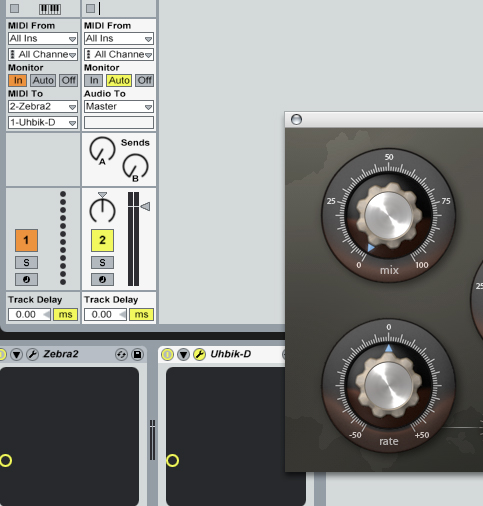
The first midi track is empty and set to monitor inputs. The second midi track has Zebra and Uhbik D on it. As you can see the output of the first midi track is routed to Uhbik D on track 2. This way CCs from your controller gets routed past Zebra (which doesn't have a midi out or through for passing midi data to the other plug-ins in a chain) directly to the Uhbiks.
-
- KVRian
- 809 posts since 24 May, 2005
Thank you Justin,justin3am wrote:This what you gotta do...alexfalcao wrote:With all Uhbiks.
On Live 7.12 The MIDI learn stop working with an Clip or instrument on the same track (Uhbik MIDI leran just works when Uhbik is alone on the track), I had a reply that it could be my Live setup but I have no problem with Zebra for example and other instruments.
The first midi track is empty and set to monitor inputs. The second midi track has Zebra and Uhbik D on it. As you can see the output of the first midi track is routed to Uhbik D on track 2. This way CCs from your controller gets routed past Zebra (which doesn't have a midi out or through for passing midi data to the other plug-ins in a chain) directly to the Uhbiks.
I will try later, but it would be nice if Uhbik could work like all other plugins like Zebra (No routing needed in order to use MIDI learn).
-
- KVRAF
- 13133 posts since 7 May, 2006 from Southern California
You see the problem isn't with Uhbik but with how midi is implemented in Live (and most other hosts that are not truly modular). If you only have Uhbik-? on a midi track, note and controller data is passed through to the effect unobstructed. However, if you place Zebra (or any other VST/AU) in front of Uhbik-? in the signal chain, the midi data is intercepted by the first device in the chain. Download the demo for an Ohmforce effect or one of the Sonalksis TBKs, it will behave the exact same way.alexfalcao wrote:Thank you Justin,
I will try later, but it would be nice if Uhbik could work like all other plugins like Zebra (No routing needed in order to use MIDI learn).
Luckily routing things around in Live is pretty easy.
-
- KVRian
- 809 posts since 24 May, 2005
Thanks again, I use live for years, and I never use MIDI learn for effects anyway (I use automation). I really appreciate your help. (I'm also lazy to go and check the user guide)justin3am wrote:You see the problem isn't with Uhbik but with how midi is implemented in Live (and most other hosts that are not truly modular). If you only have Uhbik-? on a midi track, note and controller data is passed through to the effect unobstructed. However, if you place Zebra (or any other VST/AU) in front of Uhbik-? in the signal chain, the midi data is intercepted by the first device in the chain. Download the demo for an Ohmforce effect or one of the Sonalksis TBKs, it will behave the exact same way.alexfalcao wrote:Thank you Justin,
I will try later, but it would be nice if Uhbik could work like all other plugins like Zebra (No routing needed in order to use MIDI learn).
Luckily routing things around in Live is pretty easy.

Alex.
-
- u-he
- Topic Starter
- 30215 posts since 8 Aug, 2002 from Berlin
Woah, interesting find about Live's multichannel support... but is there *any* way currently in Uhbik-D to pan from left to right? - In 7.1 it should go through the center channel first (channel 3)...
Gotta check this out and add corresponding options...
Gotta check this out and add corresponding options...
Cool! Can I use that for the manual?justin3am wrote:This what you gotta do...
The first midi track is empty and set to monitor inputs. The second midi track has Zebra and Uhbik D on it. As you can see the output of the first midi track is routed to Uhbik D on track 2. This way CCs from your controller gets routed past Zebra (which doesn't have a midi out or through for passing midi data to the other plug-ins in a chain) directly to the Uhbiks.