
New skin coming soon...

Official support for: u-he.com
RELATED
PRODUCTS

Post

I was messing around in the images folder today, opening them in Photoshop to see just how difficult this could be. And before i knew it, i was giving the Zebra a new skin. This is very very early work, basically all i've done so far is change the background skin, everything else needs to be done.

Anyway, i've got the rest of the year off from work, so i hope to finish it by the end of this month. Here's what i've got so far:

Image

The defaultknob.png is giving me problems tough, is there transparency in that knob image? I can see the transpareny checkerboard thing over it in PS.

Any ideas? Urs?

Post

Yo, almost all pngs are 24 bit with alpha transparency. It's just the background which isn't...

;) Urs

P.S.: Looking forward 8)

Post

Urs wrote:Yo, almost all pngs are 24 bit with alpha transparency. It's just the background which isn't...

;) Urs

P.S.: Looking forward 8)
:dog: Thanks! It all makes sense now, that's also the reason you can see my background texture trough the OSC panels. I was thinking that something more than only the background looked different :D

*edit* too bad i don't know scripting...otherwise i could have changed the animation for the knobs, and placement of the clickable "hotspots".

Post

Hi Polybius, Looks good. Just a suggestion. You have a sharper metal texture at the edges of the GUI. If you have the background on a layer, you can go to transpose-free transpose, grab a corner, hold down shift key and make it larger than the border, until the sharper edge is not visible. Then crop it there by making it a background again or by using the crop tool. Then the texture will be even for the whole background.
Good Luck,
Michael
ps. Thanks for your presets too.

Post

Hi, Polybius : it looks good, indeed.
However, may i dare to say that i don't like the font ? ;)
I'm looking forward to it.
CHeers

Post

MCnoone wrote:Hi Polybius, Looks good. Just a suggestion. You have a sharper metal texture at the edges of the GUI. If you have the background on a layer, you can go to transpose-free transpose, grab a corner, hold down shift key and make it larger than the border, until the sharper edge is not visible. Then crop it there by making it a background again or by using the crop tool. Then the texture will be even for the whole background.
Good Luck,
Michael
ps. Thanks for your presets too.
Yeah i noticed that too, and fixed it. I also got rid of all the gradients, and did a "render -> lighting" which gave it a much more realistic light. I updated the graphic in my original post to reflect these changes. Also fixed the preset buttons.

I really wish i could change the text and button animation tough, it seems to be hardcoded, and can only be replaced by some magical scripting guru, is this correct? If so, i has not can scipt, duuuuh :cry:

Post

sinkmusic wrote:Hi, Polybius : it looks good, indeed.
However, may i dare to say that i don't like the font ? ;)
I'm looking forward to it.
CHeers
You mean the Zebra font? Yeah i guess it's a bit of a Sylenth ripoff :), i'll play around with some different ones.
Post

Polybius wrote:I really wish i could change the text and button animation tough, it seems to be hardcoded, and can only be replaced by some magical scripting guru, is this correct? If so, i has not can scipt, duuuuh :cry:
Look at how the knobs are done in Uhbik ;)

Post

Urs wrote:
Polybius wrote:I really wish i could change the text and button animation tough, it seems to be hardcoded, and can only be replaced by some magical scripting guru, is this correct? If so, i has not can scipt, duuuuh :cry:
Look at how the knobs are done in Uhbik ;)
I did, but i can't find knob animations for Zebra anywhere. All i can find in the animation folder is stuff for the Arpeggiator. Is it hidden somewhere?

I did find a file called "Zebra2orig.txt" which probably contains all the data i need to know to change anything i want to. But looking at that thing made me dizzy and naucious, did you hand-code that entire text file?

Post

Urs, is there a way for aspiring skin makers to get the source files for gui & perf (minus the zebra pattern) for making new skins?

That way everyone doesn't have to keep re-making the paths, etc...

Unless I missed something and these are already around somewhere.

Post

Polybius wrote:
Urs wrote:
Polybius wrote:I really wish i could change the text and button animation tough, it seems to be hardcoded, and can only be replaced by some magical scripting guru, is this correct? If so, i has not can scipt, duuuuh :cry:
Look at how the knobs are done in Uhbik ;)
I did, but i can't find knob animations for Zebra anywhere. All i can find in the animation folder is stuff for the Arpeggiator. Is it hidden somewhere?

I did find a file called "Zebra2orig.txt" which probably contains all the data i need to know to change anything i want to. But looking at that thing made me dizzy and naucious, did you hand-code that entire text file?
Sheesh.

Give me a couple of days. I've already offered another skin designer to publish a special version of Zebra that runs in edit mode. This one lets you move knobs around and reassign graphics. You can also edit the cake-slice knobs, or put a knob animation (single frames, with alpha channel, like Uhbik) into Images/Animations and assign these to controls.

I'd do it today, but I simply have no time to write any documentation.

Post

Polybius wrote:did you hand-code that entire text file?
No.

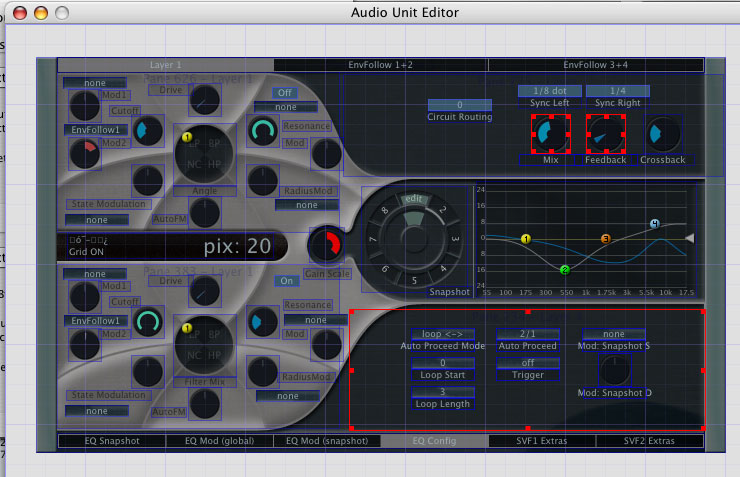
Here's a screenshot from early Filterscape days. It's the normal GUI open in AU Lab, in edit mode:
Image

I can switch back and forth between editing and normal knob tweaking.

It's got

- create, move, resize controls
- 30+ different control types, most quite multifunctional and customizable
- pixel graphics treated like vector graphics (resizable)
- multiple selection
- unlimited undo
- auto-layout for whole modules
- full cloning of anything selected
- full construction history of cloned elements
- quick parameter reassign for cloned elements
- adjustable grid snap
- colour lab - change colours in realtime
- shape lab - create cake slice images

It's basically the most important part of u-he, because creating a gui now takes up 5% of the plugin development time rather than 80%.

;) Urs

Post

Looks like a great way to edit things! So it's scalable bitmaps á la "OSX" huh? Looking forward to it!

Sorry if i sounded a bit pushy, didn't mean to, it's just that the Uhbik tip didn't sink into me and i got confused :?

Post

Polybius wrote:Sorry if i sounded a bit pushy, didn't mean to, it's just that the Uhbik tip didn't sink into me and i got confused :?
No prob :)

Post

edit mode zebra? :o

we will have gui's falling out of our computers :)

i might even have a go :P

Subz

Post Reply

Return to “u-he”