


Uhbik I/O
-
- KVRAF
- 12235 posts since 18 Aug, 2003
Would it be possible to add a .ini file for Uhbik to determine number of inputs/outputs exposed to the host by default? I know I can rename the files to do that, but I'd rather avoid that as a solution since it makes upgrading tedious. I'm never going to use the surround features, so would love to always open with stereo I/O only.
-

- u-he
- 30215 posts since 8 Aug, 2002 from Berlin
What host are you using?shamann wrote:Would it be possible to add a .ini file for Uhbik to determine number of inputs/outputs exposed to the host by default? I know I can rename the files to do that, but I'd rather avoid that as a solution since it makes upgrading tedious. I'm never going to use the surround features, so would love to always open with stereo I/O only.
If you don't need the plugin rename trick, you should be fine. Any Uhbik instantiated on a stereo track will only operate as stereo, no matter what. The exception used to be Live on Mac where the final Uhbiks switched to stereo mode by default.
Cheers,
 Urs
Urs-
- KVRAF
- Topic Starter
- 12235 posts since 18 Aug, 2003
I use modular hosts primarily, Audiomulch and Bidule, so no tracks are involved. Uhbik's always load with 8 inputs and outputs.
BTW, do the surround channels work yet? Is there some trick required to get them to work? I've yet to get any noise out of the extra I/O.
BTW, do the surround channels work yet? Is there some trick required to get them to work? I've yet to get any noise out of the extra I/O.
-
- u-he
- 30215 posts since 8 Aug, 2002 from Berlin
Well, if you connect only 2 inputs, they assume to be placed on a stereo track, no matter how many outputs involved. A real 5.1 track would have 6 ins and 6 outs. A good way of doing stereo->surround in a modular host is to connect inputs 1,3, 5 and 7 with the left signal and 2, 4, 6 and 8 with the right signal.shamann wrote:I use modular hosts primarily, Audiomulch and Bidule, so no tracks are involved. Uhbik's always load with 8 inputs and outputs.
BTW, do the surround channels work yet? Is there some trick required to get them to work? I've yet to get any noise out of the extra I/O.
However, hosts may vary in the interpretation of things. You can see from the VU-meters if channels are connected or not (green dot rather than red dot). But even if channels are connected, they do not consume cpu unless audio is coming in.
Urs-
- u-he
- 30215 posts since 8 Aug, 2002 from Berlin
Hmmm... I can try Bidule again, but I think it worked just fine. What do the VU meters say?shamann wrote:Hmm, I get nothing in either host with all i/o connected. Must be something extra I'd need to do in each, I'll have to scan around in the manuals.
-
- KVRian
- 878 posts since 24 Jan, 2006 from Universe #5346198720
Same here - Sonar and energyXT - I've switched through all modes... nothing! (didn't I mention that already... last year or so?I get nothing in either host with all i/o connected
 )
)EDIT to add: Tried the demo of Podium the other day - and there it worked.
Last edited by dreamkeeper on Thu Feb 05, 2009 7:34 pm, edited 1 time in total.
-
- u-he
- 30215 posts since 8 Aug, 2002 from Berlin
Tried again in Bidule, and when using "Default configuration" you do get 8 ins and outs, but Bidules doesn't seem activate the connections other than channels 1 and 2. So in Bidule you would need to explicitely say "8 ins 8 outs" when creating the effect instance. Then it works as expected (tested on Mac).
-
- KVRian
- 878 posts since 24 Jan, 2006 from Universe #5346198720
Seems I've missed that somehow... could you elaborate or link to a description? Does that trick work with eXT - and how? Thanks!Urs wrote:Tried again in Bidule, and when using "Default configuration" you do get 8 ins and outs, but Bidules doesn't seem activate the connections other than channels 1 and 2. So in Bidule you would need to explicitely say "8 ins 8 outs" when creating the effect instance. Then it works as expected (tested on Mac).
werner
-
- KVRAF
- Topic Starter
- 12235 posts since 18 Aug, 2003
In both hosts, when I first add a plugin but before I connect it to anything, I can see all VU meters (minimal yellow bars). As soon as I connect it to anything, instantly switches to basic stereo.Urs wrote:What do the VU meters say?
How would I explicitly specify outputs when loading?
-
- KVRian
- 878 posts since 24 Jan, 2006 from Universe #5346198720
Ah wait... I think, this is what I need? 
... determine number of inputs/outputs exposed to the host by default? I know I can rename the files to do that
-
- u-he
- 30215 posts since 8 Aug, 2002 from Berlin
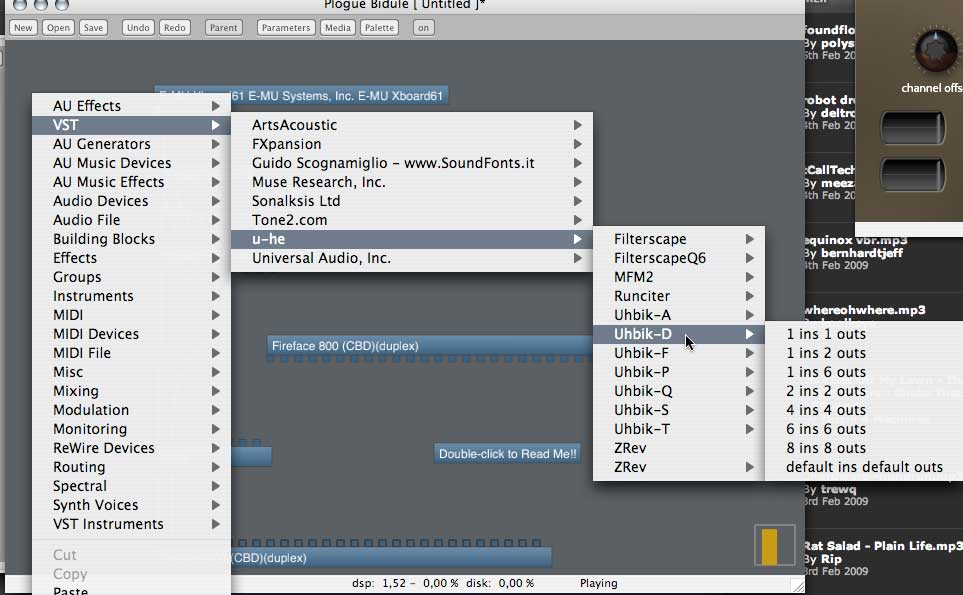
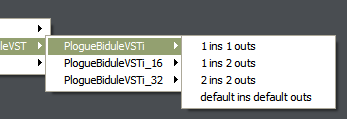
-
- u-he
- 30215 posts since 8 Aug, 2002 from Berlin
Hmmm... do you use the renamed versions?
@dreamkeeper: There's only a "force stereo" thing on Windows, explained here:
http://www.uhbik.com/index.php?item=compatibility
Urs
@dreamkeeper: There's only a "force stereo" thing on Windows, explained here:
http://www.uhbik.com/index.php?item=compatibility
Urs-
- KVRian
- 878 posts since 24 Jan, 2006 from Universe #5346198720
Ah, I see, thanks!
But how do I get the other channels to work in eXT (preferably 1.4) then? Anybody had success with that? Nevermind Sonar, its surround concept is crap anyways.
But how do I get the other channels to work in eXT (preferably 1.4) then? Anybody had success with that? Nevermind Sonar, its surround concept is crap anyways.