
New skin: LooxPosh

Official support for: mutools.com
RELATED
PRODUCTS

Post

Jass Carnival aka Gemada designed a new MU.LAB skin: LooxPosh.

Image

You can download LooxPosh from http://www.mutools.com/downloads.html

Post

loox nice!
In the future there will be robots!

Post

looks pretty posh!
"It dreamed itself along"

Post

LooxCrap IMHO!
This is the same method MJ used when he was working on Anthony Marinelli's Thriller.

Post

Aloysius wrote:LooxCrap IMHO!
only from outta space, dear! :P
"It dreamed itself along"

Post

mellotronaut wrote:
Aloysius wrote:LooxCrap IMHO!
only from outta space, dear! :P
:lol:
This is the same method MJ used when he was working on Anthony Marinelli's Thriller.

Post

It looks great, but how can I set the skin in Mutools?
I put the folder with the new skin in the Graphics folder, but cannot choose it via the 'choose skin' menu.
Post

Here is a little text file that explains it:

http://www.mutools.com/mulab/skins/how- ... a-skin.txt

Post

Hm, must be doing something utterly stupid, but I do what the description says and I still cannot choose the skin.

Apart from that, I've been messing around with the Mulab a bit and after quite some reading I eventually got how to play an ampsim through the app. But there seems to only be one general settings page for input routing and only one rack can be monitored live at a given time. Is that correct? I'm contemplating using a new sequencer for my guitar lessons but it's mandatory that my student and I can play both at the same time. Is this possible at all with Mulab?

And btw, where's the buffer settings? The latency was okayish but I could use a little less.

Thanks! Pädy

Post

Edited the MULAB.txt file and entered the folder name loox-posh manually and that worked. :shrug:

Post

Pädy wrote:Apart from that, I've been messing around with the Mulab a bit and after quite some reading I eventually got how to play an ampsim through the app. But there seems to only be one general settings page for input routing and only one rack can be monitored live at a given time. Is that correct?
Yes, that's currently the case.

(Fyi: in the future multi-channel/multi-track support will be improved)
I'm contemplating using a new sequencer for my guitar lessons but it's mandatory that my student and I can play both at the same time. Is this possible at all with Mulab?
Simple answer: Yes, you can play together.

You could mix everything together and route it thru MU.LAB for recording and effects.

But maybe you have a more complex setup in mind?
And btw, where's the buffer settings? The latency was okayish but I could use a little less.
Question: Are you on Windows or OSX?

Post

Pädy wrote:It looks great, but how can I set the skin in Mutools?
I put the folder with the new skin in the Graphics folder, but cannot choose it via the 'choose skin' menu.
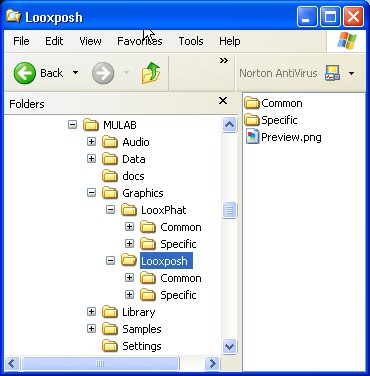
Unzip to a folder named LooxPosh (or similar). When you are done it should look like this ...

Image

BTW: I like the skin. It seems to be a little more on point than the default. Good job.
Image

Post

Thanks jpumphandle,

That's how I set it up. On two different computers now - to no avail. But editing the MULABS.txt file does the trick.

@mutools

Quite simple setup actually: Two guitars into two different inputs of my audio interface. Each input feeds a seperate instance of an ampsim. The sequencer plays some drums to jam along.
If only one rack can be monitored at a given time, that simple setup is not possible. Bummer.

Is there a way to set up what output pairs the master uses? I have 8 Stereo outputs and MuLabs chose the wrong one.

I'm on a PowerMac G5 and MacBook Pro - both Leopard.

Cheers, Pädy

Post

Like other Mac users I was unable to set the skin from within MU.LAB. When I changed the textfile it worked but I had to agree to the terms of use again and it started with the demo tune again. I could switch back to Loox Phat from within MU.LAB but couldn't go back to Loox Posh.

Post

works all of a sudden...

Post Reply

Return to “MuTools”