


Hey Urs,
How come my sequencer can see an 'Output' control for the Uhbiks but there is no knob in the GUI?
Thanks,
Alex
Output Controls in Uhbik?
-

- KVRAF
- 9590 posts since 17 Sep, 2002 from Gothenburg Sweden
He lost the knob under his couch. He promised to get it the next time he cleans his apartment which could be a while since he's so busy coding. But it's coming i promise you. At least that's what he told his girlfriend.
-
- KVRer
- Topic Starter
- 28 posts since 11 Jan, 2006
And how come the GUI has modulation and feedback toggles but the sequencer can't see them?
I'm mapping all my plugins to my control surfaces so having to switch back to the mouse is annoying!
thanks,
Alex
I'm mapping all my plugins to my control surfaces so having to switch back to the mouse is annoying!
thanks,
Alex
-

- u-he
- 30215 posts since 8 Aug, 2002 from Berlin
Yo,
From next version on all Uhbiks will have an Output dB slider (+/-12dB) and a soft bypass switch:
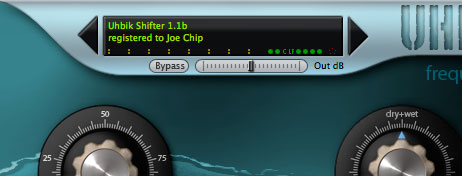
The Output parameter that the host can see is scaled linearly and is part of my engine... I wanted to get rid of it, but then left it in because some users thought it would be good to have. The +/- 12dB scale is much easier to control though and thus serves the purpose better.
The Bypass switch is important because unlike the plugin's normal bypass switch it smoothly fades between dry and wet signal over a fraction of a second. This prevents pops and clicks.
Regarding automatable parameters vs. non-automatable ones, I've become kind of notorious about keeping the count of automatable parameters low. That is so because some of my plugins have thousands of parameters and making them all automatable would have serious side effects. Naturally this isn't the case with Uhbiks which have only a few knobs and menus in general (not speaking of T patterns...). I might make up my mind and make them all automatable, too (bug me on this in case I forget)
Cheers,
 Urs
Urs
From next version on all Uhbiks will have an Output dB slider (+/-12dB) and a soft bypass switch:
The Output parameter that the host can see is scaled linearly and is part of my engine... I wanted to get rid of it, but then left it in because some users thought it would be good to have. The +/- 12dB scale is much easier to control though and thus serves the purpose better.
The Bypass switch is important because unlike the plugin's normal bypass switch it smoothly fades between dry and wet signal over a fraction of a second. This prevents pops and clicks.
Regarding automatable parameters vs. non-automatable ones, I've become kind of notorious about keeping the count of automatable parameters low. That is so because some of my plugins have thousands of parameters and making them all automatable would have serious side effects. Naturally this isn't the case with Uhbiks which have only a few knobs and menus in general (not speaking of T patterns...). I might make up my mind and make them all automatable, too (bug me on this in case I forget)
Cheers,
Urs-
- KVRist
- 243 posts since 16 Nov, 2007 from Spain
Hi Urs.. While we're on this subject.. And I don't know if this function has already been asked for, but.. Would it be possible to 'lock' parameters. So that whilst switching through presets they would remain set to what you want, at least the mix parameters would be a great help!
Thanks
Hd
Edit.. Nice improvements btw!!
One more question will the 'bypass' button be mappable?
Thanks
Hd
Edit.. Nice improvements btw!!
One more question will the 'bypass' button be mappable?
Last edited by heavensdaw on Thu Jul 16, 2009 2:24 pm, edited 1 time in total.
-
- KVRAF
- 1629 posts since 11 Dec, 2005 from Malmö, Sweden
-
- u-he
- 30215 posts since 8 Aug, 2002 from Berlin
Hmmm... havn't thought about locking parameters... hmmm... wouldn't be much of a problem, really... But! Using mechanisms that are already in place, the lock status wouldn't save with project... if that's not an issue, then it'd doable without too much pain...
Bypass and Output Gain can both be MIDI CCed as well as host automated. Of course...
Bypass and Output Gain can both be MIDI CCed as well as host automated. Of course...
-
- KVRist
- 243 posts since 16 Nov, 2007 from Spain
That for me personally wouldn't be a problem.. As by the time I save a project, I'm usually close to where I want to get to.. It is more about during the switching of presets that I would find locking down parameters very helpful.Urs wrote: Using mechanisms that are already in place, the lock status wouldn't save with project... if that's not an issue, then it'd doable without too much pain...
So.. Will you do it? Pretty please!

Hd
-
- KVRist
- 37 posts since 13 Mar, 2009
This will be great but isn't it possible to get it as a knob so it looks more intergrated with the GUI? If not, please make them the same black color as the knobs or the display.Urs wrote:Yo,
From next version on all Uhbiks will have an Output dB slider (+/-12dB) and a soft bypass switch:
The Output parameter that the host can see is scaled linearly and is part of my engine... I wanted to get rid of it, but then left it in because some users thought it would be good to have. The +/- 12dB scale is much easier to control though and thus serves the purpose better.
The Bypass switch is important because unlike the plugin's normal bypass switch it smoothly fades between dry and wet signal over a fraction of a second. This prevents pops and clicks.
Regarding automatable parameters vs. non-automatable ones, I've become kind of notorious about keeping the count of automatable parameters low. That is so because some of my plugins have thousands of parameters and making them all automatable would have serious side effects. Naturally this isn't the case with Uhbiks which have only a few knobs and menus in general (not speaking of T patterns...). I might make up my mind and make them all automatable, too (bug me on this in case I forget)
Cheers,
Spanks
-

- KVRian
- 1216 posts since 6 Jul, 2005
Bug bug bug!
Would love to have all parameters automatable for all Uhbiks. I've been mapping them out in templates in Kore2 and it would be really handy have access to the missing parameters.
Much thanks btw, these are sounding fantastic!
Would love to have all parameters automatable for all Uhbiks. I've been mapping them out in templates in Kore2 and it would be really handy have access to the missing parameters.
Much thanks btw, these are sounding fantastic!
-
- u-he
- 30215 posts since 8 Aug, 2002 from Berlin
Yes, keep bugging metaoyoyo wrote:Bug bug bug!
Would love to have all parameters automatable for all Uhbiks. I've been mapping them out in templates in Kore2 and it would be really handy have access to the missing parameters.
Much thanks btw, these are sounding fantastic!
-
- u-he
- 30215 posts since 8 Aug, 2002 from Berlin
I'll think about it.AWATARZ wrote:And is it possible to show the frequencies for Uhbik-Q in the display? if not could you make it an option?
The 2 main frequency knobs have been scaled by ear, I would have to actually measure the exact frequencies myself (well, I can use some math for that). If a readout like "9768,21 Hz" that jumps to 9773,57 Hz" and will never be "9770.00Hz" is okay for you, then I might be able to provide
-
- KVRist
- 37 posts since 13 Mar, 2009
Urs wrote:I'll think about it.AWATARZ wrote:And is it possible to show the frequencies for Uhbik-Q in the display? if not could you make it an option?
The 2 main frequency knobs have been scaled by ear, I would have to actually measure the exact frequencies myself (well, I can use some math for that). If a readout like "9768,21 Hz" that jumps to 9773,57 Hz" and will never be "9770.00Hz" is okay for you, then I might be able to provide


I thought we were talking about german precision here