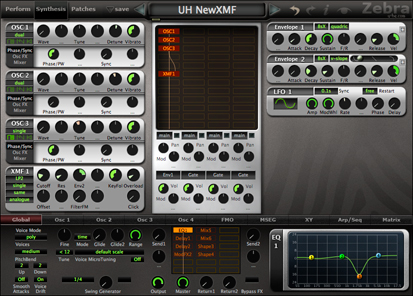
I'm very happy with this!


Yes. The XMF in "analogue" mode is pretty much identical to the Bazille filter, but instead of the 6 separate outputs it has a choice of 15 filter types, resembling the ones in the Matrix 12. Unlike latter, the XMF operates in stereo, has a choice of 5 distortion/saturation types and each XMF can process two stereo filters (optionally with different types) in series, parallel or differential.teknobryan wrote:Is the new Bazille filter in this 2.5?
 Urs
UrsI don't want to be a wet blanket but... is there the option to change the skin to Unempty Horse on this release?
if you do you wont have gui elements for all the lovely new stuffbagginz wrote:I don't want to be a wet blanket but... is there the option to change the skin to Unempty Horse on this release?
Cheers,
bagginz

I guess my question is:djsubject wrote: if you do you wont have gui elements for all the lovely new stuff
Subz
No, sorry. I have plans however to do a lower contrast gui. The one we've got now is designed for high contrast, which is good for screenshots, tutorials, videos etc. It will be easy to derive easier-on-the-eyes guis from this one, as it's now got a very clear design.bagginz wrote:Has the Unempty Skin been updated to include the new GUI elements?
I doubt it, but thought I'd ask anyway... I was (am) 100% satisfied with the Unempty Horse skin.
Do you have it installed twice, like once in your local and once in your user folder?rexlapin wrote:Urs,
I just changed Zebra2 to the new version. The title bar
indicates version 2.5 but the GUI is still 2.3.3.
Any suggestions?
Cheers,
Scott
+1 Much faster to scan and isolate the module one wishes to edit.Echoes in the Attic wrote:I like the new gui, but the only thing I would change would be to add a slight color shade to the different modules to be able to easily tell them apart (I'm so used to the dark horse skin). Ex. Oscillators one color, Comb another, filter another etc.


GreatUrs wrote:I have plans however to do a lower contrast gui. The one we've got now is designed for high contrast, which is good for screenshots, tutorials, videos etc. It will be easy to derive easier-on-the-eyes guis from this one, as it's now got a very clear design.


users can still update and create new skins for Zebra... for example, you would also not get the new 12 slot mod matrix (which Urs didn't even mention!) with one of the old skinsbagginz wrote:+1 Much faster to scan and isolate the module one wishes to edit.Echoes in the Attic wrote:I like the new gui, but the only thing I would change would be to add a slight color shade to the different modules to be able to easily tell them apart (I'm so used to the dark horse skin). Ex. Oscillators one color, Comb another, filter another etc.
Also the new shiny metallic modules are also not easy on my eye.
Personally I prefer something more subdued, especially if I am going to be staring at it for a long time. Because the synth itself positively invites one to explore and delve deep into its creative possibilities, it would be nice if the look did the same... But that's just me.
There again, perhaps this is all splitting hairs after all the great new signal processing stuff that Urs has crammed into this release
Cheers
bagginz
Submit: News, Plugins, Hosts & Apps | Advertise @ KVR | Developer Account | About KVR / Contact Us | Privacy Statement
© KVR Audio, Inc. 2000-2026