


Hi-- Two questions:
1) I am following the tuorial "Real time side chain dynamics processing" using Sonar 6 PE, the stereo gain plugin and the demo (see question #2) version of the Dynamics VST. I have inserted the dynamics vst to my source audio track, set the total gain (l) and (r) midi outputs to 54 and 55. I inserted the stero gain plugin on the target audio track, set the (l) and (r) midi inputs to 54 and 55. I created a new midi track and your instructions say to choose the output of this track to be the gain plugin input, BUT that does not appear as a choice for the outputs....so, where do I go from here ? Please excuse my ignorance, but I'm kind of new to this stuff, but does the midi track serve as the connection between the two tracks with the plugins ? Without that there is no compression going on the target track. My source track is a kick drum and I've checked to make sure there is plenty of compression for this test (turned wet/dry up to check levels). I'm trying to figure a work around for now. Hmmmmm. As a matter of fact, I'm not sure why the plugin would show up as an output source to a midi track ? Guess I'm going to learn something new here !
2) I purchase the dynamics plugin using paypal, and I recieve4d a confirmation receipt from paypal, but I have not received an email from Blue Cat with the download URL.
Best,
Dan
Question on side-chaining tutorial for Sonar
-
- KVRer
- Topic Starter
- 23 posts since 27 Nov, 2006
I think I see part of the problem. Now that I look at the tutorial again it states to insert these plugins under the softsynth choice...but both of these come in as audio vst effects. I just downloaded the dxi versions and now I can at least follow the tutorial, but I can detect no compression on the target track, but there is plenty on the source track. Wow--I've spent several hours trying to set this up...I dont want to give up yet ! Plus, I realize I ordered the vst instead of the dxi ...Thats what I get for jumping the gun.
Anyways, I'm sure the problem is somewhere in the midi cc stuff as there is absolutly no connection between the two plugins. I've triple checked the cc settings in the compressors output and the gains input and I have the gain set as the ouput of the midi track. I cant wait to get this figured out. It will be quite a learning experience.
Anyways, I'm sure the problem is somewhere in the midi cc stuff as there is absolutly no connection between the two plugins. I've triple checked the cc settings in the compressors output and the gains input and I have the gain set as the ouput of the midi track. I cant wait to get this figured out. It will be quite a learning experience.
-
 Blue Cat Audio Blue Cat Audio https://www.kvraudio.com/forum/memberlist.php?mode=viewprofile&u=39981
 - KVRAF
- 6364 posts since 8 Sep, 2004 from Paris (France)
Hi, thanks for purchasing our product!
I have one more question for you: what version of Sonar are you using? If it's 5.1 and before, you need to do the following to enable MIDI to be re-routed from the Dynamics plug-in to the gain suite one:

Then Select 'Echo soft synth input to all MIDI tracks' so that the Peak Meter MIDI CC messages are sent to all tracks:
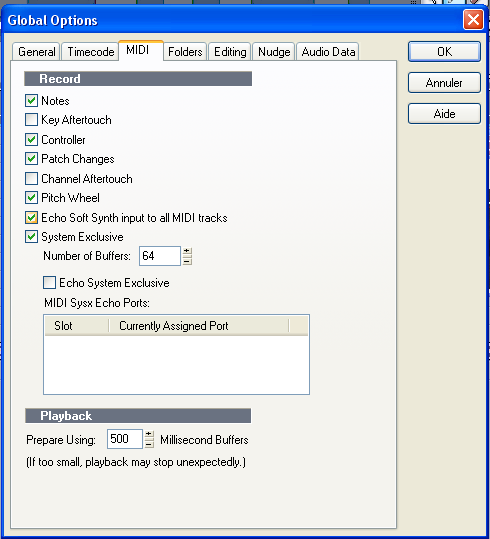
And if you are using Sonar 5.2 and above, you need to open the synth rack and enable the Dynamics plug-in MIDI output like this:


These images were extracted from some other tutorials on the website, but I think I'll add a "preliminary step" in all tutorials so that it's clearer. Sonar MIDI implementation is not straight forward .
.
Check also that you have MIDI Echo enabled on the MIDI track which output is the Gain plug-in. Sometimes it's necessary to click once or twice on the MIDI echo button (at least in Sonar 6, it used to work every time in Sonar 5).
Hope this helps. Do not hesitate if you have other questions.
Yes the MIDI track is the only way to connect both plugins.Please excuse my ignorance, but I'm kind of new to this stuff, but does the midi track serve as the connection between the two tracks with the plugins ?
Don't worry, you purchased both versions (all our products come bundled with both DX and VST versions so that you can use them in most application on the market).I dont want to give up yet ! Plus, I realize I ordered the vst instead of the dxi ...Thats what I get for jumping the gun.
I have one more question for you: what version of Sonar are you using? If it's 5.1 and before, you need to do the following to enable MIDI to be re-routed from the Dynamics plug-in to the gain suite one:
Then Select 'Echo soft synth input to all MIDI tracks' so that the Peak Meter MIDI CC messages are sent to all tracks:
And if you are using Sonar 5.2 and above, you need to open the synth rack and enable the Dynamics plug-in MIDI output like this:
These images were extracted from some other tutorials on the website, but I think I'll add a "preliminary step" in all tutorials so that it's clearer. Sonar MIDI implementation is not straight forward
.Check also that you have MIDI Echo enabled on the MIDI track which output is the Gain plug-in. Sometimes it's necessary to click once or twice on the MIDI echo button (at least in Sonar 6, it used to work every time in Sonar 5).
Hope this helps. Do not hesitate if you have other questions.
-
- KVRer
- Topic Starter
- 23 posts since 27 Nov, 2006
Hi Bluecat-- Thanks for the detailed instructions, Its working now. However I had to completly start over for some reason I dont understand. I was not able to make my original test work, even though everything is identical (not everything it would seem). It appears I have the download info as well. Thanks so much for you excellent support !
-
Blue Cat Audio Blue Cat Audio https://www.kvraudio.com/forum/memberlist.php?mode=viewprofile&u=39981
- KVRAF
- 6364 posts since 8 Sep, 2004 from Paris (France)
Sometimes MIDI behavior is a bit strange in Sonar. Usually clicking on the "MIDI echo" button or changing the output of the MIDI track to somtehing else and back to the destination plug-in does the trick. It has been like this for ages (I remember having similar issues with MIDI patch changes in the old days with Cakewalk Pro Audio).
Thanks for choosing our products.
Thanks for choosing our products.
-
- KVRer
- 1 posts since 29 Jun, 2009
Hello Blue Cat Audio, thanks for your great products!
i would like to ask if the procedure changed for Sonar 8 because there is no "Echo soft synth input to all tracks" in Global options neither can I Enable midi output in the soft synths.
Thanks!
i would like to ask if the procedure changed for Sonar 8 because there is no "Echo soft synth input to all tracks" in Global options neither can I Enable midi output in the soft synths.
Thanks!
-
Blue Cat Audio Blue Cat Audio https://www.kvraudio.com/forum/memberlist.php?mode=viewprofile&u=39981
- KVRAF
- 6364 posts since 8 Sep, 2004 from Paris (France)
The "Echo soft synth input to all tracks" has indeed disappeared some time ago from the global options menu. But the "Enable MIDI Output" in the synth rack view still exists (you need to right click to see the option). I guess you might be using the VST version for which the menu item is greyed out. For some reason Sonar still does not support MIDI output from VSTis.
-
- KVRer
- 27 posts since 14 May, 2008
still confused here... i tried to install the DXi's to get this working in Sonar 8.5.3 (as it appears the VSTs won't work), but the DXi's won't even install properly...Blue Cat Audio wrote:The "Echo soft synth input to all tracks" has indeed disappeared some time ago from the global options menu. But the "Enable MIDI Output" in the synth rack view still exists (you need to right click to see the option). I guess you might be using the VST version for which the menu item is greyed out. For some reason Sonar still does not support MIDI output from VSTis.
any help would be much appreciated.
-
Blue Cat Audio Blue Cat Audio https://www.kvraudio.com/forum/memberlist.php?mode=viewprofile&u=39981
- KVRAF
- 6364 posts since 8 Sep, 2004 from Paris (France)
Hi, thanks for trying our plug-ins. What does happen to your install? Is there an error while installing? BTW are you using the 64 or 32 bits version?
-
- KVRer
- 27 posts since 14 May, 2008
dynamics has yet to be released in 64 bit form, as far as i know.Blue Cat Audio wrote:Hi, thanks for trying our plug-ins. What does happen to your install? Is there an error while installing? BTW are you using the 64 or 32 bits version?
i am using win7 64 bit. no error when i install VST or DX, just that the DX plugs show up as Blue Cat->Stereo) and Blue Cat->Mono). when i try to insert them as a soft synth, i get an error stating they are not installed correctly.
would love to get this rig working, as these plugs have SO much potential.
thank you for your response.
-
Blue Cat Audio Blue Cat Audio https://www.kvraudio.com/forum/memberlist.php?mode=viewprofile&u=39981
- KVRAF
- 6364 posts since 8 Sep, 2004 from Paris (France)
Yeah indeed, Blue Cat's Dynamics is not 64-bit yet.
This looks akward. Is the error message coming from Sonar? Can you post a screenshot or give us the exact error message you get? (sorry for asking so many questions!).
About the Blue Cat -> Stereo)/Mono) thing: is this the actual name you see? Without "Dynamics" in there?
This looks akward. Is the error message coming from Sonar? Can you post a screenshot or give us the exact error message you get? (sorry for asking so many questions!).
About the Blue Cat -> Stereo)/Mono) thing: is this the actual name you see? Without "Dynamics" in there?
-
Blue Cat Audio Blue Cat Audio https://www.kvraudio.com/forum/memberlist.php?mode=viewprofile&u=39981
- KVRAF
- 6364 posts since 8 Sep, 2004 from Paris (France)
BTW, I guess you are using 32-bit Sonar, right? (not 64-bit with bit-bridge)
-
- KVRer
- 27 posts since 14 May, 2008
ask away!! your support is very much appreciated!!Blue Cat Audio wrote:Yeah indeed, Blue Cat's Dynamics is not 64-bit yet.
This looks akward. Is the error message coming from Sonar? Can you post a screenshot or give us the exact error message you get? (sorry for asking so many questions!).
About the Blue Cat -> Stereo)/Mono) thing: is this the actual name you see? Without "Dynamics" in there?
i've attached two screen shots of what i'm seeing.


-
- KVRer
- 27 posts since 14 May, 2008
64 with bitbridge and jbridgeBlue Cat Audio wrote:BTW, I guess you are using 32-bit Sonar, right? (not 64-bit with bit-bridge)
-
Blue Cat Audio Blue Cat Audio https://www.kvraudio.com/forum/memberlist.php?mode=viewprofile&u=39981
- KVRAF
- 6364 posts since 8 Sep, 2004 from Paris (France)
Bitbridge is probably the issue (We haven't checked it but I would not count on it). It looks like you are a good candidate to test our latest internal 64-bit release... Will PM you a link to our x64 release candidate shortly.