


Hi
HI,
I am using the demo of Digital Peak Meter Pro in both Sony Vegas Pro 9, and Sony Acid Pro 7, which are the latest versions of these products.
I however cannot get the automatic peak detection to export automation.
Automation is still created when I tweak a knob of the GUI in Digital Peak Meter Pro, but only for that knob - the automatic peak detection does not work.
I followed the tutorial on the Blue Cat Audio site called:
"Blue Cat's Digital Peak Meter Pro in Sony Vegas"
I followed it EXACTLY.
The tutorial is for Vegas 5, the latest version is now Vegas Pro 9.
Have you tested DPMP with the latest Sony products?
On a second testing, I decided to use 'peak' instead of 'transformed', and in the FX selection in Vegas, I checked all outs that have the word 'peak' in them. I also tried the same in Acid Pro 7, with the same results.
I have some screenshots of my settings here:
http://www.benedictmusic.eu/temp/SETTIN ... _PRO_7.pdf
await your reply, as a solution to the lack of sidechaining in Sony Products is most welcome. (tried the db-audioware sidechainer, but it is buggy)
cheers
Ben
Digital Peak Meter Pro not working in Sony Products
-
- KVRer
- 11 posts since 13 Jan, 2006 from Bondi, Sydney, Australia
-
 Blue Cat Audio Blue Cat Audio https://www.kvraudio.com/forum/memberlist.php?mode=viewprofile&u=39981
 - KVRAF
- 6345 posts since 8 Sep, 2004 from Paris (France)
Hi,
we haven't checked the latest versions of Sony products, but it should still work.
I think the issue here comes from the fact that our Vegas tutorial is a bit old (it has not been updated for a while as you have noticed) but our plugins have changed a little bit: now you need to activate output automation inside the plugin (in addition to the host), because some host applications do not provide such capabilities.
The step that is missing in the Vegas tutorial is the step 03.1 in this tutorial. In the preset settings, you need to activate automation output for the parameters you are interested in:
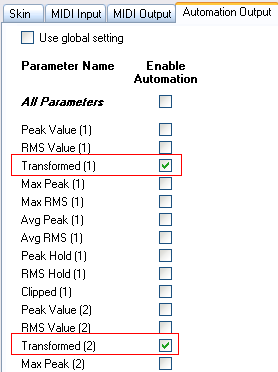
Hope this helps. We are sorry for the inconvenience. We'll have to update the tutorial! If it still does not work, do not hesitate to contact us.
(BTW are you using the DirectX or VST version of the plugin?)
we haven't checked the latest versions of Sony products, but it should still work.
I think the issue here comes from the fact that our Vegas tutorial is a bit old (it has not been updated for a while as you have noticed) but our plugins have changed a little bit: now you need to activate output automation inside the plugin (in addition to the host), because some host applications do not provide such capabilities.
The step that is missing in the Vegas tutorial is the step 03.1 in this tutorial. In the preset settings, you need to activate automation output for the parameters you are interested in:
Hope this helps. We are sorry for the inconvenience. We'll have to update the tutorial! If it still does not work, do not hesitate to contact us.
(BTW are you using the DirectX or VST version of the plugin?)
-
- KVRer
- Topic Starter
- 11 posts since 13 Jan, 2006 from Bondi, Sydney, Australia
Hi
thanks for your reply
I tried what you suggested but it still does not work.
I tested it more than once. A bug maybe?
you can download a trial or Vegas or Acid (which is fully working) here:
http://www.sonycreativesoftware.com/
test it for yourself!
await your reply
cheers
Ben
thanks for your reply
I tried what you suggested but it still does not work.
I tested it more than once. A bug maybe?
you can download a trial or Vegas or Acid (which is fully working) here:
http://www.sonycreativesoftware.com/
test it for yourself!
await your reply
cheers
Ben
-
Blue Cat Audio Blue Cat Audio https://www.kvraudio.com/forum/memberlist.php?mode=viewprofile&u=39981
- KVRAF
- 6345 posts since 8 Sep, 2004 from Paris (France)
We'll give it a try. Thanks for reporting the issue. Just for our information, have you tried the DirectX or VST version?
-
- KVRer
- Topic Starter
- 11 posts since 13 Jan, 2006 from Bondi, Sydney, Australia
Blue Cat Audio wrote:We'll give it a try. Thanks for reporting the issue. Just for our information, have you tried the DirectX or VST version?
Tried the VST version
cheers
Ben
-
Blue Cat Audio Blue Cat Audio https://www.kvraudio.com/forum/memberlist.php?mode=viewprofile&u=39981
- KVRAF
- 6345 posts since 8 Sep, 2004 from Paris (France)
Hi,
sorry for the late reply. We have tested the VST version within Vegas Pro 9.0c (the latest version available from Sony), and following the tutorial plus the extra step for output automation settings, it works:

So I guess we are missing a step here. Have enabled automation for your parameter(s) in both Vegas and the Automation output settings for the current preset in the plug-in itself?
sorry for the late reply. We have tested the VST version within Vegas Pro 9.0c (the latest version available from Sony), and following the tutorial plus the extra step for output automation settings, it works:
So I guess we are missing a step here. Have enabled automation for your parameter(s) in both Vegas and the Automation output settings for the current preset in the plug-in itself?