what is the typical use of sub-tracks ?

Official support for: mutools.com
RELATED
PRODUCTS

Post

mutools wrote: I don't see the difference with how it is now.


You are completely right..than only add the automation from a track automatically by Mulab and make this a sub track

The nature of this subtrack is mixed..it can be a automation or instrument track..it is mixed

See my picture

Post

mutools wrote:I think it's all there: just use a separate rack for that parent track, then route that rack to a Master rack.

If your concern is about avoiding overpopulation of the rack desk, then note that there is a wishlist item about being able to create rack groups, so e.g. rack A, C and D belong to the "Drum Racks" group, for example.

Then on the Rack Desk you can select a group to be shown, the other racks are hidden. Of course you will be able to also "Show All".
This is what I mean when I say Hacking Jo's mind.... :hihi:
Your wish-list is becoming like an Apple product: How much would we pay to see it! :love:

Thanks!
ABEFLGMOPPRRST :phones:

Post

wrong post

Post

mutools wrote:If your concern is about avoiding overpopulation of the rack desk, then note that there is a wishlist item about being able to create rack groups, so e.g. rack A, C and D belong to the "Drum Racks" group, for example.

Then on the Rack Desk you can select a group to be shown, the other racks are hidden. Of course you will be able to also "Show All".
This would be great.

While reading this topic, I'm picking up some good info about 'Subracks'.
Also, thanks for these tips:
mutools wrote:... Normally you can move tracks up/down without [Alt], but if you want to drop it as a subtrack, hold [Alt] then.
mutools wrote:... If a subtrack has no target, it takes the target of its parent.
If that parent track targets a rack, the subtrack will target that rack too ...
Les J. :)

Post

Taron wrote:Tucked to where the velocities are now.
That's where you edit Parameters and Controller curves now. Click where it says "All Notes". Up pops the list of stuff you can edit. The "Parameters" section depends on the target for the sequence (well, the part or whatever decides the target but you know what I mean).

Post

There is where additional collapsing lines for each parameter would be helpful with the ability to move them up or down in different order.
ABEFLGMOPPRRST :phones:

Post

janamdo wrote:
mutools wrote: I don't see the difference with how it is now.


You are completely right..than only add the automation from a track automatically by Mulab and make this a sub track

The nature of this subtrack is mixed..it can be a automation or instrument track..it is mixed

See my picture
Yes, when recording a parameter, it would be nice if a new track is created for it (depends on the context), then that new track would be a subtrack of the/a relevant track if possible. Added to the wishlist.

Post

Thank you all for the many answers.
Glad to see, that this simple question
inspires to some interesting side-discussions.
Everything should be made as simple as possible, but not simpler!

Post

Eggu wrote:Thank you all for the many answers.
Glad to see, that this simple question
inspires to some interesting side-discussions.
Yes i ask this also earlier, but nothing happens..
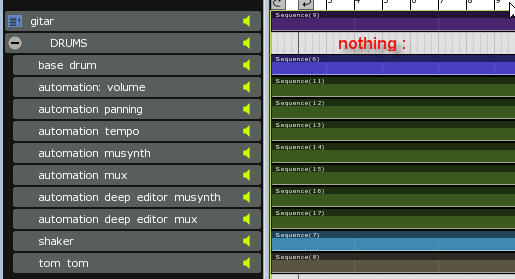
Image

When the song tracks are grouped than there is no song anymore
What to fill in for this track information ?

Post

janamdo wrote:When the song tracks are grouped than there is no song anymore
What to fill in for this track information ?
Janamdo, just to understand your query - are you asking about the empty track lane that is present on the right, after you have 'collapsed' the DRUMS track ?

eg

Image

Or, something different ?

Les J.

Post

Improviser wrote:
janamdo wrote:When the song tracks are grouped than there is no song anymore
What to fill in for this track information ?
Janamdo, just to understand your query - are you asking about the empty track lane that is present on the right, after you have 'collapsed' the DRUMS track ?

eg

Image

Or, something different ?

Les J.
I took him to mean a point we were discussing earlier. With a few subtracks used in this way, it's a significant amount of space wasted.

Or, he could mean that there's no visual indication of what a folder track contains. I'd be in favour of some sort of visual indication of which points in the timeline stuff is occurring in the folder (e.g the span of all parts in contained folders summed to a series of grey parts in the parent track) when it's minimised. Not a biggie though, and Jo's said folder track finetuning's on the list.

Post

One way to collapse a Track/Folder without leaving an empty lane is to have it collapsing to just a Line and that line gets a Tab on the extreme left of the Tracks area, and that area can collapse/expand as the Racks also do.

In other words, imagine the track are behaving like a Rack:

the "Folder Track" (the one collapsed containing sub-tracks) is the Plugin slot which can be expanded or collapsed while the regular tracks are there always like the Volume slider and the Meter.

And

like the Racks, you can see if there is any Plugin/Folder-Track with the visual clue.

Or the Tab could slightly overlap the above track with some transparency level.

Or...
I'm trying to think... :idea:
ABEFLGMOPPRRST :phones:

Post

[quote="Improviser]
Janamdo, just to understand your query - are you asking about the empty track lane that is present on the right, after you have 'collapsed' the DRUMS track ?

eg

Image

Or, something different ?

Les J.[/quote]

Yes, when you collapsed a grouping drum/bass/...? track than there is no information anymore
The track can't be used anymore for a instrument in the rack
So this track must contain information from the grouped tracks or something else?

Post

janamdo wrote:Yes, when you collapsed a grouping drum/bass/...? track than there is no information anymore
The track can't be used anymore for a instrument in the rack
So this track must contain information from the grouped tracks or something else?
As you can see, in my little picture, I would tend to add a new blank sequence part on the 'empty' lane. Then, even if that part never contains any events, at least I can give it a name, worded in a way that will remind me (at some future time, when viewing it in its 'collapsed' state) that it is a 'parent' track, that will reveal various subtracks when 'expanded'.

Collapsed view:
Image

I could, if I wanted, still record a sequence onto that part, and play it back along with the subtracks in the normal way BUT, a possible problem arises - because if I mute that parent track, then all its subtracks will be automatically muted too, so it wouldn't ever be possible to play just the subtracks (without the parent track), if you see what I mean.

Anyway, I too am still exploring, so this is just me 'thinking aloud'. I also need to have a look at how I personally might use them for 'automation', etc.

Thanks also robenestobenz, and liquidsound - for your input on 'subtracks/folder-tracks'.

Les J.

Post

Improviser wrote:As you can see, in my little picture, I would tend to add a new blank sequence part on the 'empty' lane. Then, even if that part never contains any events, at least I can give it a name, worded in a way that will remind me (at some future time, when viewing it in its 'collapsed' state) that it is a 'parent' track, that will reveal various subtracks when 'expanded'.
That's indeed a nice solution.
BUT, a possible problem arises - because if I mute that parent track, then all its subtracks will be automatically muted too, so it wouldn't ever be possible to play just the subtracks (without the parent track), if you see what I mean.
Still possible: You could mute the parts on the parent track without muting the track itself.

Post Reply

Return to “MuTools”