


Yup, I know, the wishlist is long and I'd absolutely love to see it, if only to find out what I wouldn't have to mention anymore. However, here goes one for sequence editing...
Indicator of current value inside a curve sequence. Just a friendly line at the height of the present value before you start drawing anything new into it. Set default value could be nice, too.
Example:
Recording volume control on a rack. If you record a small sequence of it in the middle of a song, you won't know what the "original" value was and the last value will continue on even after a song has looped for example. If you want to manually add a little sequence to change the volume for a few measures, you can't see where the volume was at in the curve editor.
Small one for the wishlist...
-

- KVRAF
- 3206 posts since 17 Apr, 2010 from Slovenia
-
- KVRAF
- 5573 posts since 30 May, 2006 from Hollow Earth
I think this is rare to find as automation are not recorded unless... recorded.Taron wrote:If you record a small sequence of it in the middle of a song, you won't know what the "original" value was
You can use the List Editor to control the last value back to the Original which you could find by the tool tip of the Rack Strip.and the last value will continue on even after a song has looped
I know what you mean by not having The Curve Telling you that though.
ABEFLGMOPPRRST 
-
- KVRian
- 731 posts since 25 Oct, 2008 from Holland
It seems that in my post http://www.kvraudio.com/forum/viewtopic ... dd1f3c3023Taron wrote: Indicator of current value inside a curve sequence. Just a friendly line at the height of the present value before you start drawing anything new into it. Set default value could be nice, too.
this is the same thought ?
-
- KVRAF
- 5573 posts since 30 May, 2006 from Hollow Earth
Yes but Taron is talking about adding a new sequencer and not a Parameter to an existing Part. That means that as you Target the New Sequencer the value then must show up in there. Is that feasible? It would be Cool though. 
ABEFLGMOPPRRST
-
- KVRAF
- Topic Starter
- 3206 posts since 17 Apr, 2010 from Slovenia
What I mean is this...
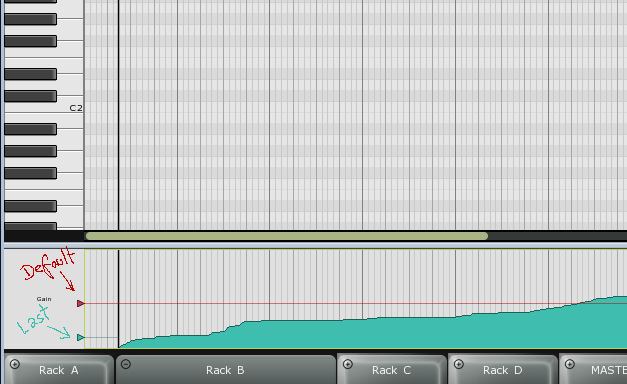
As long as that parameter is not "animated" or recorded, changing the value would be setting a default. Once it is recorded (altered over time by a curve), that default value would be indicated. Of course you could go overboard with this stuff, but on the easiest level it would already help. (fancy stuff like relative adjustments and what that does to such curves is a different topic.)
It's about visibility and orientation. Not so much about features, really.
As long as that parameter is not "animated" or recorded, changing the value would be setting a default. Once it is recorded (altered over time by a curve), that default value would be indicated. Of course you could go overboard with this stuff, but on the easiest level it would already help. (fancy stuff like relative adjustments and what that does to such curves is a different topic.)
It's about visibility and orientation. Not so much about features, really.
-
- KVRAF
- 5573 posts since 30 May, 2006 from Hollow Earth
But what happens if you add on a different track a Gain sequencer to control another Track/Plug? Where do you get that target Gain value right into the new controlling sequencer?....
ABEFLGMOPPRRST
-
- KVRAF
- Topic Starter
- 3206 posts since 17 Apr, 2010 from Slovenia
It should just be consistent with the track you're on!liquidsound wrote:But what happens if you add on a different track a Gain sequencer to control another Track/Plug? Where do you get that target Gain value right into the new controlling sequencer?....
That means, if the track has no sequence before the current one you're on, it should simply show the "default" value that you've dialed in with the rack.
Should it be another sequence further down the track then the "last" value should show what ever the previous sequence had left behind.
-
- KVRAF
- 5573 posts since 30 May, 2006 from Hollow Earth
Now we are on the same page... 
There is more to it but that's probably for M4
There is more to it but that's probably for M4
ABEFLGMOPPRRST
-

- KVRAF
- 13863 posts since 24 Jun, 2008 from Europe
Thanks for sharing your thoughts.
It's something which would affect the composer view too.
Added a note on the wishlist.
It's something which would affect the composer view too.
Added a note on the wishlist.