


did the frames in .knob and the gif in .psd for better quality.




The .knob is in the .zip archive. Maybe clear your browser cache and download again?Hlis93 wrote:Looks real nice WOK.
I'm having trouble opening it in knobman. I saved as .knob but it will not open. Normally works. Any ideas?
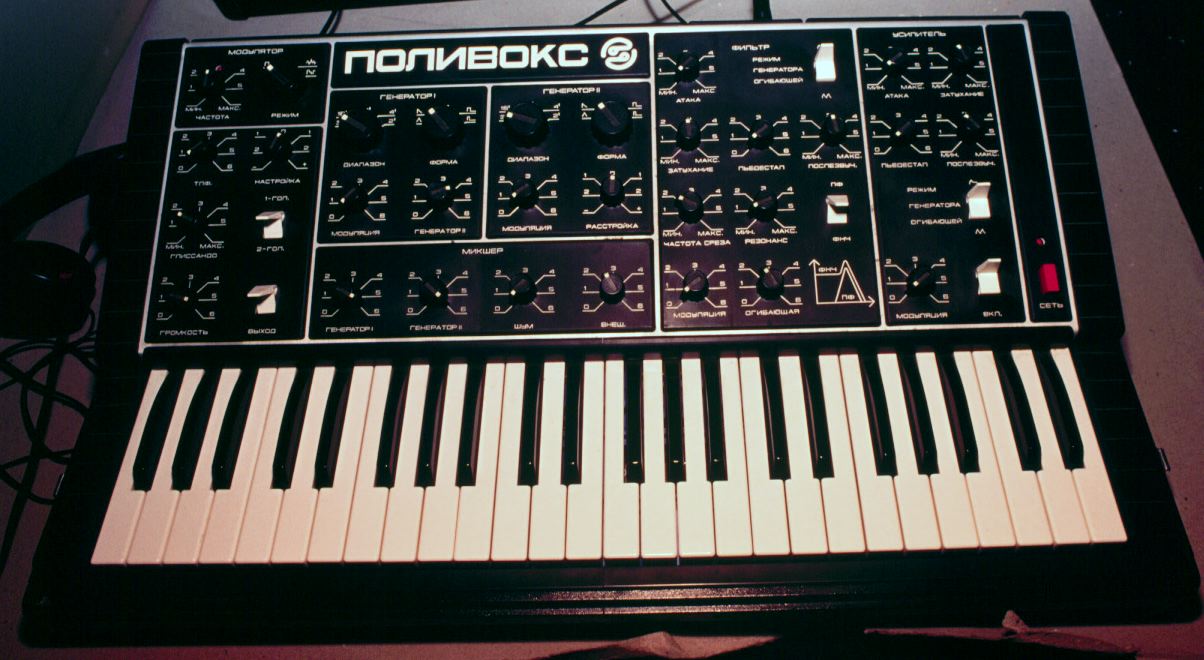
It shouldn't be that hard, take heart, all you need is a good reference to get started! I know that I have seen some patch sheets for this at matrixsynth or other, find one load it into photoshop, gimp, skinman etc and size it to the proportions of your knob, now you have a good reference point to start with. Forget photographs they are a pain in the _ _ _ and always have a perspective to them.guitarbro wrote:Thanks WOK, this entire UI is giving me a headache the dimensions Weird.
Any body want to do it?

Found this http://www.vintagesynth.com/patches/polpanel.pdfHlis93 wrote:It shouldn't be that hard, take heart, all you need is a good reference to get started! I know that I have seen some patch sheets for this at matrixsynth or other, find one load it into photoshop, gimp, skinman etc and size it to the proportions of your knob, now you have a good reference point to start with. Forget photographs they are a pain in the _ _ _ and always have a perspective to them.guitarbro wrote:Thanks WOK, this entire UI is giving me a headache the dimensions Weird.
Any body want to do it?
Here is where Skinman can be really really useful to you! First you can load you knobs made with knobman into skinman with 'insert image' and your patch sheet reference so you can resize it easily. Another good example, there are some odd details around the knobs you can use the 'angle' in the properties with a rec shape to nail them down exactly where you need them with your knob right there to reference. You can also get those waveform images by using a few rec with the 'angle' and use the 'operation' also in the properties to join them all so you only have to do the color for one of them (the top most layer but you'll already have done this to use the operations). This really shouldn't take more then an hour or so! Once you have one done you can place all the layers into one layer, copy&paste, push it to where you need it next!
Everything else there should be fairly quick using skinman depending on how fancy and photorealistic you want to try and make it! Really fancy takes much longer. Also, if you make a few layers that outline where things are you can use as a guid in another editor for that more photorealistic look, it easy to mock things up this way in skinman and just export the image. Now if you are not using Skinman to do the gui, export the particulars as a .png (transparency yes!) and load it into your editor of choice, now you have all those details without much fuss and all you have to do is add in your labels and boxes for the parameter groups and you're all set to go!!!
The switches will be difficult however.
If im telling you things you know sorry, I'm not trying to talk down to anyone. It might be useful to someone else who's reading the thread. None the less, the patchsheet thing should really help if you're having issues with the demensions.
. And i already knew most of that  , thanks.


Submit: News, Plugins, Hosts & Apps | Advertise @ KVR | Developer Account | About KVR / Contact Us | Privacy Statement
© KVR Audio, Inc. 2000-2026
