Recording

Official support for: mutools.com
RELATED
PRODUCTS

Post

janamdo wrote:
mutools wrote:What about this improvement:
looks good for the input and output management for the audiotracks

BUT ..i like to see in the composerscreen also the audiotracks that the new user not can be set on the wrong leg : where are the audio tracks located in the composerscreen ?

OR you must give a warning that the audiochannels are made after the recording process and that there are no audiochannels to be seen before recording them

The recording options panel is for that a good place too

A new user must always setup the recording options ..so it can miss :D

The best solution is a that Mulab opens with a audiotrack already there and with input and output to choose
The user can add later more audiotracks

I come back with a other idea when i user set his input/output in the recording options that a audio placeholder shows up with also the input and output in the composerscreen under the existing rack blocks
The new user nows now that there is audiochannel there in the composerscreen
and when the recording is done the real audiochannel is added

And to preserve the hybride character of Mulab it is optional to let show up the audiochannel marker with the input and outputs

So everbody is happy :party:
Last edited by janamdo on Thu Jul 15, 2010 1:57 pm, edited 1 time in total.

Post

mutools wrote:What about this improvement:

(draft graphical mockup)

Image
Again you prove yourself to be brilliant.
:tu:

Post

Hopefully this way will keep the unique feature that Mu.Lab has of having a universal Track (Audio and/or Midi) at the same time.
ABEFLGMOPPRRST :phones:

Post

janamdo wrote:
mutools wrote:What about this improvement:
So everbody is happy :party:
It is such a joy and satisfying experience for the aspirant new user when he installed his new soundcard and connect it in MUlab

When he opens Mulab there is nothing to see (in the beginning there was nothing..) and than he setup the input and output via the recording options and suddenly there is a audiochannel to see

Woow ..the creation of sound is be born
Think on all the youngster from India, China,Russia and America who want to do something with music.

Post

janamdo wrote:I come back with a other idea when i user set his input/output in the recording options that a audio placeholder shows up with also the input and output in the composerscreen under the existing rack blocks.
Track blocks you mean?

I don't get it as the resulting recording could be placed on an existing track.
The new user nows now that there is audiochannel there in the composerscreen and when the recording is done the real audiochannel is added
And to preserve the hybride character of Mulab it is optional to let show up the audiochannel marker with the input and outputs
I'm not convinced about 'forcing' MU.LAB into a traditional DAW scheme.
Even though i see good points in the traditional DAW audio recording thing.
But MU.LAB is not a traditional DAW. And it's not MU.LAB's goal. Traditional DAWs already exist, there are many of them.

If we make audio recording track-based, then also MIDI recording should be track-based. And implicitly this leads to a serious reorg of MU.LAB which will result into almost another app. This is not the intention.

The next MU.LAB X will focus on the MUX/MuSynth/SMA cfr the "What's Next" topic i referenced. Besides this i'm hopeful that the new Audio Recording Setup panel, which will be implemented too, will be a very nice improvement from where we are now. And i'm also hopeful that this new Audio Recording Setup panel will almost be as effective as the traditional DAW way. Although it might not be 'the same'. But then: MU.LAB is not targetting the tradiotnal DAW market, so no prob.

If MU.LAB can do (multi-track) audio recording in an elegant and comfortable way, then goal accomplished!

Hopefully the new Audio Recording Setup panel will deliver that.
And whether that is track-based or recorder-based is less important.
Lets judge it from the practical side i.e. by actually using it.

Post

PS: The good thing about the fact that audio recording is 'separated' from tracks/composer is that the composer's GUI stays simple.
In tradiotnal DAW, adding all these recording options in the track header bloats the GUI. And such concept implictly forces you to choose between an 'audio track' and a 'midi track' etc. That's complexity and bloaty too. So maybe MU.LAB's way is not traditional, but i might have advantages too over the traditinal way.

Post

mutools wrote:I'm not convinced about 'forcing' MU.LAB into a traditional DAW scheme.
Even though i see good points in the traditional DAW audio recording thing.
But MU.LAB is not a traditional DAW. And it's not MU.LAB's goal. Traditional DAWs already exist, there are many of them.

If we make audio recording track-based, then also MIDI recording should be track-based. And implicitly this leads to a serious reorg of MU.LAB which will result into almost another app. This is not the intention.
That's why we're here Jo :tu:
ABEFLGMOPPRRST :phones:

Post

mutools wrote:PS: The good thing about the fact that audio recording is 'separated' from tracks/composer is that the composer's GUI stays simple.
In tradiotnal DAW, adding all these recording options in the track header bloats the GUI. And such concept implictly forces you to choose between an 'audio track' and a 'midi track' etc. That's complexity and bloaty too. So maybe MU.LAB's way is not traditional, but i might have advantages too over the traditinal way.
The audiotrack is not hybride in nature..because you must first record it
So in this case it is more userfriendly to show where the audiotrack is in Mulab
After the user setup the input and output is shows a audiotrack in the composerscreen

The hybride character of Mulab still exist in the top 4 tracks wich are default

Post

mutools wrote:PS: The good thing about the fact that audio recording is 'separated' from tracks/composer is that the composer's GUI stays simple.
In tradiotnal DAW, adding all these recording options in the track header bloats the GUI. And such concept implictly forces you to choose between an 'audio track' and a 'midi track' etc. That's complexity and bloaty too. So maybe MU.LAB's way is not traditional, but i might have advantages too over the traditinal way.
Image

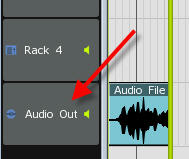
When a audiotrack is made now there is also a trackblock(header) with a name on it...only a input and output will be extra in my idea.. but you can forget this too if you want
Than we get the same headerblock as the standard MUlab
So you argument for the GUI don't hold anymore


The audiotrack is not hybride in nature..because you must first record it
So in this case it is more userfriendly to show where the audiotrack is in Mulab
After the user setup the input and output is shows a audiotrackheader automatically in the composerscreen

The hybride character of Mulab still exist in the top 4 tracks wich are default
Last edited by janamdo on Thu Jul 15, 2010 4:51 pm, edited 1 time in total.

Post

janamdo wrote:
mutools wrote:PS: The good thing about the fact that audio recording is 'separated' from tracks/composer is that the composer's GUI stays simple.
In tradiotnal DAW, adding all these recording options in the track header bloats the GUI. And such concept implictly forces you to choose between an 'audio track' and a 'midi track' etc. That's complexity and bloaty too. So maybe MU.LAB's way is not traditional, but i might have advantages too over the traditinal way.
The audiotrack is not hybride in nature..because you must first record it
So in this case it is more userfriendly to show where the audiotrack is in Mulab
After the user setup the input and output is shows a audiotrack in the composerscreen

The hybride character of Mulab still exist in the top 4 tracks wich are default
So the Track with no parts appears before Recording.... not so bad indeed.... but if you change your mind you've got a virtual audio track and monitoring applied to the composer.
ABEFLGMOPPRRST :phones:

Post

ok

Post

mutools wrote:What about this improvement
That's pretty much spot on what I was thinking, I think. (I'd have to see what you're thinking the MSA would look like as a result to be sure... ;))

Post

Hi All,

MU.LAB is a very special DAW that is for sure, one could call it unique.

I have many so called standard style DAWs.

Because of how MU.LAB works and looks it is why I use it above all others.

IMHO MU.LAB needs this uniqueness, with it's clean GUI etc, etc.

We do not need MU.LAB to be a clone of a typical standard DAW.

While we all help build this DAW lets make sure we keep it a very special DAW indeed.

I trust Jo's judgement when he works out the balance between form and function.

Anyway I am confident that MU.LAB will not only become very user friendly for newbies it will also be a great DAW for the experienced too.

Generally it already is all the above and as time goes by it will get better and better but still look and feel like the MU.LAB we all love so much.

Lets add each feature step by step and comment on it both on a theoretical side and then use it practically before deciding on final workflow etc.

Basically I am agreeing with Jo's last post.

Awesome DAW both now and in the future.

Keep the faith.

OZ

Post

liquidsound wrote:
janamdo wrote:The audiotrack is not hybride in nature..because you must first record it So in this case it is more userfriendly to show where the audiotrack is in Mulab
After the user setup the input and output is shows a audiotrack in the composerscreen The hybride character of Mulab still exist in the top 4 tracks wich are default
So the Track with no parts appears before Recording.... not so bad indeed.... but if you change your mind you've got a virtual audio track and monitoring applied to the composer.
Recording audio does not always result in a new track. So always automatically creating a new track beforehand is not right, imho.

Besides this: What's the advantage of doing that? Making things clear to the user? I don't think this will help a lot. Once the user is at the Recording Setup panel, he/she knows already how things function, i think.

And, janamdo, please note that tracks don't have an input/output thing. This would mean an big reorg in MU.LAB. Also about MIDI recording etc. as messaged before.

Lets go step by step. In this topic i conclude 2 next steps:

1) Implement the new Audio Recording Setup panel

2) Make a nice and easy YouTube video explaining audio recording.
(i.e. using that new panel)

Anyway, i'll also give it some rest & relaxation.

See ya in a couple of weeks 8) (leaving for holidays now)

Thanks for all your input guys!!

Enjoy Making Music!

Post

Agreed - keep it simple and consistent. In MU.LAB, step one is to forget about tracks. Step two is to right-click everything. Combining the two gives the solution Jo's proposing - no worrying about setting up tracks (which, for me, is generally an annoying nightmare), just tell the recording widget what I want to do and let the software sort everything else out. That's far, far simpler.

Post Reply

Return to “MuTools”