More visual midiProgramChange(?)

Official support for: thepiz.org
Post Reply New Topic
RELATED
PRODUCTS

Post

Hi,

I use Piz midiProgramChange in Live to change soft synths and sampler midi programs via laptop keyboard. It's really nice, because my midi keyboards buttons are bit broken.

However, it's hard to see what midi program I'm currently using, because there's no proper GUI in the plugin. What I would like to see is nice big (maybe rescalable) window showing the current midi program number.

Would it be hard to code such thing? I wish I could do it myself, but I'm no programmer. I can try though, but I just need a push in the right direction.. :?

-w_keisari

Post

something like this?

Image

Post

ok, i guess you inspired me...

Image

the big numbers are the current (last sent) values. otherwise it mostly works the same as the original.

http://thepiz.org/pizmidi/midiPCGUI.zip
wrongtastic, baby
tucson's number one gothic rock band since 1995

Post

Nice! Just perfect for me, thank you so much! :D
insertpizhere wrote:ok, i guess you inspired me...

Image

the big numbers are the current (last sent) values. otherwise it mostly works the same as the original.

http://thepiz.org/pizmidi/midiPCGUI.zip

Post

Hi, me again.

I was wondering, if I get too drunk before a show or something, I might forget which program is which. :D

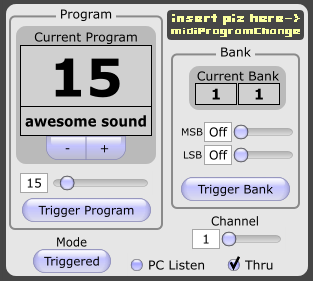
So it would be nice, if I could name the programs. The name could be located under the big number, for example.

Cheers!

w_keisari wrote:Nice! Just perfect for me, thank you so much! :D
insertpizhere wrote:ok, i guess you inspired me...

Image

the big numbers are the current (last sent) values. otherwise it mostly works the same as the original.

http://thepiz.org/pizmidi/midiPCGUI.zip

Post

w_keisari wrote:Hi, me again.

I was wondering, if I get too drunk before a show or something, I might forget which program is which. :D

So it would be nice, if I could name the programs. The name could be located under the big number, for example.

Cheers!

w_keisari wrote:Nice! Just perfect for me, thank you so much! :D
insertpizhere wrote:ok, i guess you inspired me...

Image

the big numbers are the current (last sent) values. otherwise it mostly works the same as the original.

http://thepiz.org/pizmidi/midiPCGUI.zip
it happened to me once, so i stick a piece of paper with program names and numbers on my midi controller. :D

its a bit hard to read though when stage lighting goes dim.
Bedroom Producers Blog << Free VST Plugins!

Post

good idea. how about this:
Image

double click the name to edit.

i also added a different GUI mode that only shows the program number and name (less confusing to look at). the little button in the corner switches between modes.
Image

get it here:
http://thepiz.org/pizmidi/midiPCGUI.zip
wrongtastic, baby
tucson's number one gothic rock band since 1995

Post

you're awesome!!!

Post

Oh yeah! I'll try it when I get back from work. Thanks!

Post

w_keisari wrote:Oh yeah! I'll try it when I get back from work. Thanks!
I had a gig, and it worked like a charm!

There were (again) a Ableton Live related problem. I couldn't enter the name to the name field, it just didn't write anything. It worked perfectly in Bidule, and I just saved the preset and loaded it to Live.

Maybe this is related to Midi2Qwerty arrow key problem?

Post

Live is tricky like that. i don't think it's related to the other problem, but i never figured that one out so i guess i don't really know...

you could try putting "-_EnsureKeyMessagesForPlugins" in Live's Options.txt file and that should let you type stuff into the plugin, but might have other annoying consequences.
Last edited by insertpizhere on Tue Oct 26, 2010 2:18 pm, edited 1 time in total.
wrongtastic, baby
tucson's number one gothic rock band since 1995

Post

Ok, I'll try that, but I think I can live with it. Thank you again!

Post Reply

Return to “Insert Piz Here”