SKINMAN, the new strike by g200kg (early early alpha)

DSP, Plugin and Host development discussion.
Post Reply New Topic
RELATED
PRODUCTS

Post

Pipelineaudio bug confirmed here

Code: Select all

255
0
255
is converted to

Code: Select all

 
254
0
254
on export, so skinman cant really be used for making Reaper themes, unless you change all your pinks after exporting in another app like Photoshop

NAS
Omerta

Post

Pipelineaudio wrote:Still having an issue with the pink lines changing color. If you chose "transparent background" when you export the pink color changes

Here is an example. Perhaps I am still doing something wrong
http://shup.com/Shup/479145/tcp-namebg.skin
hello,
SkinMan 0.999a is released.
http://www.g200kg.com/en/software/skinman.html

* BugFix: The pure color (ex. 255,0,255) is now exported exactly.
* OptnType font - PostScript type (.otf) font is now supported.

Post

thank you thank you thank you thank you thank you!!!!

I'll be trying this the very first second I can

p.s. thank you thank you!!!!!!!!!!!

Post

pink is working so far!

I had an HD crash and need to remake my entire theme from scratch, this new working pink will make my life so much less unpleasant :)

I have also been trying to make metal flake effects by sticking stuff into the textures folder, but I am not having much luck.

Can some art-savvy person make some skinman textures for metal flake? Would be most appreciated

Post

Pipelineaudio wrote:pink is working so far!

I had an HD crash and need to remake my entire theme from scratch, this new working pink will make my life so much less unpleasant :)

I have also been trying to make metal flake effects by sticking stuff into the textures folder, but I am not having much luck.

Can some art-savvy person make some skinman textures for metal flake? Would be most appreciated
Textures must be in .BMP 24bit format. Color is ignored, so it's best to convert them into grayscale and adjust contrast to the max.
http://ktartwork.blogspot.com/2010/12/t ... tiles.html
http://l.thumbs.canstockphoto.com/canstock2547165.jpg
http://www.filterforge.com/download/
http://www.grsites.com/archive/textures ... texture/0/
http://www.mapzoneeditor.com/index.php?PAGE=HOME
ImageImage

Post

Thank you so so so so much!!!!!

Great links!

I'm having a bit of trouble understanding how the stretching or tiling works, is there a way to make a texture file real big so that itll never repeat, but also not stretch if the zoom is at 100%?

Post

Pipelineaudio wrote:Thank you so so so so much!!!!!

Great links!

I'm having a bit of trouble understanding how the stretching or tiling works, is there a way to make a texture file real big so that itll never repeat, but also not stretch if the zoom is at 100%?
If the zoom is set to 100% the texture should appear in the original size. If the object that has the texture is bigger, the texture tiles. Seamless textures repeat without gaps.
If you want to use a big, non-repeating graphic as a texture it must have at least the size of the resulting object. But too big textures might cause problems in skinman because they are saved within the .skin file, causing memory problems.
You may also import a graphic file as object and place it over a skinman object with Alpha < 100. Importing graphic objects ("insert image") instead of using them as textures also enables you to use .png files with transparency.
ImageImage

Post

bummp with the wish to not let it die, g200kg...
regards,
brok landers
BIGTONEsounddesign
gear is as good as the innovation behind it-the man

Post

Bumping it as well!

Please g200kg add multiple edit.

Current way:

You select a group of objects to alter them simultaneous, and only the first object is altered. You end up having to manually edit all objects which consume an obnoxious amount of time, which is not the proper way to do editing.

The way it should work:

You select a group of objects to alter them simultaneous, and every object is altered. This saves time and money if you're on a tight schedule.
Best regards from Johan Brodd.
JoBroMedia since 1996.

Post

Yes, group editing would be nice.
Also it would be nice, if the focus always remains in the graphics window; I often use the cursor keys to fine move objects. But for selecting them I always use the list window. But then the cursor keys move the selection in the list - I have to click the main window title first to change the focus back.
And one other thing: the "Align" function for several selected objects ("Align center" etc.) It would be nice if not the order in the object list would dictate which object is the source for the alignment, instead the object I selected first should be the "master", that is not moved.
ImageImage

Post

Hello all :)

Now available SkinMan 0.999b.
http://www.g200kg.com/en/software/skinman.html

Ver 0.999b 20110521
* BugFix: floating value handling by cursor up/down
* BugFix: cyclic focus change when primitives are overlayed on same position
* Add setup option of 'Move primitives by cursor-key when the focus on Tree-View'.
* Add default setting of Grid enable/display to setup dialog
* Allow bulk-edit of multiple selected primitives

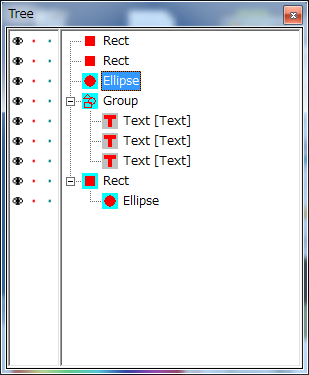
the bulk-edit function is rather big-change. multiple-selected primitives can be move on the TreeView, or edit parameters by the Properties window. the bulk-edit for parameters will be affect to the 'explicitly' selected primitives that are displayed with Cyan Icons on the TreeView.

if the primitives are 'Grouped' or 'Locked', they cannot be selected on the Canvas dragging. TreeView clicking or dragging are needed for 'explicit' selection.

Image

* And about the Master of the Align function:
the master is 'Focused' primitive that has the white rectangles handle when you press SHIFT or CTRL. that can be changed by Shift+click or Ctrl+click.
(sorry but in some case, the shift+click/ctrl+click may behave a little strange. may need more improvement)

Post

COOL !    :)

Edit: - there seems to be something wrong with the textures now. Every time I select a texture, skinman is showing it in the selection box afterwards, but actual uses THE NEXT ONE IN THE LIST for the object.
* Add setup option of 'Move primitives by cursor-key when the focus on Tree-View'.
- This works, but only in small steps. Using shift+cursor for big steps does not work
ImageImage

Post

WOK wrote:COOL !    :)

Edit: - there seems to be something wrong with the textures now. Every time I select a texture, skinman is showing it in the selection box afterwards, but actual uses THE NEXT ONE IN THE LIST for the object.
* Add setup option of 'Move primitives by cursor-key when the focus on Tree-View'.
- This works, but only in small steps. Using shift+cursor for big steps does not work
:-o :-o oh-- I'm late.
http://www.g200kg.com/en/software/skinman.html
just fixed now.

0.999c 20110522
* BugFix: Texture selection combobox is misaligned
* BugFix: TreeView item click with Shift/Ctrl behavior is wrong in some case
(now Shift=AddRange / Ctrl=Toggle)
* BugFix: 'Move primitives by cursor-key when the focus on Tree-View' with ShiftKey behavior

:)

Post

Thanks - looking good now !    :hail:
ImageImage

Post

Is it possible, that the "Small Font Opt" is not working any more?!
(has an effect directly after inserting a text object, but not any more after changing the font)
ImageImage

Post Reply

Return to “DSP and Plugin Development”