


Could this be smoother?


Yes, the "whiter" line in the Knobman example is an illusion - I measured that in Gimp. But maybe the crossover blend could be more smooth (inv exp instead linear?).g200kg wrote:I think that are Mach bands
http://en.wikipedia.org/wiki/Mach_bands
KnobMan's lighting is fully covered the primitive, then no Mach bands are generated.
anyway, the reason is that SkinMan's gradation is consist of polygonal curved luminance. i would like to do some investigation.


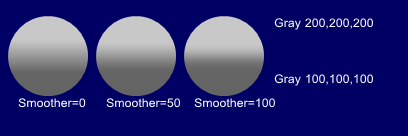
Addendum: it's not Skinman. Knobman 1.48 causes this. 1.47 works correct.WOK wrote:Thanks!
But now something about the knobs in Skinman goes wrong: When I open/edit a knob saved in an old skin, always all layers are switched to visible. Even I turn them off, save the knob, close knobman, it is showing correct in Skinman, but when I edit it again, the layers are all switched to visible again.
If I do this with a new skin (inserting a new knob), always all layers in the knob are turned off when opening it for editing!
Thanks, Now checking.WOK wrote:Addendum: it's not Skinman. Knobman 1.48 causes this. 1.47 works correct.WOK wrote:Thanks!
But now something about the knobs in Skinman goes wrong: When I open/edit a knob saved in an old skin, always all layers are switched to visible. Even I turn them off, save the knob, close knobman, it is showing correct in Skinman, but when I edit it again, the layers are all switched to visible again.
If I do this with a new skin (inserting a new knob), always all layers in the knob are turned off when opening it for editing!
Take your time. These are great pieces of software.g200kg wrote:Thanks, Now checking.
that is caused by the multi-style feature that also has another bugs. seems i had been too greedy to expanding.
 The rest is fine-tuning now. More important than many new features is that existing features work correct (not like Microsoft...).
 ) In Skinman, after drawing a free-hand shape: when I change the size with the number fields, the shape does not change it's size. I have to click on it and "edit", then "end edit", then click something else in the object tree, then the size of the shape changes.
Submit: News, Plugins, Hosts & Apps | Advertise @ KVR | Developer Account | About KVR / Contact Us | Privacy Statement
© KVR Audio, Inc. 2000-2026