SKINMAN, the new strike by g200kg (early early alpha)

DSP, Plugin and Host development discussion.
Post Reply New Topic
RELATED
PRODUCTS

Post

Example of the shading errors:
Image

Could this be smoother?
ImageImage

Post

Is that a SkinMan's gradation tool?
It looks because of the gradation point

gradation tool will not make gradation outside of the points.
Image

Post

Maybe this is more clear:
Image
The Gradation tool seem to have some "stepping" at the beginning and end.
The Lightning/Spec. function in Knobman could have a more "soft running off" at the ends.
ImageImage

Post

I think that are Mach bands
http://en.wikipedia.org/wiki/Mach_bands

KnobMan's lighting is fully covered the primitive, then no Mach bands are generated.

anyway, the reason is that SkinMan's gradation is consist of polygonal curved luminance. i would like to do some investigation.

Post

g200kg wrote:I think that are Mach bands
http://en.wikipedia.org/wiki/Mach_bands
KnobMan's lighting is fully covered the primitive, then no Mach bands are generated.
anyway, the reason is that SkinMan's gradation is consist of polygonal curved luminance. i would like to do some investigation.
Yes, the "whiter" line in the Knobman example is an illusion - I measured that in Gimp. But maybe the crossover blend could be more smooth (inv exp instead linear?).
In Skinman there is definately something wrong - you can see at the gradation with identical colors; the gradation color is always 5/256 darker until the border (must be "ends with 235" in my example picture).
ImageImage

Post

ok,
I have found a bug about the pixel blending logic. it makes error of 255/256.
EDIT: (that cause the 5/256 error i think)
Thanks WOK :)

BTW how about the Mach bands filter, that applies S-curve instead of polygonal curve. do you think is that important?

Post

Here is a comparison with similar constructions:

Photoshop
Image

Skinman
Image
3* 255>0 in different gaps, the 4. is 200>100 gray.

I don't know the Photoshop algorithm, but it's slightly smoother at the "ends"
ImageImage

Post

hello, :)
SkinMan 0.999i is released
http://www.g200kg.com/en/software/skinman.html

0.999i 20110622
* BugFix: Pixel color accuracy improved especially using Gradation
* BugFix: UseTextureAlpha is not effective when Diffuse is not zero
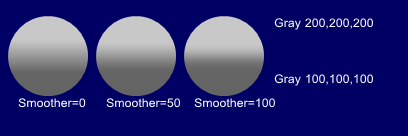
* Added 'Smoother' parameter that make Gradation more smooth, applying splined curve

Smoother sample:
Image

Post

Thanks!
But now something about the knobs in Skinman goes wrong: When I open/edit a knob saved in an old skin, always all layers are switched to visible. Even I turn them off, save the knob, close knobman, it is showing correct in Skinman, but when I edit it again, the layers are all switched to visible again.
If I do this with a new skin (inserting a new knob), always all layers in the knob are turned off when opening it for editing!
ImageImage

Post

WOK wrote:Thanks!
But now something about the knobs in Skinman goes wrong: When I open/edit a knob saved in an old skin, always all layers are switched to visible. Even I turn them off, save the knob, close knobman, it is showing correct in Skinman, but when I edit it again, the layers are all switched to visible again.
If I do this with a new skin (inserting a new knob), always all layers in the knob are turned off when opening it for editing!
Addendum: it's not Skinman. Knobman 1.48 causes this. 1.47 works correct.
ImageImage

Post

WOK wrote:
WOK wrote:Thanks!
But now something about the knobs in Skinman goes wrong: When I open/edit a knob saved in an old skin, always all layers are switched to visible. Even I turn them off, save the knob, close knobman, it is showing correct in Skinman, but when I edit it again, the layers are all switched to visible again.
If I do this with a new skin (inserting a new knob), always all layers in the knob are turned off when opening it for editing!
Addendum: it's not Skinman. Knobman 1.48 causes this. 1.47 works correct.
Thanks, Now checking.
that is caused by the multi-style feature that also has another bugs. seems i had been too greedy to expanding.

Post

g200kg wrote:Thanks, Now checking.
that is caused by the multi-style feature that also has another bugs. seems i had been too greedy to expanding.
Take your time. These are great pieces of software. :tu: The rest is fine-tuning now. More important than many new features is that existing features work correct (not like Microsoft...).

And while checking: ( :D ) In Skinman, after drawing a free-hand shape: when I change the size with the number fields, the shape does not change it's size. I have to click on it and "edit", then "end edit", then click something else in the object tree, then the size of the shape changes.
ImageImage

Post

anyway, KnobMan is updated because the bug, visibilities can't load/save seems be critical to common usage.

http://www.g200kg.com/en/software/knobman.html

Post

Hi im getting this on new install of WinXp on Bootcamp. any ideas?

"This application has failed to start because the application configuration is incorrect"

Post

Something's wrong in 0.999h: Try create a few primitives, and group them. The primitives are now a few pixels from where you created them. Sometimes even the width is altered. I tried to lock the objects, before grouping, but this had no effect. I also tried to copy the group a few times. The same thing happens with them.
Best regards from Johan Brodd.
JoBroMedia since 1996.

Post Reply

Return to “DSP and Plugin Development”