


I am attempting to use the Farbrausch V2 VSTi plugin synth in MuLab. It is capable of making some very nice and unusual sounds. The only problem is that once the edit window is opened for this plugin, it can never be closed and remains on top of the MuLab composition window.
Is there a command to hide or minimize the Farbrausch V2 window? ESC does not seem to do any good; the normal MuLab plugin header is not visible or accessible.
I also tried using it solely from the Modular area, but same problem occurs there.
Farbrausch V2
-
- KVRist
- 357 posts since 5 Aug, 2006 from St. Louis

-
- KVRist
- Topic Starter
- 357 posts since 5 Aug, 2006 from St. Louis
bump
Is this a problem with the GUI display of the VST module or a problem in Mulab in positioning the top of the display (since the Mulab header is missing.)?
Is this a problem with the GUI display of the VST module or a problem in Mulab in positioning the top of the display (since the Mulab header is missing.)?
-

- KVRAF
- 13863 posts since 24 Jun, 2008 from Europe
-
- KVRist
- Topic Starter
- 357 posts since 5 Aug, 2006 from St. Louis
Mulab on Windows
-
- KVRAF
- 13863 posts since 24 Jun, 2008 from Europe
I think it's the first.jpumphandle wrote:Is this a problem with the GUI display of the VST module or a problem in Mulab in positioning the top of the display (since the Mulab header is missing.)?
Did you also emailed this VSTi's developer?
-
- KVRist
- Topic Starter
- 357 posts since 5 Aug, 2006 from St. Louis
Yes - to kb@1337haxorz.de .. and I sent a link to this discussion
http://www.kvraudio.com/forum/viewtopic ... 38#4571838
Also tried this plugin in FL Studio. The plugin window can be positioned, hidden, etc. but will not display a small portion of the GUI at the bottom. However, it is usable in FL Studio.
http://www.kvraudio.com/forum/viewtopic ... 38#4571838
Also tried this plugin in FL Studio. The plugin window can be positioned, hidden, etc. but will not display a small portion of the GUI at the bottom. However, it is usable in FL Studio.
-
- KVRAF
- 13863 posts since 24 Jun, 2008 from Europe
-
- KVRist
- Topic Starter
- 357 posts since 5 Aug, 2006 from St. Louis
Screenshots for Farbrausch V2 plugin below ...
Use 'View image' to see full size.
Mulab
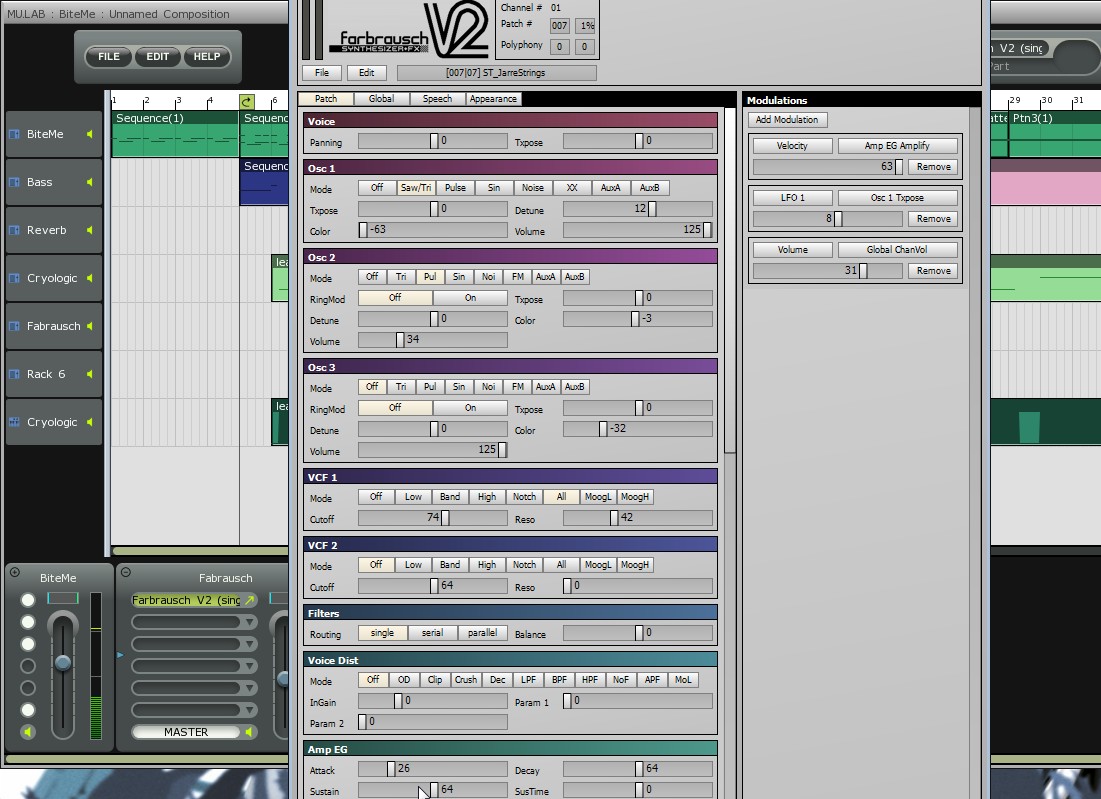
FL Studio
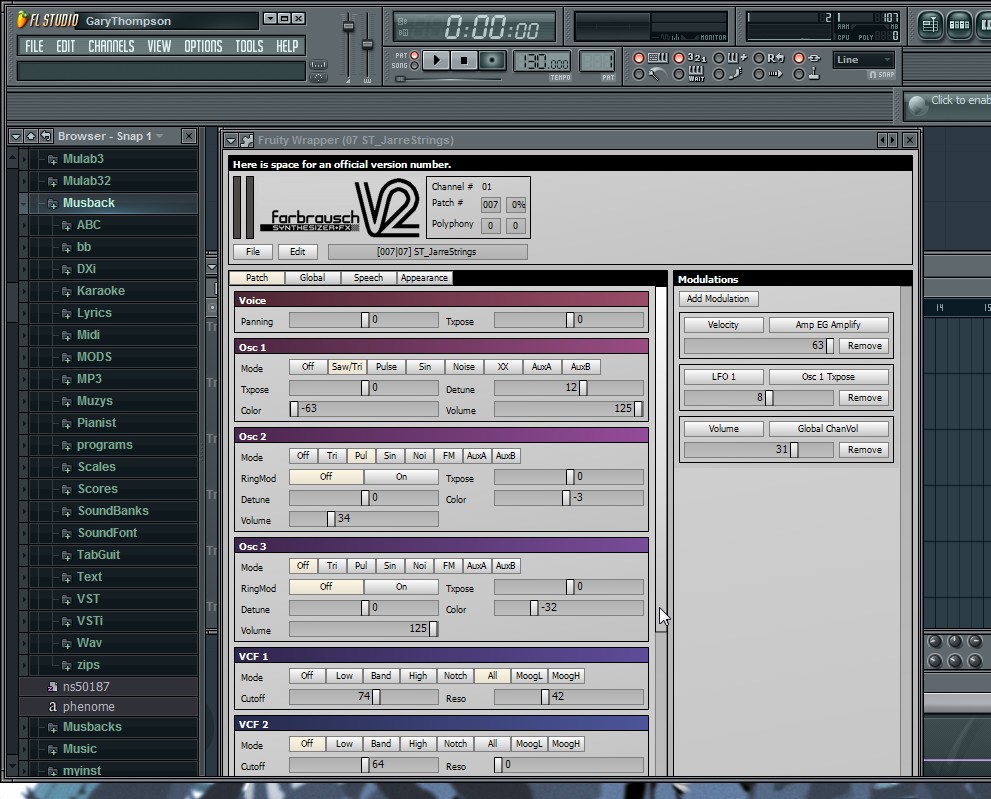
Farbrausch contains an internal vertical scroll bar to display more controls than will fit the screen area. [/img]
Use 'View image' to see full size.
Mulab
FL Studio
Farbrausch contains an internal vertical scroll bar to display more controls than will fit the screen area. [/img]
-
- KVRAF
- 13863 posts since 24 Jun, 2008 from Europe
Thanks for the screenshots.
Based on what i see here it looks like this plugin tries to use a maximized window, but then it doesn't take into account that the host could add more controls to the window. I think it's more a plug design issue.
Besides this: note that you can move any MuLab window to the top-left by right-clicking on its borders -> window context menu -> Move To Top-Left.
Then the MuLab controls should be visible. Maybe this helps.
Based on what i see here it looks like this plugin tries to use a maximized window, but then it doesn't take into account that the host could add more controls to the window. I think it's more a plug design issue.
Besides this: note that you can move any MuLab window to the top-left by right-clicking on its borders -> window context menu -> Move To Top-Left.
Then the MuLab controls should be visible. Maybe this helps.
-
- KVRist
- 185 posts since 12 Nov, 2009
Confirmed - 'Move To Top-Left' works as expected, however...
...I'd love to have a dedicated, MU.LAB native scrollbars as a huge amount of controls is still hidden at 1280x800 screen resolution I'm at the moment. Issue had been spoken in the past: http://www.kvraudio.com/forum/viewtopic.php?t=249636 with right click menu as only temporary solution. It's not the first plugin I encountered to have bigger GUI than my screen res is. It works quite well in i.e. SAVIHost that's providing its own dynamic scrollbars for loaded plugin (appearing only when the plugin is too big to be displayed). I think this feature could be easily implemented especially MU.LAB aims to be usable at even mid/lower spec computers, with laptops in this category obviously having smaller screens.
Please consider
Sincerely, dwsel
P.S. waiting impatiently for upgrade to M4, checking site from time to time
...I'd love to have a dedicated, MU.LAB native scrollbars as a huge amount of controls is still hidden at 1280x800 screen resolution I'm at the moment. Issue had been spoken in the past: http://www.kvraudio.com/forum/viewtopic.php?t=249636 with right click menu as only temporary solution. It's not the first plugin I encountered to have bigger GUI than my screen res is. It works quite well in i.e. SAVIHost that's providing its own dynamic scrollbars for loaded plugin (appearing only when the plugin is too big to be displayed). I think this feature could be easily implemented especially MU.LAB aims to be usable at even mid/lower spec computers, with laptops in this category obviously having smaller screens.
Please consider
Sincerely, dwsel
P.S. waiting impatiently for upgrade to M4, checking site from time to time
Sapling Studio Contact me at kontakt@saplingstudio.eu
-
- KVRist
- Topic Starter
- 357 posts since 5 Aug, 2006 from St. Louis
To close this thread ...dwsel wrote:Confirmed - 'Move To Top-Left' works as expected, however...
...I'd love to have a dedicated, MU.LAB native scrollbars as a huge amount of controls is still hidden at 1280x800 screen resolution I'm at the moment. Issue had been spoken in the past: http://www.kvraudio.com/forum/viewtopic.php?t=249636 with right click menu as only temporary solution. It's not the first plugin I encountered to have bigger GUI than my screen res is. It works quite well in i.e. SAVIHost that's providing its own dynamic scrollbars for loaded plugin (appearing only when the plugin is too big to be displayed). I think this feature could be easily implemented especially MU.LAB aims to be usable at even mid/lower spec computers, with laptops in this category obviously having smaller screens.
I certainly agree that these GUI's should always be made to perform at the default of 1280x800 screen rez. Going to a 1050 pixel vertical size is necessary to reveal all the controls of the Farbrausch V2.
At 800 vertical pixels, the 'Move to top left' allows the Mulab header to be accessed, but the entire GUI and bottom few controls (e.g. Compression, polyphony) cannot be accessed.
Vertical scroll bars would take care of this problem for this module and any other ungainly VST modules.
-
- KVRAF
- 13863 posts since 24 Jun, 2008 from Europe
1) To be honnest adding such scrollbars is not a priority in the wishlist.
2) Personally i think that such big plugin windows are not ideal, GUI-wise as they cover the whole screen and all other windows. But that's just my personal opinion.
2) Personally i think that such big plugin windows are not ideal, GUI-wise as they cover the whole screen and all other windows. But that's just my personal opinion.