


I can see the benefits of tabs for the sessions.
Atoh note that sessions need to be in their own window in order to drag-drop objects between them.
Edit: Ok, maybe drag-drop could also work via such tabs, but at this point i don't have the time resources anymore to start implementing such things.
M4 Test
-

- KVRAF
- Topic Starter
- 13863 posts since 24 Jun, 2008 from Europe
-
- KVRAF
- Topic Starter
- 13863 posts since 24 Jun, 2008 from Europe
That's only for unsaved sessions, because they don't have a name yet.pljones wrote:I just noticed that when I quit, I get a series of "Are you sure to close MuLab Session?" questions. They give no indication of which session they're talking about, so it's impossible to make an informed choice. That could do with fixing.
Maybe it would be better to say "unnamed session" there?
-
- KVRAF
- 5573 posts since 30 May, 2006 from Hollow Earth
Most applications have at the end of the File menu "Open Recent" , even Reason. You could use that feature but instead put there the open sessions : " Go to Session" or "Switch to Session " etc.
ABEFLGMOPPRRST 
-
- KVRAF
- Topic Starter
- 13863 posts since 24 Jun, 2008 from Europe
MuLab too.liquidsound wrote:Most applications have at the end of the File menu "Open Recent" , even Reason.
Ok, it's not at the end of the file menu, no, it's near the other Open functions which is more logical, imho.
We're looking for a simple way to indicate the newbie that when he does MULAB -> New/Open then there is an extra session added and so things take more CPU.You could use that feature but instead put there the open sessions : " Go to Session" or "Switch to Session " etc.
The experienced user knows, and he can see+switch the multiple session windows via the standard ways on your Windows/OSX system.
Essentally it's only about avoiding the surprise of the increased cpu.
I do like the Tabs idea, but at this point i don't have the resources anymore, unfortunately, to go that way, because altogether it's quite some work, also because it changes the concept. I can only go for a simple indicator solution.
Or auto-mute all existing sessions when creating/opening a new one.
-

- KVRAF
- 9091 posts since 28 May, 2005 from Netherneverlands
No problem and no hurries, it's not an essential feature after all, but it would be very nice and useful maybe in a future upgrade:)mutools wrote:I can see the benefits of tabs for the sessions.
Atoh note that sessions need to be in their own window in order to drag-drop objects between them.
Edit: Ok, maybe drag-drop could also work via such tabs, but at this point i don't have the time resources anymore to start implementing such things.
If M5 will have multicore support and such handy things as session tabs, then M5 will be again a very nice step up imho

-
- KVRAF
- 5573 posts since 30 May, 2006 from Hollow Earth
Are the Sequencer Parts skinnable?
ABEFLGMOPPRRST
-
- KVRAF
- Topic Starter
- 13863 posts since 24 Jun, 2008 from Europe
-
- KVRAF
- 5573 posts since 30 May, 2006 from Hollow Earth
mutools wrote:No.


ABEFLGMOPPRRST
-

- KVRAF
- 7412 posts since 8 Feb, 2003 from London, UK
No, this was for unedited demo sessions, not unsaved new or edited existing sessions.mutools wrote:That's only for unsaved sessions, because they don't have a name yet.
Maybe it would be better to say "unnamed session" there?
-
- KVRAF
- Topic Starter
- 13863 posts since 24 Jun, 2008 from Europe
I can't repeat this.pljones wrote:No, this was for unedited demo sessions, not unsaved new or edited existing sessions.mutools wrote:That's only for unsaved sessions, because they don't have a name yet.
Maybe it would be better to say "unnamed session" there?
When i load a demo session X, and i quit, MuLab ask for confirmation to close demo session X, not "MuLab session". Ok, when there also was a new session besides the demo session, then i got a "close MuLab session?" for the unsaved session, which is ok.
Can you please give me a step by step how i can get a "close Mulab session?" for a loaded demo session. Thanks.

-
- KVRAF
- Topic Starter
- 13863 posts since 24 Jun, 2008 from Europe
This is how the MuDrum should look like:
http://www.mutools.com/pics/temp/p20111214.png
Is is like this?
If yes, then i assume you mean with "weird" that you don't like the knobs, right?
http://www.mutools.com/pics/temp/p20111214.png
Is is like this?
If yes, then i assume you mean with "weird" that you don't like the knobs, right?
-
- KVRAF
- 9091 posts since 28 May, 2005 from Netherneverlands
Auch! Yes indeed, they are like that. I thought those where your "test" knobs of some kind before you put the right ones on tbhmutools wrote:This is how the MuDrum should look like:
http://www.mutools.com/pics/temp/p20111214.png
Is is like this?
If yes, then i assume you mean with "weird" that you don't like the knobs, right?

I really don't like those knobs, sorry..! These are too 2D, too dark, the red line is too thick and the shadow doesn't fit to them.. And they don;t fit nicely with the rest of the (imo very nice and elegant) MuLab GUI. They look like they are done within a minute in MS Paint to me.
Very synth1-ish which I also don't really like
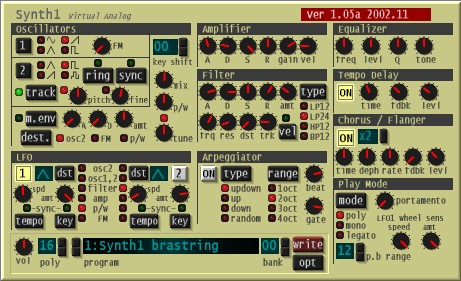
The white/red ones before where 10 times better imho.
Sorry Jo, just reflecting my personal opinion
-
- KVRAF
- 5573 posts since 30 May, 2006 from Hollow Earth
Great metronome sound! Who's the drummer?
ABEFLGMOPPRRST
-
- KVRian
- 855 posts since 3 Mar, 2009
The beauty of Mulab is that it is skinable.Nielzie wrote:Auch! Yes indeed, they are like that. I thought those where your "test" knobs of some kind before you put the right ones on tbhmutools wrote:This is how the MuDrum should look like:
http://www.mutools.com/pics/temp/p20111214.png
Is is like this?
If yes, then i assume you mean with "weird" that you don't like the knobs, right?
I really don't like those knobs, sorry..! These are too 2D, too dark, the red line is too thick and the shadow doesn't fit to them.. And they don;t fit nicely with the rest of the (imo very nice and elegant) MuLab GUI. They look like they are done within a minute in MS Paint to me.
Very synth1-ish which I also don't really like
The white/red ones before where 10 times better imho.
Sorry Jo, just reflecting my personal opinion
The knob can be found in App/Graphics/LooxPhat/Common/Common/icons/Knob.png
You could copy the older one here or replace it with any of your own. In case you need it, g2000k's knobman is a way to go.
Since the Send knob in a rack slot is using a different knob, there should be no side effects using your own choice.