
The M4 Files

Official support for: mutools.com
RELATED
PRODUCTS

Post

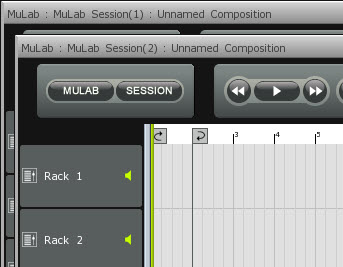
A pic is the answer ...
Image

So when a user opens a second mulab it clear what is going on as i may assume that the average user now this screen format.

Or there must be build in a soft voice in MUlab as warning ..or a sound from a one arm bandit ( gambling machine) that you have the jackpot or so..or also possible a big red warning sign.
Last edited by janamdo on Fri Jan 20, 2012 3:25 pm, edited 1 time in total.

Post

But the you have to click 'maximize' to continue in a comfortable way!
That's not comfortable, at least not for me.

Post

Yeah..i do also some other "solutions", perhaps with a big red warning sign?

Post

Got a new idea:

Lets put all New/Open session funcs in the SESSION menu.
Then on New/Open a question alert pops up: "Replace this session" / "Add As Extra Session". This is not an extra alert as there now is an alert anyway, at least when opening via session menu. So no extra clicks, and this way everything may be 100% clear. Hopefully.

What do you think?

Post

mutools wrote:But the you have to click 'maximize' to continue in a comfortable way!
That's not comfortable, at least not for me.
This i for me totally acceptable and doesn't bother me at all.. i know for sure that i have opened a second program of the same program as you know what i mean.
There are so many clicks in the whole process of making a song..

Post

mutools wrote:Got a new idea:

Then on New/Open a question alert pops up: "Replace this session" / "Add As Extra Session". What do you think?
Perhaps a alert pop up with a voice : Congratulations you have opened a new Mulab program - enjoy making music!

The condition is here ..there is no misunderstanding..for the NOOB :help:
So it is question for the new user that he reads that he opens now a new mulab program ( a second ) : a alert: you open a second mulab program

So in the menu comes no session name "thing", but open a new Mulab program what contains session

So ..open a new mulab program has nothing to do with a session ..clear?

You can call this a multisession, but that is too difficult for a NOOB user of Mulab and i know that Jo from Mulab some day want to drive in his new Porsche, but than he must not use multi session as notion in MUlab for NOOB's.. i think.
Last edited by janamdo on Fri Jan 20, 2012 4:34 pm, edited 4 times in total.

Post

mutools wrote:Got a new idea:

Lets put all New/Open session funcs in the SESSION menu.
Then on New/Open a question alert pops up: "Replace this session" / "Add As Extra Session". This is not an extra alert as there now is an alert anyway, at least when opening via session menu. So no extra clicks, and this way everything may be 100% clear. Hopefully.

What do you think?
this was to be one of my suggestions ;-)

Post

Good luck :hihi:

Post

Found 2 minor bugs in the files:

http://www.mutools.com/mulab/docs/main-menu.html
Export MIDI File

Exports the current Composition to a MIDI file using the WYHIWYG principle, thus muted parts are now exported.
I assume should be "not"...


http://www.mutools.com/mulab/docs/racks.html
-There are multiple slots, in which you can plug in a synth or effect modules, or plug in a Send (cfr the example above).

-At the left of these slots, there is the Pre/Post Indicator, which you can move up or down by clicking at the left of the slots.

-At the left of these slots, there is the Pre/Post Indicator, which you can move up or down by clicking at the left of the slots.

-[Alt]+click a slider/knob steps thru its main positions, cfr the User Interface page.
Double posted...

Post

Updated!

And a couple of more tunings/extensions to the docs.

Thanks!

Post Reply

Return to “MuTools”