


I thought this would be a good sticky topic if Jo agrees, perhaps we can share our best creations/ideas/solutions through screenshots and descriptions here.
Maybe it is best to refrain from discussions here and just post the MUX screenshots?
Show me your MUX!
-

- KVRAF
- 9096 posts since 5 Feb, 2004
Last edited by braj on Sun Aug 12, 2012 9:21 am, edited 1 time in total.
If you have requests for Korg VST features or changes, they are listening at https://support.korguser.net/hc/en-us/requests/new
-
- KVRAF
- Topic Starter
- 9096 posts since 5 Feb, 2004
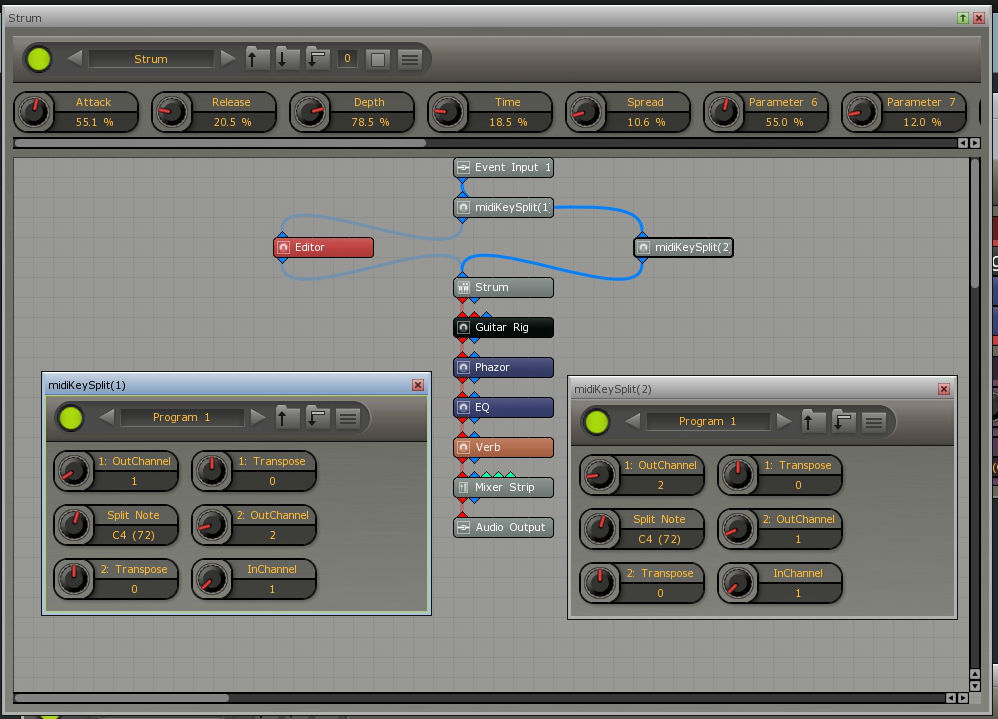
This MUX rescales/transposes Strum Electric while keeping the right-hand strum fingering intact. Also you can of course throw a guitar amp in there as you like 
The free Piz plugins are used: http://thepiz.org/plugins/?p=pizmidi
midiKeySplit is used to split the key, it sends midi to two different midi channels set to a specific range. I used two, both ultimately send to Strum on Ch 1 and Ch 2 is just a dummy placeholder. I hope this makes sense.
midiScaleChanger is easy, it just goes in front of any plugin. The GUI is super easy since piz uses generic controls provided by MUX. You just open the plugin GUI and drag and arrange the 'notes' as shown in the screenshot, as well as the root note and program change. It is super easy, all I am doing is providing the controls from the plugin there, nothing complicated, no extra routing. I personally leave all of the black notes 'blank' and only assign notes to the white keys. This was an early screenshot, but where it says "Program 9" for example would be the scale name (I just hadn't properly named that preset). So the red area is for changing the scale and key.

The free Piz plugins are used: http://thepiz.org/plugins/?p=pizmidi
midiKeySplit is used to split the key, it sends midi to two different midi channels set to a specific range. I used two, both ultimately send to Strum on Ch 1 and Ch 2 is just a dummy placeholder. I hope this makes sense.
midiScaleChanger is easy, it just goes in front of any plugin. The GUI is super easy since piz uses generic controls provided by MUX. You just open the plugin GUI and drag and arrange the 'notes' as shown in the screenshot, as well as the root note and program change. It is super easy, all I am doing is providing the controls from the plugin there, nothing complicated, no extra routing. I personally leave all of the black notes 'blank' and only assign notes to the white keys. This was an early screenshot, but where it says "Program 9" for example would be the scale name (I just hadn't properly named that preset). So the red area is for changing the scale and key.
If you have requests for Korg VST features or changes, they are listening at https://support.korguser.net/hc/en-us/requests/new
-

- KVRAF
- 3160 posts since 28 Mar, 2008 from a Galaxy S7 far far away
I didn't realise you could assign a knob to a key range. I have a question about that - I requested an option for Recording to start on Note On. Jo replied saying it's possible to set a key to activate recording. This is, this key will obviously always change depending on what your playing. As I'd want this key to be the first note of whatever I'm currently playing.
What I want to know is can I use a knob to change that first note that starts recording?
What I want to know is can I use a knob to change that first note that starts recording?
-
- KVRAF
- Topic Starter
- 9096 posts since 5 Feb, 2004
Well to be clear these knobs belong to VSTs within MUX, not the MUX VST (they have generic GUIs, so they automatically take on MUX controls, which makes them extremely convenient for using in MUX). I don't know the answer to your questionsl23 wrote:I didn't realise you could assign a knob to a key range. I have a question about that - I requested an option for Recording to start on Note On. Jo replied saying it's possible to set a key to activate recording. This is, this key will obviously always change depending on what your playing. As I'd want this key to be the first note of whatever I'm currently playing.
What I want to know is can I use a knob to change that first note that starts recording?
Do you mean the MUX would start the sequencer? I'm not sure how to do that, is this to happen within MuLab?
If you have requests for Korg VST features or changes, they are listening at https://support.korguser.net/hc/en-us/requests/new
-

- KVRAF
- 13863 posts since 24 Jun, 2008 from Europe
Some feedback thoughts: It's for sure a great initiative to share MUX presets! I'm not sure if a sticky is the best way to organize this though because it can become messy after some time as replies will be mixed up. Also such sticky is not very searchable etc. I realize that the need grows to have an organized way of sharing MUX presets i.e. building a common user MUX preset library. That's an important one on the wishlist. Thinking loud about that one: The problem is not webspace, there is plenty of free webspace available via things like dropbox etc. If each user makes a free 2 GB dropbox account, that prob is solved. I think the issue is especially about having a central place where you can find all the community MUX presets, i.e. a kind of central TOC. Right? What do you think?braj wrote:I thought this would be a good sticky topic if Jo agrees
-
- KVRAF
- Topic Starter
- 9096 posts since 5 Feb, 2004
Yeah definitely long term some sort of database definitely makes sense, but short term to get the juices flowing a sticky seems immediate, easy, and free
If you have requests for Korg VST features or changes, they are listening at https://support.korguser.net/hc/en-us/requests/new
-
- KVRAF
- 3160 posts since 28 Mar, 2008 from a Galaxy S7 far far away
Actually, yes I suppose it would. Jo said I could assign a key on the keyboard to start the sequencer recording. So basically if my first key to be played was D3 then I'd assign this to start the recording process. But when I record the next part I'd want the key to be played first to be changed to that key so I'd have to redo the steps required to change the key.braj wrote:Do you mean the MUX would start the sequencer? I'm not sure how to do that, is this to happen within MuLab?
This would change every time I wanted to record a riff or whatever into the sequencer. But... if I could assign a key that could be changed via a Mux knob that would be close to perfect. It would still be easier if Note on was added to the record function, pretty please?
-
- KVRAF
- 13863 posts since 24 Jun, 2008 from Europe
Screenshots only but no replies? Isn't that a bit unrealistic? Anyway i do appreciate your initiative, great movebraj wrote:I thought this would be a good sticky topic if Jo agrees, perhaps we can share our best creations/ideas/solutions through screenshots and descriptions here.
Maybe it is best to refrain from discussions here and just post the MUX screenshots?
 So i've been searching some more and i think Drop Box could be a good solution.
I've created a shared MUX folder on Drop BOX, here is the link: https://www.dropbox.com/sh/lztrpkl7q1296sa/mOBJPsO2sD
To all interested MUX users: Let me know your Drop Box user name or your email address and i'll invite you to that shared folder. Then you can add, edit, remove files too.
Some organizational guidelines:
When you share a MUX preset, if it's only a .Mux file you can put it directly in the relevant sub-folder. If you share a MUX preset and it includes extra files like samples or an info text file etc. then put it in an extra sub-folder so all of the related files for that MUX preset are neatly grouped. And Drop Box makes it easy to download a complete sub-folder as a zip file.
Then you can also create a new forum topic here about your MUX preset and so all replies on that topic will be about that specific MUX preset, so that's neatly grouped too.
Please be gentle to the preset files of someone else. Don't start editing/deleting someone else's MUX presets because you don't like them.
Lets see how this works out
-

- KVRist
- 409 posts since 26 Jul, 2010 from Germany
Hi Jo,
why not using KVR's place for patches: http://www.kvraudio.com/product/mulab-b ... /downloads
We all have an account here, so no other service will be involved.
why not using KVR's place for patches: http://www.kvraudio.com/product/mulab-b ... /downloads
We all have an account here, so no other service will be involved.

-
- KVRAF
- 13863 posts since 24 Jun, 2008 from Europe
I think that's up to you users to decide. It's about a user driven preset library. The essence is to have a central webspace where registered users can manage and exchange MUX presets, independent from me. Just a thought: I think some registration is important because if really everyone could access the online user library then that might lead to unwanted chaos. Anyway: to be discussed and decided by the users. I'll support where necessary.
-
- KVRist
- 409 posts since 26 Jul, 2010 from Germany
There is a menu row on every KVR page with an entry called "Banks & Patches
/ Download & Upload". Some information about this:
- An upload requires a login at KVR!
- An uploaded file will be associated with the respective product ( MuLab )
- It can later be changed only by the uploading person.
- Moderation is not required.
- A download is possible for everyone, not only for registered users.
- And: It's right here! Or: We are already there!
So, what is the advantage of dropbox over KVR's patch-list?
JR
/ Download & Upload". Some information about this:
- An upload requires a login at KVR!
- An uploaded file will be associated with the respective product ( MuLab
) - It can later be changed only by the uploading person.
- Moderation is not required.
- A download is possible for everyone, not only for registered users.
- And: It's right here! Or: We are already there!
So, what is the advantage of dropbox over KVR's patch-list?
JR
-
- KVRist
- 409 posts since 26 Jul, 2010 from Germany
At the bottom of the "Banks & Patches" page there is a brief description how to.
On the quick:
1. Go to the product page http://www.kvraudio.com/product/mulab-by-mutools
2. Below the title "MuLab by MUTOOLS" click on "Downloads, Banks, Patches, etc."
3. Click on "Upload & Share" (you must be logged on)
4. Follow the upload form
Have done it twice, and it works fine. But we've already discussed that here:
http://www.kvraudio.com/forum/viewtopic ... 52#4825517
Please try the steps above. If it doesn't work, try accepting cookies. Maybe there is a problem with a proxy or the firewall? Can you try it from another computer? EDIT: Have you activated javascript?
JR
On the quick:
1. Go to the product page http://www.kvraudio.com/product/mulab-by-mutools
2. Below the title "MuLab by MUTOOLS" click on "Downloads, Banks, Patches, etc."
3. Click on "Upload & Share" (you must be logged on)
4. Follow the upload form
Have done it twice, and it works fine. But we've already discussed that here:
http://www.kvraudio.com/forum/viewtopic ... 52#4825517
Please try the steps above. If it doesn't work, try accepting cookies. Maybe there is a problem with a proxy or the firewall? Can you try it from another computer? EDIT: Have you activated javascript?
JR