

Hello everyone! This is my first post here, and this is not an entry. I don't own the program but I still thought this was interesting enough to share. Aalto is a pretty nice piece of software. It's very easy to make crazy sounds quickly which seems to be one of its virtues.
Here is the "preset" I made.
Some cool tones in there, sounded like a girl calling out at times.
https://soundcloud.com/dodeiale/dadadaalto

One-Synth-Challenge 51: Aalto and Aalto Solo - Submissions and gossip
-
- KVRer
- 1 posts since 23 Apr, 2013
-
- KVRist
- 452 posts since 1 Dec, 2011
-

- KVRAF
- 3922 posts since 15 Dec, 2009
Sounds good and an example how constantly moving sounds with knob tweaking or automation really keeps the interest. Should ideally be done to every instance in a tune I guess. Combined with pan the same movements can enhance the stereo image as well.
One of the (imo) best sound designers Arksun makes patches that comes with a lot of lfo movement already from the start and it shows in his music. With a lot put into each sound, you can get away with fewer instruments and make space and purity in a mix that way.
I guess I want to start a movement for more movement..

-
- KVRAF
- 2726 posts since 19 Dec, 2010 from North America
MOTIVATION / INSPIRATION / LET'S DO IT!!
Hey everyone, I wanted to post this to give people some motivation to finish their track. Maybe we can all motivate eachother I barely started mine, and have been procrastinating pretty bad.
KEEP AT IT!!!

GO GO GO GO GO - KICK SOME ARSH!!!
Hey everyone, I wanted to post this to give people some motivation to finish their track. Maybe we can all motivate eachother I barely started mine, and have been procrastinating pretty bad.
KEEP AT IT!!!
GO GO GO GO GO - KICK SOME ARSH!!!
-
- KVRist
- 108 posts since 2 Jun, 2010 from Seattle
I'm writing with more last-minute motivation!
Firstly, I would like to add a copy of Aalto to the prize pool. I'm kind of impressed that people are wrestling with many copies of the solo version and some other software to play chords. If you win the contest, you won't have to do that, because you can have your own full license!
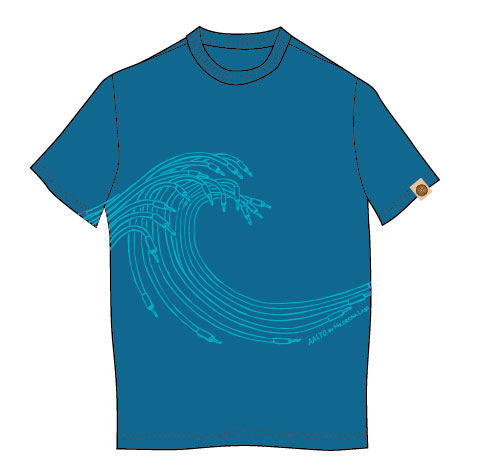
Second, I would like to add an Aalto T-shirt. I'm having these made this Spring. They are not quite ready yet, but when they are, they will look a lot like this:
In other news, Aalto has been added to the Computer Music plugins collection:
https://www.facebook.com/photo.php?fbid=538300836208498
This Aalto-CM is exactly the same thing as the Beat Aalto-Solo (with a different logo), so there is no reason to get it if you have the Beat version. If you had problems getting the Beat version, you may find the CM download process much easier.
Good hunting.
P.S. I'm concerned about the Cubase issues and will definitely do some extra testing on Cubase for the next version. In the meantime I haven't been able to reproduce any of these problems, so If anyone has time would appreciate a bug report---steps to reproduce, minimal test case, you know the drill---sent to support at madrona labs.
Firstly, I would like to add a copy of Aalto to the prize pool. I'm kind of impressed that people are wrestling with many copies of the solo version and some other software to play chords. If you win the contest, you won't have to do that, because you can have your own full license!
Second, I would like to add an Aalto T-shirt. I'm having these made this Spring. They are not quite ready yet, but when they are, they will look a lot like this:
In other news, Aalto has been added to the Computer Music plugins collection:
https://www.facebook.com/photo.php?fbid=538300836208498
This Aalto-CM is exactly the same thing as the Beat Aalto-Solo (with a different logo), so there is no reason to get it if you have the Beat version. If you had problems getting the Beat version, you may find the CM download process much easier.
Good hunting.
P.S. I'm concerned about the Cubase issues and will definitely do some extra testing on Cubase for the next version. In the meantime I haven't been able to reproduce any of these problems, so If anyone has time would appreciate a bug report---steps to reproduce, minimal test case, you know the drill---sent to support at madrona labs.
Randy Jones
Madrona Labs
Madrona Labs
-
- KVRAF
- 2726 posts since 19 Dec, 2010 from North America
Randy, all I can say is this is perfect motivation, thank you 
-
- KVRAF
- 3922 posts since 15 Dec, 2009
Yes great, thank you very much 
Too bad with the compatibility issues but for sure it's fixable.
Too bad with the compatibility issues but for sure it's fixable.
-

- KVRist
- 396 posts since 7 Dec, 2006 from Richmond, VA, USA
My two submissions this month
bh9090 - AaltoOSC1
http://soundcloud.com/hennessey/bh9090-aaltoosc1
25 instances of Aalto Solo, Ableton Live with EQ8, Saturator, Compressor, and various delays. 13.5 db range
bh9090 - AaltoOSC2
http://soundcloud.com/hennessey/bh9090-aaltoosc2
17 instances of Aalto Solo, Ableton Live with effects as above plus TAL reverb 2. 14 db range.
I need to go sit at the piano now so I can play chords! Can't wait to hear what others have come up with using this beast.
bh9090 - AaltoOSC1
http://soundcloud.com/hennessey/bh9090-aaltoosc1
25 instances of Aalto Solo, Ableton Live with EQ8, Saturator, Compressor, and various delays. 13.5 db range
bh9090 - AaltoOSC2
http://soundcloud.com/hennessey/bh9090-aaltoosc2
17 instances of Aalto Solo, Ableton Live with effects as above plus TAL reverb 2. 14 db range.
I need to go sit at the piano now so I can play chords! Can't wait to hear what others have come up with using this beast.
-
- KVRist
- 396 posts since 7 Dec, 2006 from Richmond, VA, USA
What file format are you using to upload? Your tracks have good volume and sound straight out of the Soundcloud player. I know this is mostly due to great mixing and EQ on your part, but am wondering what you upload. Currently I export my Live track to 24bit wav then use LAME to encode to 320bit mp3. It then gets encoded at Soundcload again.jasinski wrote: ...Live 9 using only native plugins such as eq, delay, reverb, saturation, and compression.
I try not to over compress, but I'm not getting the loudness and clarity that is apparent on many of the submissions I hear. Any advice appreciated.
edit: disregard. I just downloaded you track: 16bit wav - squashed to hell

Last edited by bh9090 on Thu Apr 25, 2013 7:58 pm, edited 1 time in total.
-
- KVRist
- 489 posts since 3 Apr, 2004
_
I had time to do another one this month!
https://soundcloud.com/nikp2000/nikp200 ... ue-william
9 instances of aalto with compression, eq, autopan from Live8
DR =19
Nick
_
I had time to do another one this month!
https://soundcloud.com/nikp2000/nikp200 ... ue-william
9 instances of aalto with compression, eq, autopan from Live8
DR =19
Nick
_
-
- KVRian
- 850 posts since 20 Oct, 2003 from Seattle
bh9090 wrote:What file format are you using to upload? Your tracks have good volume and sound straight out of the Soundcloud player. I know this is mostly due to great mixing and EQ on your part, but am wondering what you upload. Currently I export my Live track to 24bit wav then use LAME to encode to 320bit mp3. It then gets encoded at Soundcload again.jasinski wrote: ...Live 9 using only native plugins such as eq, delay, reverb, saturation, and compression.
I try not to over compress, but I'm not getting the loudness and clarity that is apparent on many of the submissions I hear. Any advice appreciated.
edit: disregard. I just downloaded you track: 16bit wav - squashed to hell
Squashed?... I guess so. I export the 16bit wav file from Live 9, using Live's built in bit reduction algorithm. It's recorded originally in 24bit. Before I master I try to keep the sum of all my tracks to -6 to -10 db. Then add gain using a bit of compression and limiter.
-
- KVRian
- 805 posts since 17 May, 2011 from Philadelphia
Doesn't sound overly squashed to me.. but maybe I'm just another casualty of the loudness wars.jasinski wrote:bh9090 wrote:What file format are you using to upload? Your tracks have good volume and sound straight out of the Soundcloud player. I know this is mostly due to great mixing and EQ on your part, but am wondering what you upload. Currently I export my Live track to 24bit wav then use LAME to encode to 320bit mp3. It then gets encoded at Soundcload again.jasinski wrote: ...Live 9 using only native plugins such as eq, delay, reverb, saturation, and compression.
I try not to over compress, but I'm not getting the loudness and clarity that is apparent on many of the submissions I hear. Any advice appreciated.
edit: disregard. I just downloaded you track: 16bit wav - squashed to hell
Squashed?... I guess so. I export the 16bit wav file from Live 9, using Live's built in bit reduction algorithm. It's recorded originally in 24bit. Before I master I try to keep the sum of all my tracks to -6 to -10 db. Then add gain using a bit of compression and limiter.

@Jasinski, any reasoning behind dithering from 24bit to 16? Why not just leave at 24?
-
- KVRist
- 396 posts since 7 Dec, 2006 from Richmond, VA, USA
I want to be clear - it sounds great. It just looked squashed in the wave editor.evo2slo wrote:Doesn't sound overly squashed to me.. but maybe I'm just another casualty of the loudness wars.jasinski wrote:bh9090 wrote:What file format are you using to upload? Your tracks have good volume and sound straight out of the Soundcloud player. I know this is mostly due to great mixing and EQ on your part, but am wondering what you upload. Currently I export my Live track to 24bit wav then use LAME to encode to 320bit mp3. It then gets encoded at Soundcload again.jasinski wrote: ...Live 9 using only native plugins such as eq, delay, reverb, saturation, and compression.
I try not to over compress, but I'm not getting the loudness and clarity that is apparent on many of the submissions I hear. Any advice appreciated.
edit: disregard. I just downloaded you track: 16bit wav - squashed to hell
Squashed?... I guess so. I export the 16bit wav file from Live 9, using Live's built in bit reduction algorithm. It's recorded originally in 24bit. Before I master I try to keep the sum of all my tracks to -6 to -10 db. Then add gain using a bit of compression and limiter.
@Jasinski, any reasoning behind dithering from 24bit to 16? Why not just leave at 24?
-
- KVRAF
- 2726 posts since 19 Dec, 2010 from North America
Speaking of Squashed guys... the farmers market is coming soon. Anyone psyched? Can't wait ... squash is a little later though.jasinski wrote: I want to be clear - it sounds great. It just looked squashed in the wave editor.
NEVER EVER eat squash while mastering
-

- KVRAF
- 8498 posts since 18 Apr, 2004
Saving bandwidth/disk space for listeners? Unless you've got a tremendous dynamic range, a 24 bit range for a presentation format is a waste of resources.evo2slo wrote:any reasoning behind dithering from 24bit to 16? Why not just leave at 24?
