

You can use it to vocode as well. There's a nice skin by Vostek/Vostok? floating around (he designed Daedalus IIRC).Davias wrote:
I was just wondering what was the concept behind Pentagon, is is a simple VA or can it load wavetables like Rapture ?

Cakewalk's Rapture on Sale again: $19.99
-
- KVRian
- 632 posts since 3 Sep, 2009 from Vancouver
-

- KVRAF
- 2275 posts since 4 Dec, 2011 from Brasília, Brazil
-
- KVRAF
- 8413 posts since 4 Jul, 2012 from Alesia
V0RT3X wrote:purchased... *sighs*
my GAS got the best of me .. lol

I kind of tossed away $20 because I don't really see the use for this when I already own a bunch of others. The low CPU use though is nice and I could probably see myself using this for the times I use the X86 version of live *which is rare*
So if you own *like me*
- Komplete 8
- Fxpansion Synthsquad
- Cableguys Curve2
- U-he ACE
- CM Free bundle
- Beat Magazine Synthmaster
- etc etc etc
Maybe it's not worth $20 unless like me you wanted it along time ago when it was more newer. Still it's kind of nostalgic, too bad the money was'nt going to a developer who was interested in actually supporting their products better.
my summary
Pros
----
- Decent set of sampled waveforms that come shipped with rapture
- Easy to use!
- very very low CPU use
- Some cool presets *If and when you get it installed properly on OSX Lion*
Cons
----
- No 64 bit version
- needs manual work-around to install on OSX lion systems (Which can be scary to some)
- Dated sounding filters and FX
all in all if you are looking for a super low CPU synth and only got $20 I would say maybe pick up a computer magazine issue and get the free stuff you get with it instead of buying this. The CM Synthmaster and CM Zebra will get you way way more synthesis mileage than this archaic plugin.
If you got $20 to kind of piss away then by all means check it out. Like i said there are some things you can get out of this like the waveform selection which can be used beyond this.
Cheers


-

- KVRAF
- 5109 posts since 5 May, 2005 from Stockholm, Sweden
I'm having serious problems opening Rapture in existing projects in Cubase 7 64bit. I just get an empty frame and an 'infinitely' repeating error dialogue. Need to use task manager to shut Cubase down. Opening in standalone mode and opening in a fresh project are no problem.
Z3ta+2 and Dimension Pro both work fine though.
Z3ta+2 and Dimension Pro both work fine though.
-
- KVRAF
- 8413 posts since 4 Jul, 2012 from Alesia
I don't think it's 64bit compatible since it was made way back in the daylotus2035 wrote:I'm having serious problems opening Rapture in existing projects in Cubase 7 64bit. I just get an empty frame and an 'infinitely' repeating error dialogue. Need to use task manager to shut Cubase down. Opening in standalone mode and opening in a fresh project are no problem.
Z3ta+2 and Dimension Pro both work fine though.
-

- KVRAF
- 6535 posts since 9 Dec, 2008 from Berlin
Works just fine in 64 Bit Ableton Live 8, Usine 6, Studio One 2.5...
On Windows 8 Pro x64
Cheers,
Tom
On Windows 8 Pro x64
Cheers,
Tom
"Out beyond the ideas of wrongdoing and rightdoing, there is a field. I’ll meet you there." · Rumi
UrbanFlow.art · Instagram · YouTube
UrbanFlow.art · Instagram · YouTube
-
- KVRAF
- 2275 posts since 4 Dec, 2011 from Brasília, Brazil
-
- KVRAF
- 8413 posts since 4 Jul, 2012 from Alesia
Maybe it's cause Im on OSX?ThomasHelzle wrote:Works just fine in 64 Bit Ableton Live 8, Usine 6, Studio One 2.5...
On Windows 8 Pro x64
Cheers,
Tom
Here are 2 screenshots of my full VST list in Live9 x64


I rescanned everything manually too! It only shows up for me when I use the X86 version of Live9.
-

- KVRAF
- 24411 posts since 7 Jan, 2009 from Croatia
Both Rapture and DimPro are 64-bit on Windows at least.
-
- KVRAF
- 5109 posts since 5 May, 2005 from Stockholm, Sweden
I installed the 64bit version (Windows). I'll install the 32bit version and see if that works properly.V0RT3X wrote:I don't think it's 64bit compatible since it was made way back in the daylotus2035 wrote:I'm having serious problems opening Rapture in existing projects in Cubase 7 64bit. I just get an empty frame and an 'infinitely' repeating error dialogue. Need to use task manager to shut Cubase down. Opening in standalone mode and opening in a fresh project are no problem.
Z3ta+2 and Dimension Pro both work fine though.
-
- KVRist
- 30 posts since 9 Nov, 2010 from Netherlands
<skip this, since it has been said before, windows does have a 64bit version of rapture.>

Last edited by saymoo on Mon May 27, 2013 5:25 pm, edited 2 times in total.
-
- KVRist
- 279 posts since 13 Feb, 2007
As far as Windows is concerned the DimPro and Rapture you purchased are the same plug-ins bundled with SONAR X2 Producer. They are supplied in both native 32bit and 64bit VST format.
Last edited by scook on Mon May 27, 2013 6:08 pm, edited 1 time in total.
-

- KVRian
- Topic Starter
- 1276 posts since 30 Apr, 2004 from Louisville, KY
Another reminder: If you have just purchased Rapture, you need to try the patches available on Patch Arena, most easily found at
http://patcharena.com/rapture-patches-a ... ure-deals/
http://patcharena.com/rapture-patches-a ... ure-deals/
-

- KVRAF
- 25849 posts since 20 Jan, 2008 from a star near where you are
Yeah, most def Daedalus inspired, not bad:awol9000 wrote:You can use it to vocode as well. There's a nice skin by Vostek/Vostok? floating around (he designed Daedalus IIRC).
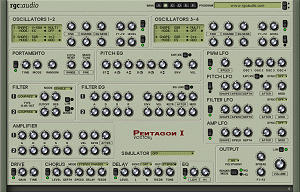
http://forum.cakewalk.com/tm.aspx?m=1569900
Is Pentagon worth €20 still? I'm feeling GAS filling me up
-
- KVRian
- Topic Starter
- 1276 posts since 30 Apr, 2004 from Louisville, KY
One last thing: I never did "pull the trigger" on Dimension Pro. Instead, I spent my $20 on Rapture patches.
To quote another thread:
"Fr4ncesco is being modest Wink I see he also has a NEW set of patches (actually an entire expansion with EGs, LFO's, waves etc) which are on sale during the CW sale. Definitely a no-brainer after hearing his work on Muz3um."
http://fisound.com/product/universal-120/
To quote another thread:
"Fr4ncesco is being modest Wink I see he also has a NEW set of patches (actually an entire expansion with EGs, LFO's, waves etc) which are on sale during the CW sale. Definitely a no-brainer after hearing his work on Muz3um."
http://fisound.com/product/universal-120/