


T5 bugs + FRs
-
- KVRAF
- 1790 posts since 30 Dec, 2012
Hi LawrenceF, if you zoom in you probably will see this crossfading. By default comp segments crossfade by 20ms which should give a smooth transition between segments. You can change this however from the "General Settings" page under "Comping X-Fade Time" if a different length suits your performance better.
-
- KVRist
- 331 posts since 1 Nov, 2005 from UK
One button.
"Assign multiple VST outs to seperate tracks".
Thanks.
"Assign multiple VST outs to seperate tracks".
Thanks.
http://www.amazon.co.uk/Croak-Dilemmas/ ... MMAS+CROAK
I7 3770K, Asus P8Z77 V PRO, WIN 7 HP.
T1/2/3/4/5/6.
I7 3770K, Asus P8Z77 V PRO, WIN 7 HP.
T1/2/3/4/5/6.
-

- KVRAF
- 2328 posts since 22 Aug, 2006
FR: Full screen mode 
satYatunes.com
Discover free skins, themes, plugins, deals and soundsets. Sell and promote your product.
Follow us on Facebook, Twitter, Instagram for latest updates.
Discover free skins, themes, plugins, deals and soundsets. Sell and promote your product.
Follow us on Facebook, Twitter, Instagram for latest updates.
-
- KVRAF
- 3338 posts since 18 May, 2003 from Sweden
Urgent FR: Takes and comping for MIDI (not just audio), please!
At the very least, please implement MIDI Take Folders, à la Logic Pro.
Kind regards,
Joachim
At the very least, please implement MIDI Take Folders, à la Logic Pro.
Kind regards,
Joachim
If it were easy, anybody could do it!
-
- KVRist
- 131 posts since 7 Sep, 2004 from SF Bay Area
FR: Some way of creating an ex post facto "assembly" or "pseudoloop" track, in which you could place different performances of a part that were done on different tracks at different times, thus creating the illusion that they were created through looped recording. These tracks could then be comped by using the swipe tool, just as if they were recorded in loop mode.
For audio and (just for Joachim) for MIDI too.
I request this because multiple versions of a part often are not best or most easily recorded in loop mode. Sometimes they're recorded over a span of time and thus must be done on separate tracks. It would be nice if they could be "re-bundled" into a kind of combined track that you could then easily use that cool new comp technique on.
For audio and (just for Joachim) for MIDI too.
I request this because multiple versions of a part often are not best or most easily recorded in loop mode. Sometimes they're recorded over a span of time and thus must be done on separate tracks. It would be nice if they could be "re-bundled" into a kind of combined track that you could then easily use that cool new comp technique on.
Win10 Pro 64, Clevo P750DM3, i7-7700, 32GB, nVidia GTX1060, 500GB/500GB/1TB SSD, PreSonus Quantum 2 Thunderbolt, Waveform 10
-

- Banned
- 1376 posts since 23 Jun, 2007 from france
OSX MAverick,
plug ins UI are sluggish and sometimes knobs don't turn.
plug ins UI are sluggish and sometimes knobs don't turn.
-
- KVRist
- 473 posts since 1 Feb, 2006
repost from a thread because it should not be overlooked:
please, can you check autosave.
i lost one hour of work right now through a plugin-related crash.
autosave was set to 5 min and after opening the edit again, it was one hour behind
should not happen,
mathias
please, can you check autosave.
i lost one hour of work right now through a plugin-related crash.
autosave was set to 5 min and after opening the edit again, it was one hour behind
should not happen,
mathias
-
- KVRist
- 292 posts since 17 Sep, 2004 from Good Old Germany
FR:
- Split audio files at transients
- Better & faster plugin scanning
- integrated Arpeggiator
- integrated virtual keyboard
- much better video support (more formats, video track, automatic audio extraction...)
- Split audio files at transients
- Better & faster plugin scanning
- integrated Arpeggiator
- integrated virtual keyboard
- much better video support (more formats, video track, automatic audio extraction...)
-
- KVRAF
- 3299 posts since 7 May, 2004 from Athens, Greece
I've practically stopped recording/mixing etc. since a few years back, but as an old Tracktion user (T1-NFR, T2, T3) I was tempted to upgrade to T5.
Tried the Win 32-bit demo on my Windows XP DAW-only machine but it was crashing when I was trying to load Jamstix v1 or v2. Is it because Jamstix was written in Delphi? It's working fine on T3.
I have no immediate plans to upgrade Jamstix or my DAW OS so this was kind of a dealbreaker for me.
Other than that I have to congratulate Jules and the whole team for bringing our beloved T back to life, fixing long standing bugs and adding exciting new features. Keep up with the good work guys!
PS: cheers to all the oldtimers
Tried the Win 32-bit demo on my Windows XP DAW-only machine but it was crashing when I was trying to load Jamstix v1 or v2. Is it because Jamstix was written in Delphi? It's working fine on T3.
I have no immediate plans to upgrade Jamstix or my DAW OS so this was kind of a dealbreaker for me.
Other than that I have to congratulate Jules and the whole team for bringing our beloved T back to life, fixing long standing bugs and adding exciting new features. Keep up with the good work guys!
PS: cheers to all the oldtimers
-
- KVRian
- 1185 posts since 2 Jan, 2004 from England
FR: I mentioned this on another thread, but could T5 add a user metadata column to the plugins? That way, we could organise our filters using our own criteria rather than just by manufacturer or synth/effect.
For example, I'd organise synths by type (Sampler, additive, subtractive etc) and effects by type (FSU, delays, reverbs, compression etc). Others might do it by order of usage. A user column would allow us to set our own structure in the filter menu.
For example, I'd organise synths by type (Sampler, additive, subtractive etc) and effects by type (FSU, delays, reverbs, compression etc). Others might do it by order of usage. A user column would allow us to set our own structure in the filter menu.
11, 418th in line to the KVR throne
-
- KVRist
- 248 posts since 26 Jan, 2014
I also really like this idea of the 'psudeoloop'. The comping tracks should be freely importable/exportable. That is, you should be able to simply drag two takes out of the comp view and drop them in new tracks (maybe you nailed it amazingly well twice!). And vice versa.
S1's comping is supposed to be really well done but it drives me crazy how everything is so locked into the comping mode.
I also experienced some crashes yesterday related to file saving. Don't try to manually rename a file through text input, at least while 'Auto-render' is turned on. It crashed when I tried to use the rename file dialog box (so yes, I was basically renaming twice).
So nice to be back in Tracktion!
S1's comping is supposed to be really well done but it drives me crazy how everything is so locked into the comping mode.
I also experienced some crashes yesterday related to file saving. Don't try to manually rename a file through text input, at least while 'Auto-render' is turned on. It crashed when I tried to use the rename file dialog box (so yes, I was basically renaming twice).
So nice to be back in Tracktion!
-

- KVRist
- 192 posts since 16 Mar, 2004
Yup to this.danbroad wrote:FR: I mentioned this on another thread, but could T5 add a user metadata column to the plugins? That way, we could organise our filters using our own criteria rather than just by manufacturer or synth/effect.
For example, I'd organise synths by type (Sampler, additive, subtractive etc) and effects by type (FSU, delays, reverbs, compression etc). Others might do it by order of usage. A user column would allow us to set our own structure in the filter menu.
-
- KVRAF
- 6159 posts since 4 Dec, 2004
Not really a bug but maybe a performance issue.
I imported some audio stems, 64 mono 48k tracks, and re-ordering tracks while the song is playing causes a big delay, like 5-7 seconds after dropping the track into the new position until it moves, and the audio always stops or glitches.
It's the stems from here.... https://www.soundonsound.com/sos/dec13/ ... a-1213.htm
Granted, maybe Tracktion isn't really designed for that, projects with tons of audio tracks so, just mentioning it. Here's a gif where you can see it happening. When I let go of that track everything stops for X seconds.

Win 7, 8 core i7, 8gb ram.
Thanks.
I imported some audio stems, 64 mono 48k tracks, and re-ordering tracks while the song is playing causes a big delay, like 5-7 seconds after dropping the track into the new position until it moves, and the audio always stops or glitches.
It's the stems from here.... https://www.soundonsound.com/sos/dec13/ ... a-1213.htm
Granted, maybe Tracktion isn't really designed for that, projects with tons of audio tracks so, just mentioning it. Here's a gif where you can see it happening. When I let go of that track everything stops for X seconds.
Win 7, 8 core i7, 8gb ram.
Thanks.
-
- KVRist
- 473 posts since 1 Feb, 2006
i had a crash while in the rendering window, too.I also experienced some crashes yesterday related to file saving. Don't try to manually rename a file through text input, at least while 'Auto-render' is turned on. It crashed when I tried to use the rename file dialog box (so yes, I was basically renaming twice).
i changed some options, disabled autorendering, typed in a desired filename.
then pressed "render" and pooooof tracktion is gone
(this is on mac osx)
-
- KVRAF
- 4908 posts since 10 Aug, 2004 from Colorado Springs
FR:
OK, I won't ask for notation - not directly at least.
But, how about labeling each note with midi note value like Mixcraft 6:
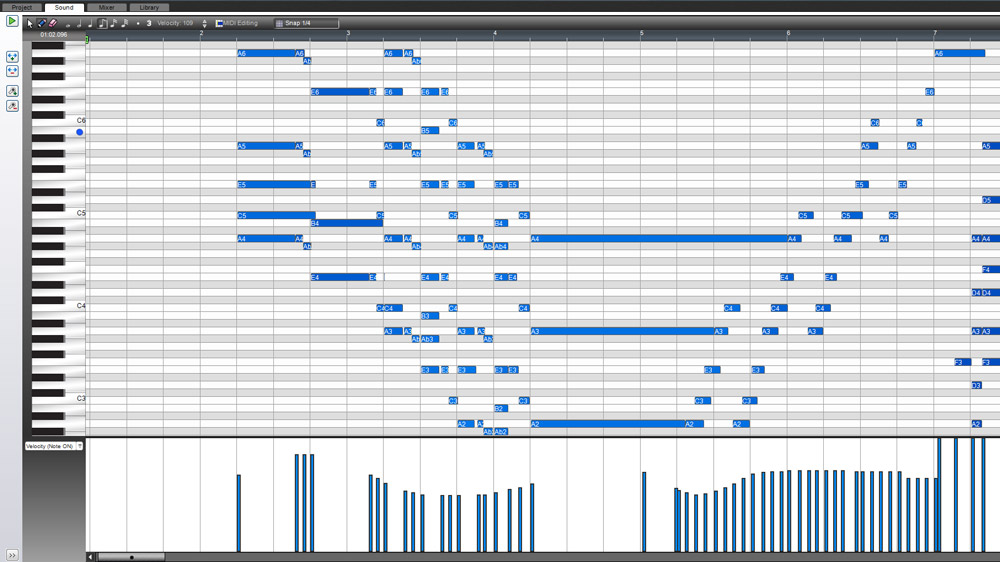
Might be a mess for a zoomed out edit, but for precise editing of fat-fingered notes, I like this idea immensely.
OK, I won't ask for notation - not directly at least.
But, how about labeling each note with midi note value like Mixcraft 6:
Might be a mess for a zoomed out edit, but for precise editing of fat-fingered notes, I like this idea immensely.
