


just tested it with Jamstix v3 demo and it seems to work fine.zeoy wrote:I've practically stopped recording/mixing etc. since a few years back, but as an old Tracktion user (T1-NFR, T2, T3) I was tempted to upgrade to T5.
Tried the Win 32-bit demo on my Windows XP DAW-only machine but it was crashing when I was trying to load Jamstix v1 or v2. Is it because Jamstix was written in Delphi? It's working fine on T3.
I have no immediate plans to upgrade Jamstix or my DAW OS so this was kind of a dealbreaker for me.
Other than that I have to congratulate Jules and the whole team for bringing our beloved T back to life, fixing long standing bugs and adding exciting new features. Keep up with the good work guys!
PS: cheers to all the oldtimers
T5 bugs + FRs
-
- KVRAF
- 3299 posts since 7 May, 2004 from Athens, Greece

If I go insane, please don't put your wires in my brain

-
- KVRian
- 526 posts since 7 May, 2007 from Angus,Scotland
I,m using Xp Home sp3 32bit/ E-mu 1212m PCIe / Intel core i3 2120@3.3Ghz /4G Ram(3.5)
Ati Radeon HD5400 series Graphics Card.
I have Jamstix 3.5 and have no problems with it and T5.
Ati Radeon HD5400 series Graphics Card.
I have Jamstix 3.5 and have no problems with it and T5.
Windows 10 / Intel core i7 2700k @ 3.50GHz / 16GB Ram / Emu 1212m Sound Card / Ati Radeon HD5400 Series G/Card
-
- KVRAF
- 3299 posts since 7 May, 2004 from Athens, Greece
terrynoakes wrote:I,m using Xp Home sp3 32bit/ E-mu 1212m PCIe / Intel core i3 2120@3.3Ghz /4G Ram(3.5)
Ati Radeon HD5400 series Graphics Card.
I have Jamstix 3.5 and have no problems with it and T5.
Thanks. Although I'm still with the previous version of Jamstix it's good to know that the latest version works fine with T5.
If I go insane, please don't put your wires in my brain
-
- KVRist
- 35 posts since 23 Nov, 2011 from Ottawa, Ontario, Canada
Interesting idea...rockstar_not wrote:FR:
OK, I won't ask for notation - not directly at least.
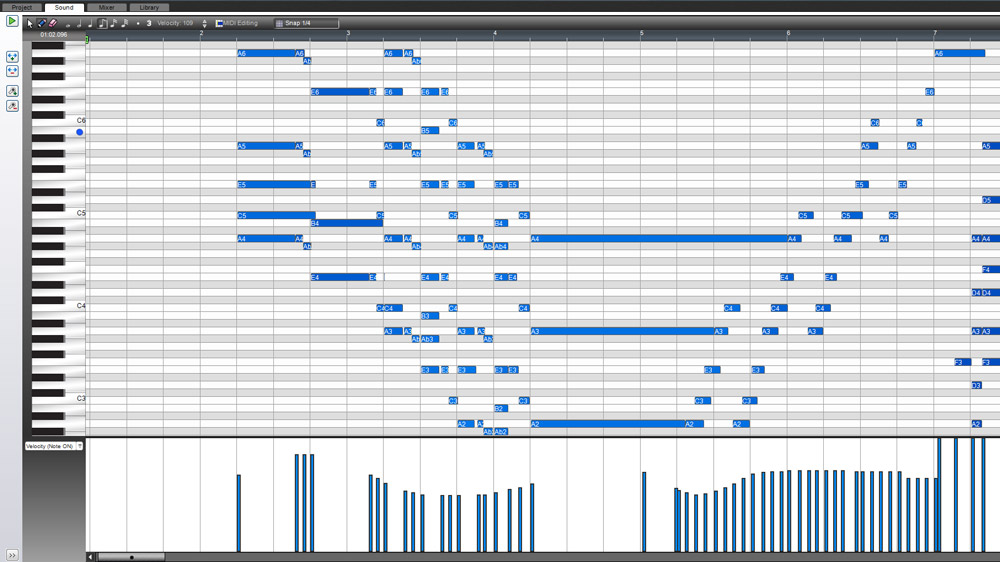
But, how about labeling each note with midi note value like Mixcraft 6:
Might be a mess for a zoomed out edit, but for precise editing of fat-fingered notes, I like this idea immensely.
-

- KVRian
- 1325 posts since 26 Mar, 2004 from UK
I know plugin scanning is on the agenda for improvement, but I have a couple of VSTi which aren't recognised as such in T5 32 & x64 - New Sonic Arts Granite and Audio Damage Phosphor - both latest versions. I can drag them to a track fine but if I whack a midi clip on the track I get the little yellow warning about how the clip doesn't output to a midi track or instrument. Both VSTi work as expected in Live 9.1.
Can anyone confirm?
Can anyone confirm?
ABLETON LIVE 12 & PUSH3
Soundcloud: Nation of Korea vs Shitty Dog
Soundcloud: Nation of Korea vs Shitty Dog
-

- Beware the Quoth
- 35529 posts since 4 Sep, 2001 from R'lyeh Oceanic Amusement Park and Funfair
Ive just tested, and can confirm this happens with Granite (T5 x64/Granite 1.51 x64 / Win7).mcnelson wrote:I know plugin scanning is on the agenda for improvement, but I have a couple of VSTi which aren't recognised as such in T5 32 & x64 - New Sonic Arts Granite and Audio Damage Phosphor - both latest versions. I can drag them to a track fine but if I whack a midi clip on the track I get the little yellow warning about how the clip doesn't output to a midi track or instrument. Both VSTi work as expected in Live 9.1.
Can anyone confirm?
Curiously, I discovered it can be made to work, by inserting an empty rack filter in front of Granite. As soon as you do Granite will start outputting audio if its on an 'ungated' patch.
To get MIDI to register in Granite, though, you'll need to join the MIDI in to the MIDI out within the Rack..
More curiously still, if you delete the rack filter again, it keeps working, even the MIDI
An idiot on Set Theory:
"In some cases there is an object called red that contains everything that is red. In much the same way a pot is a plate."
"In some cases there is an object called red that contains everything that is red. In much the same way a pot is a plate."
-
- KVRian
- 1325 posts since 26 Mar, 2004 from UK
Good find, I can confirm the workaround for Granite - and inserting an empty rack (with midi in & out connected) also remedies Phosphor.whyterabbyt wrote:Ive just tested, and can confirm this happens with Granite (T5 x64/Granite 1.51 x64 / Win7).mcnelson wrote:I know plugin scanning is on the agenda for improvement, but I have a couple of VSTi which aren't recognised as such in T5 32 & x64 - New Sonic Arts Granite and Audio Damage Phosphor - both latest versions. I can drag them to a track fine but if I whack a midi clip on the track I get the little yellow warning about how the clip doesn't output to a midi track or instrument. Both VSTi work as expected in Live 9.1.
Can anyone confirm?
Curiously, I discovered it can be made to work, by inserting an empty rack filter in front of Granite. As soon as you do Granite will start outputting audio if its on an 'ungated' patch.
To get MIDI to register in Granite, though, you'll need to join the MIDI in to the MIDI out within the Rack..
More curiously still, if you delete the rack filter again, it keeps working, even the MIDI
Thanks Whyterabbyt.
ABLETON LIVE 12 & PUSH3
Soundcloud: Nation of Korea vs Shitty Dog
Soundcloud: Nation of Korea vs Shitty Dog
-

- KVRAF
- 8705 posts since 9 Jan, 2004 from leroyaumeuni
FR:
Allow a temporally grid view (through a shortcut) which lines up the level meters of all the tracks and makes every filter the same size.
This would be a fast way to get a good overview of all filters for mixing tasks such as leveling multiple tracks.
Also, you should be able to mark tracks, as being a group track, for instance, so that a toggle can be used to display a certain type of track only, like only group tracks, only send tracks, only audio tracks. I know you can colour tracks, but that's really not quite the same.
Allow a temporally grid view (through a shortcut) which lines up the level meters of all the tracks and makes every filter the same size.
This would be a fast way to get a good overview of all filters for mixing tasks such as leveling multiple tracks.
Also, you should be able to mark tracks, as being a group track, for instance, so that a toggle can be used to display a certain type of track only, like only group tracks, only send tracks, only audio tracks. I know you can colour tracks, but that's really not quite the same.
My other host is Bruce Forsyth
-

- KVRAF
- 3462 posts since 17 Sep, 2006 from Fredericksburg, VA USA
Reverse not working with .ogg file type.
D Scarlatti, Dell XPS8700 i7/8gb mem/1tb hd/Steiny UR22/Presonus ER5s/Nektar LX61 kbd ctrlr/Win 10 Pro/S1 4.6/ my music here: https://www.magix.info/us/profile/my-profile/media/
-
- KVRist
- 131 posts since 7 Sep, 2004 from SF Bay Area
And, since we're spitballing here, how about if they're directly combinable too? Suppose you have a loop/pseudoloop track containing 6 takes that you did on a Monday, as well as a similar track with 3 takes that you did on the following Wednesday. It would be great to be able to drag-and-drop one track onto the other and end up with a single track containing all 9 takes, which you could then swipe-comp as usual.ceasless wrote:I also really like this idea of the 'psudeoloop'. The comping tracks should be freely importable/exportable.
Win10 Pro 64, Clevo P750DM3, i7-7700, 32GB, nVidia GTX1060, 500GB/500GB/1TB SSD, PreSonus Quantum 2 Thunderbolt, Waveform 10
-
bobmartinmusic bobmartinmusic https://www.kvraudio.com/forum/memberlist.php?mode=viewprofile&u=169078
- KVRist
- 212 posts since 26 Dec, 2007 from UK
Render Track “pass through filter” Inactive.
It looks like this feature isn’t working, as effects are getting included with a render.
I wonder if it would be better for it to default to the off position anyway.
If a simple butt join has been made and I want to combine them into a single audio clip, when the 2 pieces are selected could there not be a simple “glue in place” option in the properties box?
It looks like this feature isn’t working, as effects are getting included with a render.
I wonder if it would be better for it to default to the off position anyway.
If a simple butt join has been made and I want to combine them into a single audio clip, when the 2 pieces are selected could there not be a simple “glue in place” option in the properties box?
-
- KVRer
- 4 posts since 12 Feb, 2014
This happens to me too.fedexnman wrote:Bugs 2 things .
EZdrummer , dragging midi clip from EZ to the edit does not not fill the Bar , you have to drag the clip arrow to the right to fill the Bar still ...
Also, when I copied a one bar midi clip I did myself a number of times, some of the clips ended up with an added beat, making it longer and not aligning with the bars.
This, however, hasn't happened in the last few days.

-
- KVRist
- 131 posts since 7 Sep, 2004 from SF Bay Area
Not sure that is a T5 bug. I think that has to do with how EzD supplies its loops. They don't all fill out the measures IME.TonySwe wrote:This happens to me too.fedexnman wrote:Bugs 2 things .
EZdrummer , dragging midi clip from EZ to the edit does not not fill the Bar , you have to drag the clip arrow to the right to fill the Bar still ...
Also, when I copied a one bar midi clip I did myself a number of times, some of the clips ended up with an added beat, making it longer and not aligning with the bars.
This, however, hasn't happened in the last few days.
Win10 Pro 64, Clevo P750DM3, i7-7700, 32GB, nVidia GTX1060, 500GB/500GB/1TB SSD, PreSonus Quantum 2 Thunderbolt, Waveform 10
-
bobmartinmusic bobmartinmusic https://www.kvraudio.com/forum/memberlist.php?mode=viewprofile&u=169078
- KVRist
- 212 posts since 26 Dec, 2007 from UK
Here’s a clip with 16 Hi Hat hits falling short of the bar. It’s not EDZ, it works fine in Reaper, where the MIDI also shows up as diamonds, still can’t see/find the MIDI in T5.. 
You do not have the required permissions to view the files attached to this post.
-
bobmartinmusic bobmartinmusic https://www.kvraudio.com/forum/memberlist.php?mode=viewprofile&u=169078
- KVRist
- 212 posts since 26 Dec, 2007 from UK
The same clip In Reaper..
You do not have the required permissions to view the files attached to this post.