

Thanks Andrew, I sent an email through the 2CAudio contact us link.Galbanum wrote:sure... send me an emailtonkatodd wrote:Ok I brought this the other day and love it but now I wish I brought the Architecture Volume 01 KS with it. Is there anyway to buy it separately at the special pricing?

2CAudio Kaleidoscope | It's A Trip | Latest Update 1.1
-
- KVRist
- 305 posts since 25 Jun, 2010
-
- KVRist
- 32 posts since 31 Jan, 2015
What I'd like to see in a video is someone going over sound design - perhaps starting with a preset and explaining (in brief) all the things that can be done to edit it. Then moving on to a look at the 2 ways you mentioned for building it into a composition and doing that for a short track.Galbanum wrote:Banquet wrote:Awesome! Looking forward to the tutorial vids showing how you do itGalbanum wrote: again one KS into one B2. (it can create heaven and hell...)
Videos coming yes.
But in this case everything you needed to know was shown in the screen shot. It was literally ONE KS instance into one B2 instance. The KS instance used a factory preset. The B2 instance used a preset that is in the Creativity Expansion.
I noticed yesterday how much you can change the sound by changing the timing on both input and output. However, if the pattern is (say) 9 bars are you suppose to change the timing to make sure it gets across the image map in 9 bars (to avoid it stopping before the end and not merging into the next bit smoothly (perhaps you could crossfade to get around that) or can you change the timings to whatever you want it would work ok? (i.e., really slow it up a a lot) Little things like that I'm not sure about and some tutorial vids would be a great help.
-
 Sampleconstruct Sampleconstruct https://www.kvraudio.com/forum/memberlist.php?mode=viewprofile&u=191286
 - KVRAF
- 16750 posts since 12 Oct, 2008 from Here and there
Banquet wrote: I noticed yesterday how much you can change the sound by changing the timing on both input and output. However, if the pattern is (say) 9 bars are you suppose to change the timing to make sure it gets across the image map in 9 bars (to avoid it stopping before the end and not merging into the next bit smoothly (perhaps you could crossfade to get around that) or can you change the timings to whatever you want it would work ok? (i.e., really slow it up a a lot) Little things like that I'm not sure about and some tutorial vids would be a great help.
I often prefer to work in time/frequency mode rather than working with bars and measures, especially if the texture I am producing does not have a tempo/time-signature. The you just enter seconds or Hertz numbers numerically which also works much faster than opening the bar menue, selecting two numbers and closing it again.
Tip: also try using very fast hertz rates, so that the loop speed gets into the audible range like a fast LFO and becomes part of the sound, which is great for strange ring-modulation-like effects.
[insist]I still believe we should have backward/forward looping as an option, in many cases I find the looping back to the beginning of the image too obvious.[/insist]

-
- KVRist
- 305 posts since 25 Jun, 2010
Yes I would like to have a forward/backward feature as well.Sampleconstruct wrote: [insist]I still believe we should have backward/forward looping as an option, in many cases I find the looping back to the beginning of the image too obvious.[/insist]
+1
-
- KVRian
- 911 posts since 10 Dec, 2013
Any plans for tagging functionality for the browser? Currently finding it quite difficult to narrow down on exactly what I'm looking for in an image, especially with the millionmillion different options available with Architecture V1 (obviously over time I'll start to get a feel for it but it's certainly quite daunting at first).
Tags would sort of serve as an enhanced 'favourites' marker, as by filtering just for tagged images/tunings you'd already be narrowed down to ones you liked enough to tag to start with. Not so applicable to the wild ambient and noise ones, but I find some of the more basic envelopes I keep trying to track down when I'm trying to use KS in a more conventional/predictable scenario.
Tags would sort of serve as an enhanced 'favourites' marker, as by filtering just for tagged images/tunings you'd already be narrowed down to ones you liked enough to tag to start with. Not so applicable to the wild ambient and noise ones, but I find some of the more basic envelopes I keep trying to track down when I'm trying to use KS in a more conventional/predictable scenario.
-
- KVRist
- 100 posts since 13 May, 2004
A little star system for tagging would hopefully not be too difficult, though of course it would take up added space in the browser. I agree that it's a really good idea with KS having so many possibilities!
-

- KVRAF
- Topic Starter
- 2621 posts since 12 Sep, 2008
OK. It's not hard to do.tonkatodd wrote:Yes I would like to have a forward/backward feature as well.Sampleconstruct wrote: [insist]I still believe we should have backward/forward looping as an option, in many cases I find the looping back to the beginning of the image too obvious.[/insist]
+1
Denis wanted to do this already, but I overruled it. I think it is actually less interesting than it seems. Music and sound in general almost never does something and does the same thing exactly in reverse. Time generally flows in one direction. So while this seems fun, it very quickly gets boring and unlikely to be used.
If seamlessly tiling random images that don't tile is the goal there are actually better ways to do this IMHO, and we will explore those also...
But, it's simple to do, so I suppose we can add this... maybe it has some uses...
Also I should note: I've generally been fairly obsessive about making images tile perfectly. This actually does NOT need to be the case always. Musical and sound-design "events" are often of a "one-hit" nature in music production and sound-design. For such uses, there is absolutely no reason why the image has to tile. The entire image could be considered a single "single-hit event".
Or more advanced: one of the image could be using something that tiles and repeats a few times to provide faster texture etc, and the other image could be a "single-hit" kind of thing. Then you would want to render the length of the single hit period.
This has application mostly for "genitive" content creation. For uses as an FX applied to musical signals, then yes, perhaps tiling is the more desirable behavior. But even then images with discrete rhythmic pulses in them could be said to not tile in a perfectly continuous manner...
-
 secretkillerofnames secretkillerofnames https://www.kvraudio.com/forum/memberlist.php?mode=viewprofile&u=283916
 - KVRian
- 598 posts since 9 Jul, 2012
I'm presuming you are not having the same problem i'm having with Audio Hijack. When I try to move any of the knobs or sliders the plugin window gets dragged along as well and it's nearly impossible to control the values. Where the values can be entered in manually - that is possible - otherwise it really isn't very suitable.TwoToneshuzz wrote:@ Sound Authour
I'm actually using it in an external host called Audio Hijack pro where I can hijack the audio from my Daw and then either record it , it has the additional functionality that I can setup effects chains before recording. This seems to give my system an added boost so gone are all the crackles and sync issues..
So far this happens only with B2 and Kaleidoscope - so presume it is something unique about their GUIs.
-
- KVRAF
- 1548 posts since 12 Jan, 2010 from Copenhagen
I've just double checked I'm Hijacking audio output from a Host called Numerology 4 Pro version 4.1 build 147.5 I'm using a recently updated version of Audio Hijack Pro 2.11.4, Kaleidoscope version 1.1.0 [A37a]AVX, My hardware is a iMac mid 2011 3.1 Ghz i5 processor with 12 Gb ram.. My OS is Yosemite 10.10.2 and my toothpaste is ecologically friendly.secretkillerofnames wrote:I'm presuming you are not having the same problem i'm having with Audio Hijack. When I try to move any of the knobs or sliders the plugin window gets dragged along as well and it's nearly impossible to control the values. Where the values can be entered in manually - that is possible - otherwise it really isn't very suitable.TwoToneshuzz wrote:@ Sound Authour
I'm actually using it in an external host called Audio Hijack pro where I can hijack the audio from my Daw and then either record it , it has the additional functionality that I can setup effects chains before recording. This seems to give my system an added boost so gone are all the crackles and sync issues..
So far this happens only with B2 and Kaleidoscope - so presume it is something unique about their GUIs.
The Gui of Kaleidoscope and B2 work as normal. On a side note if I want synced audio I have input the BPM manually on the timing pane in Kaleidoscope as Audio Hijack doesn't seem to have an input for sync data. just to the right of the period window, there is an down arrow when clícked on it allows you to set the Kaleidoscope to internal sync which I enable for using it with Audio Hijack Pro.
waves break, but somehow it all makes sense.
-
- KVRAF
- Topic Starter
- 2621 posts since 12 Sep, 2008
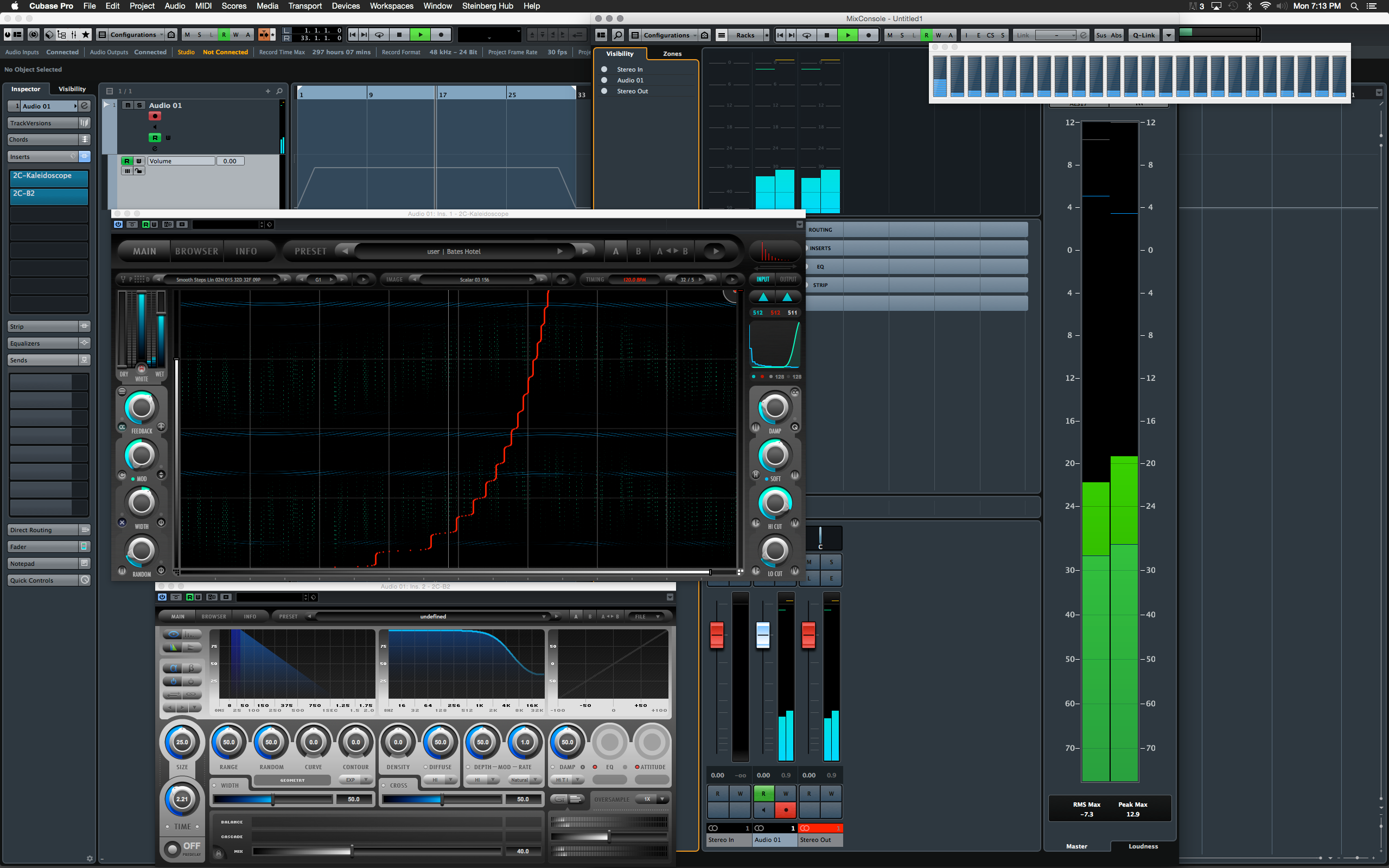
Anyone have to score an Alfred Hitchcock film??
https://soundcloud.com/2caudio/ks-bates-hotel
http://www.2caudio.com/sitecontent/prod ... _Hotel.png
https://soundcloud.com/2caudio/ks-bates-hotel
http://www.2caudio.com/sitecontent/prod ... _Hotel.png
Last edited by Andrew Souter on Tue Feb 03, 2015 12:33 am, edited 1 time in total.
-
Sampleconstruct Sampleconstruct https://www.kvraudio.com/forum/memberlist.php?mode=viewprofile&u=191286
- KVRAF
- 16750 posts since 12 Oct, 2008 from Here and there
-
Sampleconstruct Sampleconstruct https://www.kvraudio.com/forum/memberlist.php?mode=viewprofile&u=191286
- KVRAF
- 16750 posts since 12 Oct, 2008 from Here and there
I can see some activity on your first core, what went wrong?Galbanum wrote:Anyone have to score a Alfred Hitchcock film??
http://www.2caudio.com/sitecontent/prod ... _Hotel.png

-
- KVRAF
- Topic Starter
- 2621 posts since 12 Sep, 2008
That is likely from B2...
B2 is not multi-threaded at the moment.
note however that this preset is using 511 active "2-string" Resonators, with double dynamic mod.... this is about as CPU intensive as possible in KS. (Edit: not "about", it IS as CPU intensive as possible in KS -- unless you were to start turning on Oversampling, which we do NOT recommend for real-time.)
So, things now start to become quite reasonable for how much processing is actually happening...
consider: most FDN reverbs our there use about 16 comb delays/filters.
This preset is using 2048 of them. (ok, fine 511*2*2 = 2044, you caught me... ) Each with it's own independent damping filter... Look at the CPU meter. Pretty insane now actually...
B2 is not multi-threaded at the moment.
note however that this preset is using 511 active "2-string" Resonators, with double dynamic mod.... this is about as CPU intensive as possible in KS. (Edit: not "about", it IS as CPU intensive as possible in KS -- unless you were to start turning on Oversampling, which we do NOT recommend for real-time.)
So, things now start to become quite reasonable for how much processing is actually happening...
consider: most FDN reverbs our there use about 16 comb delays/filters.
This preset is using 2048 of them. (ok, fine 511*2*2 = 2044, you caught me...
) Each with it's own independent damping filter... Look at the CPU meter. Pretty insane now actually...
Last edited by Andrew Souter on Tue Feb 03, 2015 12:44 am, edited 2 times in total.
-
Sampleconstruct Sampleconstruct https://www.kvraudio.com/forum/memberlist.php?mode=viewprofile&u=191286
- KVRAF
- 16750 posts since 12 Oct, 2008 from Here and there
Grrmmmppffff...Galbanum wrote:That is likely from B2...
B2 is not multi-threaded at the moment.
-
- KVRAF
- 1548 posts since 12 Jan, 2010 from Copenhagen
After giving all those personal details about my setup I thought I might add the toothpaste parametre because you never know with computers they can be easily jinxed, remember the SCSI problems of yesteryear?Sampleconstruct wrote:LOLZ -TwoToneshuzz wrote:... and my toothpaste is ecologically friendly.

Actually there was an article in the news awhile back about how bad certain toothpastes are for the environment, so there were a few very expensive toothpastes that were ecologically friendly and one budget brand that made the grade, guess which one I use!
waves break, but somehow it all makes sense.