

I usedan oscilloscope and analyzer to learn about sound before. A bit of a pain to set up, plus many windows floating. This synth has it built in.
If syntorial would use this, I'd be in heaven




Wonder if there are many sub-menus?Timman wrote:Nice but...why do they have to put those angled screenshoots? I want to see the actual interface, not tilt my head trying to figure out what it is.
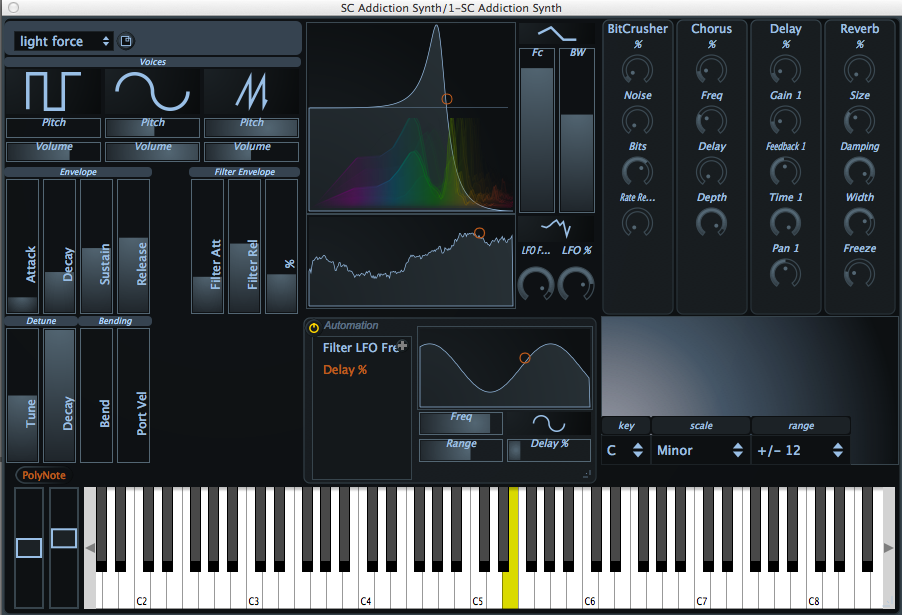
Massive, Razor, and Serum are some others. It's one of my favorite workflow features as well.urlwolf wrote:A great way to represent modulation is what Diversion does: draws a cricle around the knob that is being modulated.

Yes. And very simple. When one learns the principles of something, there must not be anything which could disturb the mind... and also in the experiments there must not be anything which could introduce a confusion. For example knobs which are of no use in the learning period.mike the mental wrote:in my opinion its better to learn synthesis on a more traditional GUI


+1 CharlatanBlackWinny wrote:Yes. And very simple. When one learns the principles of something, there must not be anything which could disturb the mind... and also in the experiments there must not be anything which could introduce a confusion. For example knobs which are of no use in the learning period.mike the mental wrote:in my opinion its better to learn synthesis on a more traditional GUI
There are many, many, many freewares which are very simple and excellent to learn the subtractive synthesis (which is always the first to learn, because 90% of the essential which will be yet available in the other synthesis... is learned in this one).
For the synthesis itself:That's all. And all that being shown in the most traditional way because the purpose is to learn. And some features are here cited as optional because they can be learned after the principles, they don't take part to the main things to imperatively know as early as the beginning.
- 2 VCO having 3 or 4 of the classical waveforms (sorted by importance: saw, square, triangle, sine)
- 1 LFO
- 1 VCF LP/(optionally HP)
- 1 or 2 ADSR envelopes
- 1 VCA
- Optional: 1 noise source
- Optional: 1 PWM feature
- Optional: 1 RM feature
And for the learning of the main effects (these effects being embedded or added by another freeware, and anyway they will be learned AFTER the essential principles of the synthesis itself):Some freewares synth which are very simple but of high quality and therefore all match perfectly these criteria to learn the synthesis:
- A delay
- A reverb
- An EQ
- A chorus
- A phaser
- A flanger
At the output of the synth I would put a very simple analyzer which shows the look of the signal along the experiments. Something in the kind of
- Charlatan
- Logana
- MinimogueVA
- Phutura
- Square I
- TAL-BassLine (the free edition)
- TAL-Elek7ro
- TAL-U-No-62 (the free edition)
- Twin Bass
- Signal Analyzer from RS-Met
And to learn the modulations by a matrix (a common variation on the presentation, the synthesis itself being exactly the same) here are other excellent very simple freeware subtractive synths presenting the modulations by a matrix, but I would recommend to progress with them AFTER having learned the principles with those above to not be disturbed):And about the learning of the additional effect, simply the installation of the Melda Freeware Pack. It contains all the traditional effects, very simple to use, and each effect contains the graphical curve which allows to learn what makes the effect on the signal.
- Free Alpha (for example)
It's just need to choose only one synth among these above, at your feeling concerning its look, and here you go to learn the synthesis!
Why suggest synths having complex GUI and lots of features having no use and being disturbing just by their presence... when it is to learn? The guy who learns will have later all the time and ability to choose more complex synths.
And all that costs... not a cent!
Submit: News, Plugins, Hosts & Apps | Advertise @ KVR | Developer Account | About KVR / Contact Us | Privacy Statement
© KVR Audio, Inc. 2000-2026
