


Hive preview (April 1 update)
-
- KVRist
- 69 posts since 20 Dec, 2014
Could somebody please upload a screenshot of the new Beta. I do not want to download it for now. Thanks

-
- KVRian
- 886 posts since 14 May, 2014
Well, it's an overall improvement in my bookUrs wrote:It's still work in progress. Basti tried some different settings during the past few days, and then just briefly fixed it over night.Shiek927 wrote:While the overall GUI is better, I turned the lighting straight to 'brighter'. I wonder how many people did the same.Chapelle wrote:+1Kaboom75 wrote:I think the knobs are a bit too dark.
IMO the GUI from the previous betas was better.
Thing is, the old UI was completely done in Photoshop while this UI is rendered from a 3D model. There'll be a few more iterations until it's set in stone.
 . It's less transparent looking, but I'm not complaining. It feels more finished like this.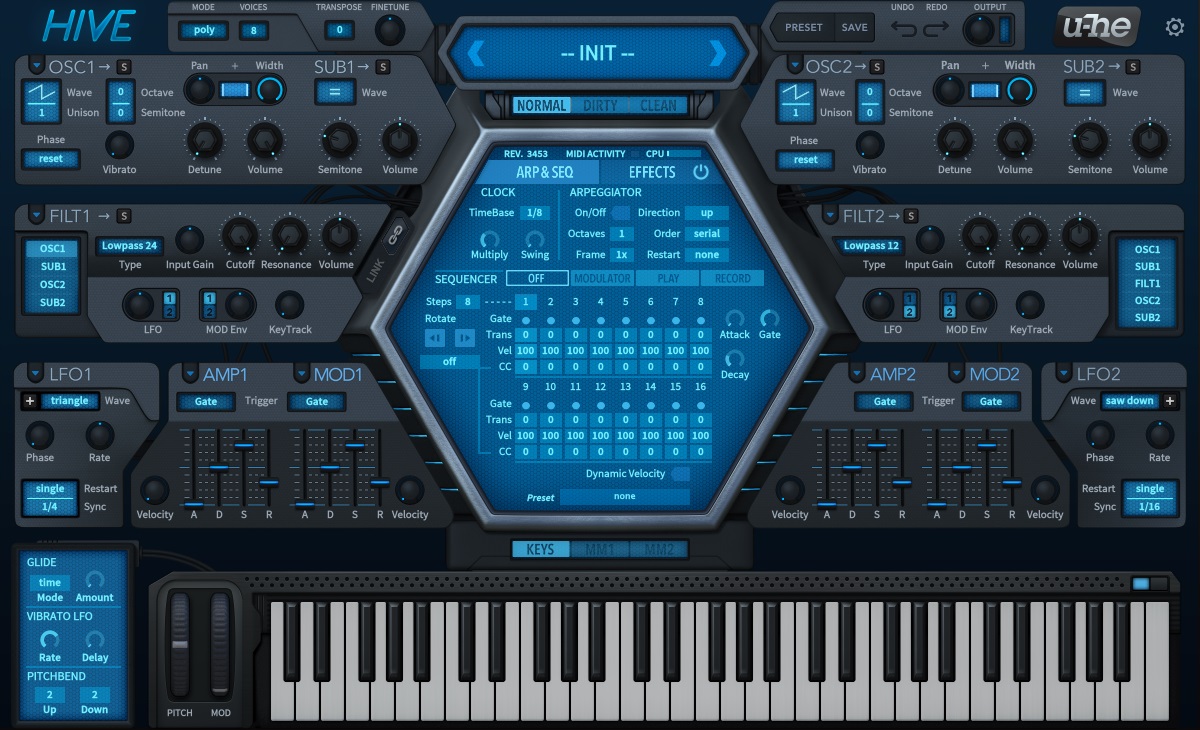
-
- KVRist
- 69 posts since 20 Dec, 2014
Thanks Chapelle !
I prefer the earlier look..Maybe I just got too used to it
I prefer the earlier look..Maybe I just got too used to it
-

- u-he
- Topic Starter
- 30209 posts since 8 Aug, 2002 from Berlin

-
- KVRist
- 253 posts since 13 Nov, 2013 from London
I prefer the old look as well. The central hexagon's shell looked a LOT nicer, especially the top left corner, and the edges of the panels had these very slight highlights to them as if they had an ultra-thin bevel. The subtle gradients in colour were pleasing too. I love the old look.
I must add that I'm only viewing this at work on my crap work monitor - anything you view looks terrible on it, so I'll wait til I get home to judge. But the new skin does seem to lack character and seems more sterile.
I must add that I'm only viewing this at work on my crap work monitor - anything you view looks terrible on it, so I'll wait til I get home to judge. But the new skin does seem to lack character and seems more sterile.
Last edited by tedlogan on Wed Apr 01, 2015 4:43 pm, edited 2 times in total.
-

- Banned
- 10196 posts since 12 Mar, 2012 from the Bavarian Alps to my feet and the globe around my head
And I expected an April fool's joke when I read about the update but Urs is so serious... 
Anyway, I found a new background for Hive:

Anyway, I found a new background for Hive:
Last edited by Tricky-Loops on Wed Apr 01, 2015 4:42 pm, edited 1 time in total.
-
- KVRist
- 69 posts since 20 Dec, 2014
What is mouse wheel Raster and when is the attack and decay on the sequencer used ?
-
 Touch The Universe Touch The Universe https://www.kvraudio.com/forum/memberlist.php?mode=viewprofile&u=190615
 - KVRAF
- 5842 posts since 2 Oct, 2008
Thank you very much urs for the generous extension  ! This really helps me out a lot. I have hundreds of presets I want to tweak better for a soundbank I want to compile and also finally finish up that old song from the osc
  Cheers
! This really helps me out a lot. I have hundreds of presets I want to tweak better for a soundbank I want to compile and also finally finish up that old song from the osc Cheers
Last edited by Touch The Universe on Wed Apr 01, 2015 6:58 pm, edited 1 time in total.
100 High Quality Soundsets: Omnisphere 2, Dune 3, Tone 2 Synths, Pigments, Uhe Synths, Halion, Spire, and others.
TTU Youtube
TTU Youtube
-
- KVRian
- 1278 posts since 28 Dec, 2007
From the manual:Nutrinoland wrote:What is mouse wheel Raster and when is the attack and decay on the sequencer used ?
Mouse Wheel Raster
If your mouse wheel is rastered (you can feel it clicking slightly as you roll the wheel),
set YES so thatl each little click increments / decrements in sensible value steps.
Sequencer
Attack
How slowly the the modulation source SeqGate fades in for each step.
Decay
How slowly the the modulation source SeqGate fades out for each step.
-
- KVRist
- 69 posts since 20 Dec, 2014
Thanks Chapelle.
The mouse wheel clicks increments even with this option off. My physical mouse wheel clicks in increments. Is this not how all mouse wheels are ?
The mouse wheel clicks increments even with this option off. My physical mouse wheel clicks in increments. Is this not how all mouse wheels are ?
-
- u-he
- Topic Starter
- 30209 posts since 8 Aug, 2002 from Berlin
Some mouse wheels have acceleration and inertia. Apple's mouse has a "wheel" based on a touch pad and it doesn't work well with the "rastered" setting. My rastered Logitech mouse doesn't work well if the setting is off.Nutrinoland wrote:Thanks Chapelle.
The mouse wheel clicks increments even with this option off. My physical mouse wheel clicks in increments. Is this not how all mouse wheels are ?
-
- KVRAF
- 12094 posts since 2 Dec, 2004 from North Wales
I like the new GUI.
I am sure it will get skinned anyway!
I am sure it will get skinned anyway!
X32 and 24C mixers, S88MK3, Live + PUSH 3, Osmose, RedShift 6, Pro3, S4, Tempera, Syntakt, Digitone, OP1-F, OPXY, TR-1000, Eurorack, TD27 Drums, Guitars, Basses, Amps and of course lots of pedals!