


I'm trying to get to the bottom of glitchy playback behavior of my multitracks in T7, which seems to have occurred after letting T7's plugin page scan and create all my HUNDREDS of VSTs.
Now I'm wondering if that bogs down the ram or cache somehow.
I'm on windows xp pro.
So, where are the stored pictures located?
Is it safe to delete them?
What do all you T gurus think about this observation.
Thanks, Michael at The Coffeehouse
T7 VST pics creating glitching? Where are they located? Can I delete them?
-
Mr Coffeehouse Mr Coffeehouse https://www.kvraudio.com/forum/memberlist.php?mode=viewprofile&u=40087
- KVRist
- 277 posts since 9 Sep, 2004 from Middletown, CT USA
-
- KVRAF
- 1790 posts since 30 Dec, 2012
The thumbnail images are only loaded when you show the new thumbnail plugin selector. They're also only loaded when actually shown (i.e the visible ones) so shouldn't take up any RAM or CPU when not in use. However, I did just find an issue that meant some images weren't being released properly so memory usage could grow if the list is scrolled over time. I'll get this fixed ASAP and you shouldn't notice any abnormal memory usage if you don't actually show the new plugin selector.
-

- KVRAF
- 37476 posts since 14 Sep, 2002 from In teh net
Would still be useful to know where they are
-
- KVRAF
- 1790 posts since 30 Dec, 2012
They're with the rest of Tracktion's settings files in "C:\Users\UserName\AppData\Roaming\Tracktion4\Plugin Images"
-
- KVRAF
- 37476 posts since 14 Sep, 2002 from In teh net
Sorry, on Mac?dRowAudio wrote:They're with the rest of Tracktion's settings files in "C:\Users\UserName\AppData\Roaming\Tracktion4\Plugin Images"
-
- KVRAF
- 1790 posts since 30 Dec, 2012
-
Mr Coffeehouse Mr Coffeehouse https://www.kvraudio.com/forum/memberlist.php?mode=viewprofile&u=40087
- KVRist
- Topic Starter
- 277 posts since 9 Sep, 2004 from Middletown, CT USA
dRowAudio wrote:The thumbnail images are only loaded when you show the new thumbnail plugin selector. They're also only loaded when actually shown (i.e the visible ones) so shouldn't take up any RAM or CPU when not in use. However, I did just find an issue that meant some images weren't being released properly so memory usage could grow if the list is scrolled over time. I'll get this fixed ASAP and you shouldn't notice any abnormal memory usage if you don't actually show the new plugin selector.
Thanks T guru. Good to know the bank of pics isn't likely the source of taxing the system. I'll keep at it to find my glitching problem source. Appreciate knowing where these pics are nonetheless.
Best, Michael at The Coffeehouse
-

- KVRian
- 1310 posts since 3 May, 2005 from Victoria, BC
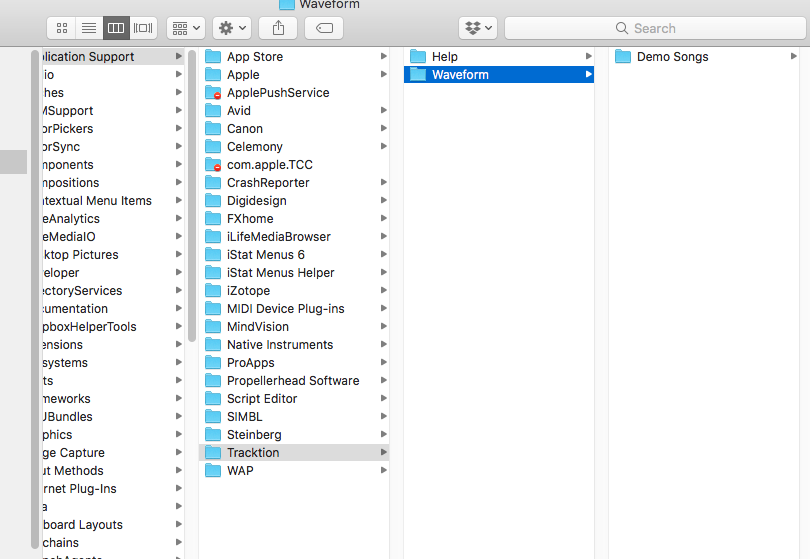
~/Library/Application Support/Tracktion/Waveform/Plugin Images
-
- KVRian
- 524 posts since 16 Mar, 2017
Asking just because I can't tell from your screenshot - you did catch that this is the Library folder inside your home directory, not the one inside the hard drive root, correct?
-
- KVRAF
- 2417 posts since 17 Jun, 2003
Yeah, that folder in the screenshot is
/Library/Application Support/Tracktion/Waveform/
not
~/Library/Application Support/Tracktion/Waveform/
/Library/Application Support/Tracktion/Waveform/
not
~/Library/Application Support/Tracktion/Waveform/
"my gosh it's a friggin hardware"