


This is in MTransformer.
When i insert a point in (PROPERTIES OF ALL POINTS).
It automatically selects that point in the (TRANSFORMATION) curve editor.
This started to happen when i upgraded to (maudioplugins_10_00_setup.exe)
-
 MeldaProduction MeldaProduction https://www.kvraudio.com/forum/memberlist.php?mode=viewprofile&u=176122
 - KVRAF
- 14339 posts since 15 Mar, 2008 from Czech republic
Hmmm, ok, that doesn't sound wrong... or does it???

-
MeldaProduction MeldaProduction https://www.kvraudio.com/forum/memberlist.php?mode=viewprofile&u=176122
- KVRAF
- 14339 posts since 15 Mar, 2008 from Czech republic
I don't seem to understand what it does to you, could you send me some screen video?
-
- KVRAF
- 10375 posts since 2 Sep, 2003 from Surrey, UK
Whatever you've got. I use Licecap: http://cockos.com/licecap/
Here's one I did, then uploaded to imgur.com:
 >>> http://i.imgur.com/nBwiNtS.gif
and another
 >>> http://i.imgur.com/leNbLS0.gif
Here's one I did, then uploaded to imgur.com:
>>> http://i.imgur.com/nBwiNtS.gifand another
>>> http://i.imgur.com/leNbLS0.gif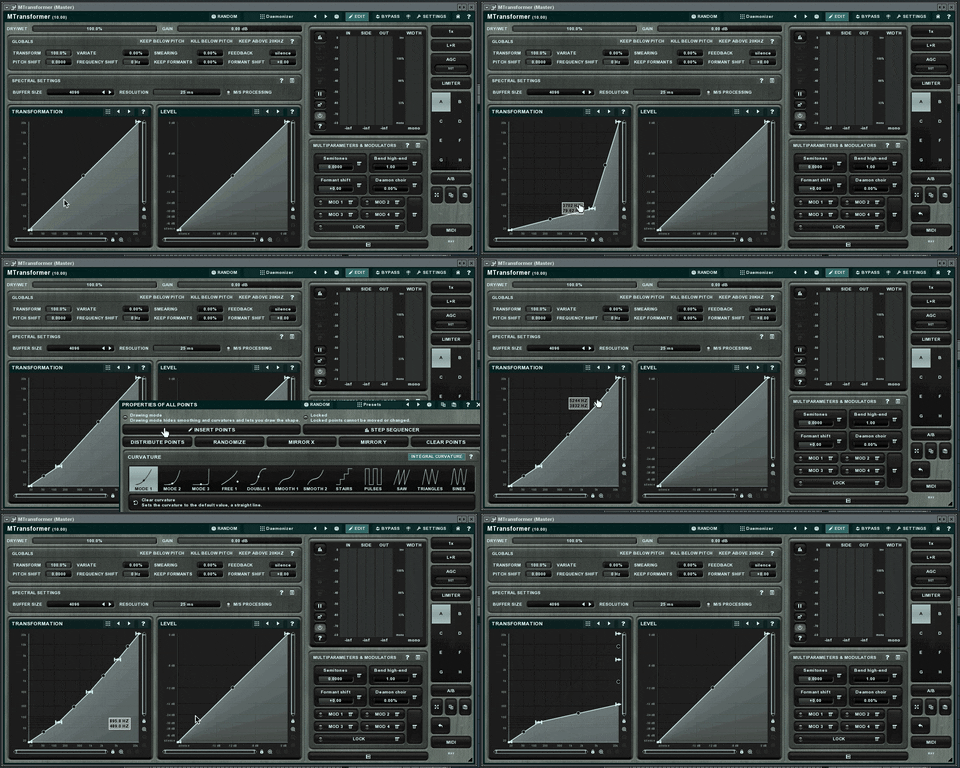
-
- KVRAF
- 10375 posts since 2 Sep, 2003 from Surrey, UK
I see a similar behaviour - the new point is inserted where the right mouse click occurred and the pop-up window is closed. That point is 'glued' to the mouse and moves with it (although it is not marked as 'selected') without holding the mouse button down so I can position it exactly where you want then do another click to release it.
Generally, I just use double-click to add a new point. Then click and drag to move it.
PS The button legend should be "Insert point" rather than "Insert points".
Generally, I just use double-click to add a new point. Then click and drag to move it.
PS The button legend should be "Insert point" rather than "Insert points".
-
MeldaProduction MeldaProduction https://www.kvraudio.com/forum/memberlist.php?mode=viewprofile&u=176122
- KVRAF
- 14339 posts since 15 Mar, 2008 from Czech republic
Aaaaha! Interesting!