


There seems to be inconsistent behavior when loading a script. Launch PnS and click on the drop down to the right of "Load script". You get a menu that includes "Factory Scripts" (or something like that). Click on that and you get a second level that has entries in a third level. Load something and you get a useable plug-in.
Now, instead click on the selector next to Redo/Undo in the topmost bar. This gets you to a "Factory Scripts" that gets you to a second level that gets you to third levels that have many more scripts than the first way. Furthermore, they bring up different UIs. Look at the two different Looper versions as a perfect example.
So, feature? Bug? This is most confusing.
Thanks.
Plug and Script Question
-
 Blue Cat Audio Blue Cat Audio https://www.kvraudio.com/forum/memberlist.php?mode=viewprofile&u=39981
 - KVRAF
- 6349 posts since 8 Sep, 2004 from Paris (France)
Hi,
These are actually two different things. In the script menu you just select a DSP script, whereas the other menu is the presets menu, that let you load presets, which include a script + parameter values (and sometimes a skin).
Hope this clarifies!
These are actually two different things. In the script menu you just select a DSP script, whereas the other menu is the presets menu, that let you load presets, which include a script + parameter values (and sometimes a skin).
Hope this clarifies!
-
- KVRAF
- Topic Starter
- 1759 posts since 11 Nov, 2009 from Northern CA
Aha, now it makes some sense.Blue Cat Audio wrote:Hope this clarifies!
Another question. I was looking at some of the factory UIs - I found an on/off switch in one case and a drop-down selector in another. I assumed that a skin was dictating these widgets appear on the UI. But I could not locate the .xml skins associated with these. Are there certain conditions that make the UI widget default to either a on/off switch or drop-down selector? For example, if the parameter enumeration is "on;off", does that get you a switch on the UI by default?
Yet another question. I was trying to determine if the constant PI were available in the math code. Where should I look to answer questions like this one?
Thanks.
-
Blue Cat Audio Blue Cat Audio https://www.kvraudio.com/forum/memberlist.php?mode=viewprofile&u=39981
- KVRAF
- 6349 posts since 8 Sep, 2004 from Paris (France)
If you write your own skin, then you can choose whatever widget you want for controls. With the default skin, the choice depends on the stepsCount defined for the parameter in the dsp:
if it is set to 2 then you will get an on/off switch. For up to 50 steps you will get a dropdown menu, and for more or -1 (continuous), only the knob is avalable.
The PI constant is defined in a utility header provided with the plug-in: see the library/Constants.hxx file in the Scripts directory.
Hope this helps!
Code: Select all
/// Number of steps for the corresponding input parameters.
  /// Default is -1 (continuous control - no steps).
  array<int>    inputParametersSteps={10,20};
The PI constant is defined in a utility header provided with the plug-in: see the library/Constants.hxx file in the Scripts directory.
Hope this helps!
-
- KVRAF
- Topic Starter
- 1759 posts since 11 Nov, 2009 from Northern CA
Cool! That was *exactly* the answer I was hoping to hear.Blue Cat Audio wrote:if it is set to 2 then you will get an on/off switch. For up to 50 steps you will get a dropdown menu, and for more or -1 (continuous), only the knob is avalable.

-
- KVRAF
- Topic Starter
- 1759 posts since 11 Nov, 2009 from Northern CA
This is not what I am experiencing. For two steps, yes, I get the on/off switch. However, for four steps, I continue to get a dial widget. Is there an additional criteria that must be met for a drop down?Blue Cat Audio wrote:If you write your own skin, then you can choose whatever widget you want for controls. With the default skin, the choice depends on the stepsCount defined for the parameter in the dsp:if it is set to 2 then you will get an on/off switch. For up to 50 steps you will get a dropdown menu, and for more or -1 (continuous), only the knob is avalable.Code: Select all
/// Number of steps for the corresponding input parameters.
  /// Default is -1 (continuous control - no steps).
  array<int>    inputParametersSteps={10,20};
Two other questions. First, I wanted to have two complementary dials that, going clockwise, respectively range from -100% to 100% and from 100% to -100%. Is there any way to make that work? P&S did not seem to like the min. value being higher than max.
Second, I had hoped to set the enumerations for one parameter dynamically based on the value of another parameter, but it seems the enumerations are read at script load and not referenced thereafter. Am I unable to do this or is there a trick I might be missing?
Thanks.
-
- KVRAF
- Topic Starter
- 1759 posts since 11 Nov, 2009 from Northern CA
Bump, plus one more question.
When a script loads, I would expect the controls (input parameters) to be set to their default value. Instead, they are all set to the minimum value. Should they not be set to the default? If not, should I initialize them to the default value in the initial processing section?
When a script loads, I would expect the controls (input parameters) to be set to their default value. Instead, they are all set to the minimum value. Should they not be set to the default? If not, should I initialize them to the default value in the initial processing section?
-
Blue Cat Audio Blue Cat Audio https://www.kvraudio.com/forum/memberlist.php?mode=viewprofile&u=39981
- KVRAF
- 6349 posts since 8 Sep, 2004 from Paris (France)
Hi,
please find below our answers and comments:
- even with steps you indeed get a dial widget, but if you click on the parameter name, you should see a dropdown menu.
- min value has indeed to be inferior to the max value... Maybe it can be modified in a future version to support reverse order. For the moment this will require you to write a custom skin and set the "reverse" attribute of the knob to true.
- enumeration values (and in general parameter information) indeed cannot be changed by another parameter value. If it is only a user interface thing, it can be done via scripting though, but it won't be visible in the parameters exposed to the host application. Usually if you need to change the possible values of a parameter based on another, yo may want to use two different parameters instead.
- Loading a script only loads the DSP code, so it cannot load the default values. Usually you will instead save a preset, that includes the DSP code, the parameter values, and maybe a custom skin.
Hope this helps!
please find below our answers and comments:
- even with steps you indeed get a dial widget, but if you click on the parameter name, you should see a dropdown menu.
- min value has indeed to be inferior to the max value... Maybe it can be modified in a future version to support reverse order. For the moment this will require you to write a custom skin and set the "reverse" attribute of the knob to true.
- enumeration values (and in general parameter information) indeed cannot be changed by another parameter value. If it is only a user interface thing, it can be done via scripting though, but it won't be visible in the parameters exposed to the host application. Usually if you need to change the possible values of a parameter based on another, yo may want to use two different parameters instead.
- Loading a script only loads the DSP code, so it cannot load the default values. Usually you will instead save a preset, that includes the DSP code, the parameter values, and maybe a custom skin.
Hope this helps!
-
- KVRAF
- Topic Starter
- 1759 posts since 11 Nov, 2009 from Northern CA
Next question. Everything in my script is working so it was time to try my hand at a skin. I started with the analog comp.xml as a model. I have mostly succeeded but there is one *major* issue.
There are several include elements in analog comp.xml (and the included files have nested includes). The only way I could quickly get this all to work was to copy DarkBlue-Theme and several other directories, and mapping.inc and several other files from ...Program Files/Common Files/VST3/.../Skins to the Skins directory under My Documents for user-supplied content.
I'm quite sure this is not the preferred way to do this. How can I code my include statements so that they would work on any machine that had Plug n Script installed. I certainly do not want to explicitly code the path "C:/Program Files/..." - that would work on my computer but it would fail on many others.
There are several include elements in analog comp.xml (and the included files have nested includes). The only way I could quickly get this all to work was to copy DarkBlue-Theme and several other directories, and mapping.inc and several other files from ...Program Files/Common Files/VST3/.../Skins to the Skins directory under My Documents for user-supplied content.
I'm quite sure this is not the preferred way to do this. How can I code my include statements so that they would work on any machine that had Plug n Script installed. I certainly do not want to explicitly code the path "C:/Program Files/..." - that would work on my computer but it would fail on many others.
-
- KVRAF
- Topic Starter
- 1759 posts since 11 Nov, 2009 from Northern CA
Bump, plus additional questions.
I have an input parameter used to specify number of samples, with a value range between 1 and 10000. I have defined the number of steps to be 10000. But I'm getting the knob readout displaying one digit to the right of the decimal point. This is not at all appropriate here. Is there something I could do to fix that? It seems to me that only integers should be showing given that the step count is specified.
I would also like this control to have an additional readout for msec. Is there an existing script/skin in the factory content that I could use to see how this might be done? [Edit:] Never mind - I figured this one out.
Running Plug'n'Script under Patchwork, if I double click a knob, I get a text entry box - just what I would like to see. Running under Cubase, the double click does nothing. Any suggestions on how to make this work? [Edit:] well, today it's working ... no clue as to why it did not seem to be yesterday. But no problem after all, it would appear.
If my script fails to load due to an intentional return of false in the init method, I still see the PnS message about "script load failure" (or however it's worded). Is there some way I can get my own message that's more informative to display in the message area and not make the user, who may not even know how to pull up the log file display, try to figure out the problem?
Finally, just an FYI. I have an input parameter, values -1, 0 and 1, defined with three steps and defined with enumeration text. When clicking, I get no dropdown menu. You said earlier that I should but it's not happening here, either under Cubase or Patchwork standalone.
Thanks.
I have an input parameter used to specify number of samples, with a value range between 1 and 10000. I have defined the number of steps to be 10000. But I'm getting the knob readout displaying one digit to the right of the decimal point. This is not at all appropriate here. Is there something I could do to fix that? It seems to me that only integers should be showing given that the step count is specified.
I would also like this control to have an additional readout for msec. Is there an existing script/skin in the factory content that I could use to see how this might be done? [Edit:] Never mind - I figured this one out.
Running Plug'n'Script under Patchwork, if I double click a knob, I get a text entry box - just what I would like to see. Running under Cubase, the double click does nothing. Any suggestions on how to make this work? [Edit:] well, today it's working ... no clue as to why it did not seem to be yesterday. But no problem after all, it would appear.
If my script fails to load due to an intentional return of false in the init method, I still see the PnS message about "script load failure" (or however it's worded). Is there some way I can get my own message that's more informative to display in the message area and not make the user, who may not even know how to pull up the log file display, try to figure out the problem?
Finally, just an FYI. I have an input parameter, values -1, 0 and 1, defined with three steps and defined with enumeration text. When clicking, I get no dropdown menu. You said earlier that I should but it's not happening here, either under Cubase or Patchwork standalone.
Thanks.
-
Blue Cat Audio Blue Cat Audio https://www.kvraudio.com/forum/memberlist.php?mode=viewprofile&u=39981
- KVRAF
- 6349 posts since 8 Sep, 2004 from Paris (France)
It is usually a better solution to copy the files for your own skin, as it is not guaranteed that full compatibility will be ensured in the future (we might change variable names etc.). If you really want to reference them, it is still possible using the following root path: "$PLUGIN_DATA_PATH$/Skins/"
-
Blue Cat Audio Blue Cat Audio https://www.kvraudio.com/forum/memberlist.php?mode=viewprofile&u=39981
- KVRAF
- 6349 posts since 8 Sep, 2004 from Paris (France)
This has indeed not been implemented in the generic skin. If you are building your own, you can however change this by adding the value_format=".0" to the custom parameter or to the PARAM_TEXT element.I'm getting the knob readout displaying one digit to the right of the decimal point
For the double click issue in Cubase, I am not sure what happened. Are you running a Mac or Windows PC?
For Script failure, it is indeed not possible at this stage to write messages outside of the error log, but you could maybe use an output parameter that contains an enum with possible messages and change its value in the initialize function?
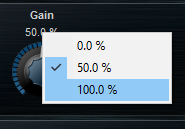
Are you clicking on the parameter value as shown below? Maybe you can share part of the script with us so that we can check it out?I have an input parameter, values -1, 0 and 1, defined with three steps and defined with enumeration text. When clicking, I get no dropdown menu.
-
- KVRAF
- Topic Starter
- 1759 posts since 11 Nov, 2009 from Northern CA
Hmmm, that just moves the problem back on level of includes. In other words, the first file I include has its own includes, and we'd end up with the same dilemma.Blue Cat Audio wrote:It is usually a better solution to copy the files for your own skin, as it is not guaranteed that full compatibility will be ensured in the future (we might change variable names etc.). If you really want to reference them, it is still possible using the following root path: "$PLUGIN_DATA_PATH$/Skins/"
If the Blue Cat factory content (include files) used that convention of specifying $PLUGIN_DATA_PATH$/Skins/, however, all would be good. Any chance you'd consider adapting that convention?
-
- KVRAF
- Topic Starter
- 1759 posts since 11 Nov, 2009 from Northern CA
Brilliant! That should do the trick.Blue Cat Audio wrote: If you are building your own, you can however change this by adding the value_format=".0" to the custom parameter or to the PARAM_TEXT element.
The behavior happens randomly. It might be due to switching between Cubase 8 and 8.5. I will investigate further and report back. To answer your question: Windows 7 64-bit using 64-bit VST 3 Blue Cat plug-ins.Blue Cat Audio wrote: For the double click issue in Cubase, I am not sure what happened. Are you running a Mac or Windows PC?
OK, then how about a feature request. Supply a string variable called something like initErrorMessage. Default it to blank, but if it has content upon exit to the init method, the use that rather than your own load-error message.Blue Cat Audio wrote: For Script failure, it is indeed not possible at this stage to write messages outside of the error log, but you could maybe use an output parameter that contains an enum with possible messages and change its value in the initialize function?
I replaced the knob with a drop-down box (almost all working), so this problem has become moot, at least for the moment.Blue Cat Audio wrote: Are you clicking on the parameter value as shown below? Maybe you can share part of the script with us so that we can check it out?
Thanks for all the responses.
-
- KVRAF
- Topic Starter
- 1759 posts since 11 Nov, 2009 from Northern CA
I have found a repeatable scenario. This is for Cubase 8.0 but I think the behavior is the same in 8.5 - I tested that only *very* briefly.Blue Cat Audio wrote: For the double click issue in Cubase, I am not sure what happened. Are you running a Mac or Windows PC?
Start a new Cubase project and include an instance of Plug'n'Script. Open any factory preset with knobs (I used both my own script and also one of the factory gate presets - same problems either way).
Double click on any knob and you get a text entry box as expected. Save the project and close it, leaving the PnS window open.
Open the project again. The PnS window should be visible. Double click on a knob and the nothing happens. Switch to a different preset. Now the double click works again (at least most of the time). There appears to be something about the restore-from-previous-state that disables the double click behavior.