Question on Mix controls and Key Track

Official support for: lennardigital.com
Locked New Topic
RELATED
PRODUCTS

Post

I am not sure I understand how they work. Intuitively I thought Mix A and B are basically the same as Main Volume, but split for the two layers so one can set the relative volume between the two and change the overall volume with the main volume control without changing the sound character that might result from a given balance between two very different layers. Correct me if I'm wrong so far :)
Do Mix A and B refer to the layer volumes before effects (i.e. unlike the Main Volume control?)
Be that as it may, when turning off all effects, they should behave the way I described, right?

Anyway, so here is what I don't understand: I load for instance the init patch (to keep things simple) and create a modulation of Mix A via Key Track, setting it to minus 10. When I now play a sustained key and slide the Mix A control from min to max, the volume decreases first and then increases again. Why is that? The most quiet control position changes with the key played.
However, when I set the modulation to plus 10, the behavior is different, in that case the volume seems to increase in a linear fashion for all keys.
Shouldn't it be like that for minus 10 as well? I mean, shouldn't a varying volume be output for different keys, rather than when changing the Mix level for the very same key?

I hope those are not embarrassing questions :oops:

Post

fluffy_little_something wrote:Do Mix A and B refer to the layer volumes before effects (i.e. unlike the Main Volume control?)
Be that as it may, when turning off all effects, they should behave the way I described, right?
Yes and yes.
fluffy_little_something wrote:Anyway, so here is what I don't understand: I load for instance the init patch (to keep things simple) and create a modulation of Mix A via Key Track, setting it to minus 10. When I now play a sustained key and slide the Mix A control from min to max, the volume decreases first and then increases again. Why is that? The most quiet control position changes with the key played.
However, when I set the modulation to plus 10, the behavior is different, in that case the volume seems to increase in a linear fashion for all keys.
Shouldn't it be like that for minus 10 as well? I mean, shouldn't a varying volume be output for different keys, rather than when changing the Mix level for the very same key?
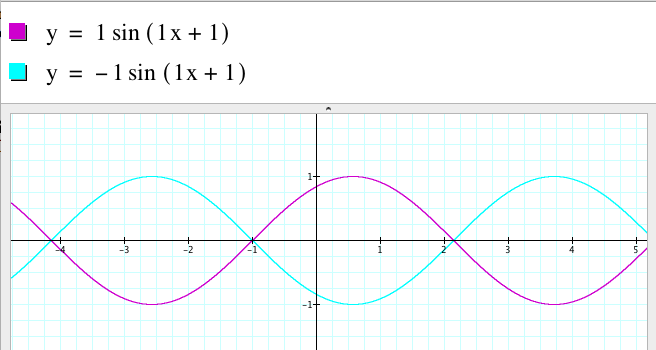
When you set a modulation value of -10 to Mix A, this means that you're adding a negative value to the Mix A slider. So say the keytrack value at a certain key is 0.5, then you're adding -5 to Mix A. When the Mix A slider is set to 0, the total Mix A value is -5. A negative volume simply inverts the waveform, so the volume is the same as when Mix A is 5. So when you slide Mix A up, you're sliding from -5 to 0 to +5. When the slider is halfway, the sound will vanish. Hope that explains it.
Image

Post

Thanks for the explanation, but no, frankly I do not understand it 8)

- When I use kb tracking to modulate the volume, what does the vaveform have to do with it? I am not modulating the phase or anything.
- Here is a little illustration of how I thought this whole kb business would and should work :hihi:

https://app.box.com/s/br3bnvijueum4b2pug9opp2jbpvgvosm

The purple line is how Sylenth works, right?

I just tried it on another synth. Since I can't bypass the filter, I set kb tracking for the cutoff frequency to 100% in order to achieve the same volume across the keyboard.
Then I set up my kd tracking for volume to minus 100%, and finally I turned the volume knob for random keys from min to max. The volume increase is always linear, never interrupted like on Sylenth.

Post

Your drawing is correct. The volume becomes negative, so the waveform is inverted:

Image

It has the exact same amplitude (volume) as the positive wave, so it sounds just as loud. That's what you're hearing.
Image

Post

OK, so we agree on how it works, But in my view the question remains whether or not that makes sense...
Does anyone else have an opinion on that?
How does it work on Dune 2 for instance? Can't test it as the demo expired long ago :P

Post

Lennard wrote:
fluffy_little_something wrote:Anyway, so here is what I don't understand: I load for instance the init patch (to keep things simple) and create a modulation of Mix A via Key Track, setting it to minus 10. When I now play a sustained key and slide the Mix A control from min to max, the volume decreases first and then increases again. Why is that? The most quiet control position changes with the key played.
However, when I set the modulation to plus 10, the behavior is different, in that case the volume seems to increase in a linear fashion for all keys.
Shouldn't it be like that for minus 10 as well? I mean, shouldn't a varying volume be output for different keys, rather than when changing the Mix level for the very same key?
When you set a modulation value of -10 to Mix A, this means that you're adding a negative value to the Mix A slider. So say the keytrack value at a certain key is 0.5, then you're adding -5 to Mix A. When the Mix A slider is set to 0, the total Mix A value is -5. A negative volume simply inverts the waveform, so the volume is the same as when Mix A is 5. So when you slide Mix A up, you're sliding from -5 to 0 to +5. When the slider is halfway, the sound will vanish. Hope that explains it.

Returning to this topic, I wonder if we were talking about the same thing, actually.
When I negatively modulate the volume via the key/note played, what I expect to hear is: the lower the note, the louder - and vice versa. When I use an extreme modulation amount like -20 (via 2 slots combined) there will be a note somewhere on the upper quarter of the keyboard where any higher notes become too quiet to hear, right? And as I increase or decrease the Mix slider, that threshold should move up or down the keyboard respectively, and in a linear fashion.
So, in the case of Sylenth1, which note is what I referred to as the hinge point in my little diagram? On Retrologue for instance one can set the hinge note freely. At that hinge note the normally horizontal volume distribution line tilts as soon as that kind of modulation is applied.

Post

The hinge point is central note A4. Keytrack ranges from 0 at A-1 to +10 at A9.

Care should be taken when modulating the Mix A and B parameters though, because they internally scale from 0 to +15. This is actually a leftover from an early version of Sylenth1 and kept this way to keep the presets compatible. It is displayed as 0 to 10 just because that's a more intuitive scale.

So for the Mix parameters, you should set Mix a to 6.667 (which is a real 10 internally), then you can modulate it via keytrack with the exact values. Or you can set Mix to 10 and modulate keytrack with +15 (in 2 mod dest slots).

Other parameters like Volume A/B are using the correct scale of 0 to 10, so modulation should be precise there.
Image

Post

Ah, I suppose that differing internal scaling explains some of the strange behavior. When I set the modulation to -10 and press A4 (the hinge note as you say) the slider position at which there is silence, is 3.3 rather than the expected (?) 5.

But I can't say that I've fully understood the whole keytracking thingy :ud: I will look for explanations on the Web, and should I find that there is nothing wrong with Sylenth1 after all, I might buy it for the second time. Is that even possible? Is there a discount for repeat buyers? :hihi: :roll:

Post

fluffy_little_something wrote:Ah, I suppose that differing internal scaling explains some of the strange behavior. When I set the modulation to -10 and press A4 (the hinge note as you say) the slider position at which there is silence, is 3.3 rather than the expected (?) 5.
That's correct. Because of the internal scale of the Mix parameter you get this:
If you set modulation to -15, you get the silence point at Mix A/B value 5.
If you set modulation to -10, you get the silence point at Mix A/B value 3.333.
Image

Post

fluffy_little_something wrote:But I can't say that I've fully understood the whole keytracking thingy :ud:
I did some more tests, set up the same modulation (key -> volume) on Hybrid 3 and Predator, and both react more or less the way that seems logical to me. I.e., there is no dead point on either volume control when turning that control from min to max.

So, unfortunately I continue to think that there is something wrong about the way that whole thing is implemented on Sylenth1...
Last edited by fluffy_little_something on Sat Oct 22, 2016 10:50 pm, edited 1 time in total.

Post

No, all modulation in Sylenth1 is additive. This means you add it to the knob value.

Keytrack modulation ranges from 0 at A-1 to +10 at A9 (so +5 at A4) . So if you take an Init preset, then modulate Volume A with Keytrack and set the Volume A1 knob to 0, then the volume will be 0 at A-1 and 10 at A9.

If you set Volume A to 10 and modulation to -10, then the volume will be 10 at A-1 and 0 at A9.

If you set Volume A to 5 and modulation to -10, then the volume will be -5 at A-1, 0 at A4 and +5 at A9. A volume of -5 is the same as +5, but inverted.
Image

Locked

Return to “LennarDigital”