


How do you or can you create multiple drum patterns a bar or two long (intro, verse, chorus, ect) and then string them together drum machine style to create a full drum track ?
Maybe similar to how EZDrummer takes one bar midi patterns and strings them together to create drum their tracks.
Thanks....
Sequencing MIDI Drum Patterns ?
-
- KVRist
- 105 posts since 20 Dec, 2014
-

- KVRAF
- 7412 posts since 8 Feb, 2003 from London, UK
How far have you got trying?
Open MuLab, select New (the Factory New template).
Delete the existing track and basic synth rack.
Up on the main bar, click the browser button if the browser isn't already showing, then set "What" to MuClips and "Where" to "Factory Library". You'll see a whole load of drum loops listed.
Drag one of the loops over to the track header area and you'll get a new track and rack created with the sequence in the composer.
You can keep dragging loops onto the same track or onto new tracks, either by dropping on the track header or dropping onto the composer, which lets you position them in time.
If you want to repeat a loop, stretch it's right-hand edge.
I did a small MuProject just playing with these presets: http://www.kvraudio.com/forum/viewtopic ... 9&t=480641
Open MuLab, select New (the Factory New template).
Delete the existing track and basic synth rack.
Up on the main bar, click the browser button if the browser isn't already showing, then set "What" to MuClips and "Where" to "Factory Library". You'll see a whole load of drum loops listed.
Drag one of the loops over to the track header area and you'll get a new track and rack created with the sequence in the composer.
You can keep dragging loops onto the same track or onto new tracks, either by dropping on the track header or dropping onto the composer, which lets you position them in time.
If you want to repeat a loop, stretch it's right-hand edge.
I did a small MuProject just playing with these presets: http://www.kvraudio.com/forum/viewtopic ... 9&t=480641
-

- KVRist
- 367 posts since 26 Feb, 2017 from Lituania,Vilnius

Orion, Bitwig, Tracktion, Mixbus 

Win 10, intel i7, ram 20 steinberg UR22mkII
Win 10, intel i7, ram 20 steinberg UR22mkII
-
- KVRist
- Topic Starter
- 105 posts since 20 Dec, 2014
pljones wrote:How far have you got trying?
Open MuLab, select New (the Factory New template).
Delete the existing track and basic synth rack.
Up on the main bar, click the browser button if the browser isn't already showing, then set "What" to MuClips and "Where" to "Factory Library". You'll see a whole load of drum loops listed.
Drag one of the loops over to the track header area and you'll get a new track and rack created with the sequence in the composer.
You can keep dragging loops onto the same track or onto new tracks, either by dropping on the track header or dropping onto the composer, which lets you position them in time.
If you want to repeat a loop, stretch it's right-hand edge.
I did a small MuProject just playing with these presets: http://www.kvraudio.com/forum/viewtopic ... 9&t=480641
Hi pljones, I think what you are referring to are audio loops, I was asking about MIDI patterns.
I'd like to write MIDI patterns a bar or so long, then string them together to create a MIDI drum track.
FLStudio has Pattern Blocks where you can string your patterns together.

And Hydrogen has a similar process where you write your MIDI patterns (bottom section) and then string them together (top section) to create a full drum track. Verse, bridge, chorus, ect...
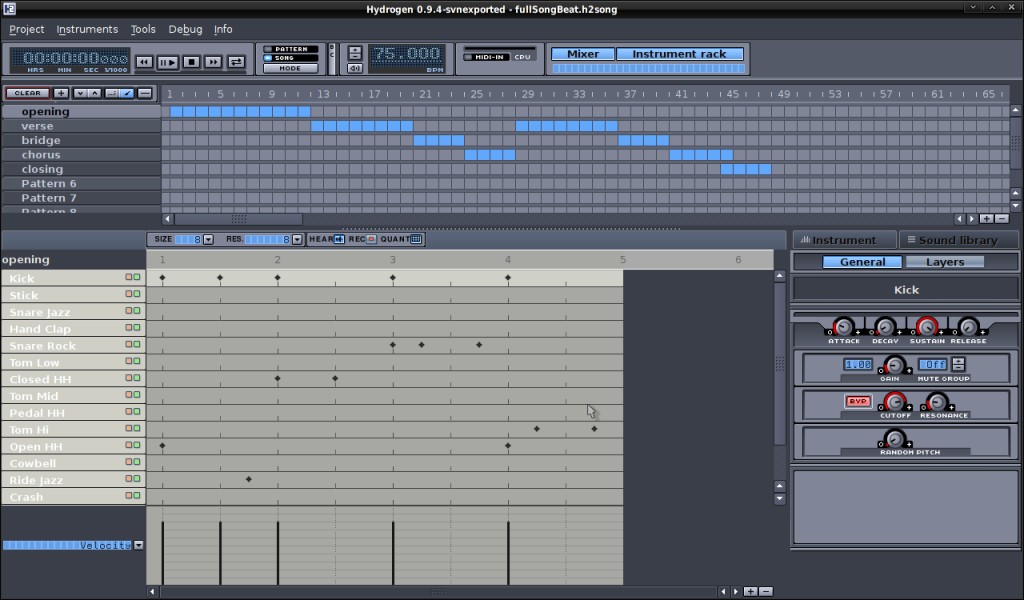
Can MULab do this or something similar ?
Thanks....
-
- KVRAF
- 7412 posts since 8 Feb, 2003 from London, UK
Have you actually tried what I said? There's no audio involved at all in the patterns. MuClips are event sequences plus the target instrument wrapped up to make them easy to use. You can set the track/rack and drag/drop MIDI files instead, just as easily.
-

- KVRAF
- 13863 posts since 24 Jun, 2008 from Europe
You can use sequence parts for that. See http://www.mutools.com/info/docs/mulab/composer.html
Sequence parts can reuse the same sequences = patterns in FL language.
Each MuLab project has a sequence pool, see the project browser.
What pljones wrote is almost the same, except that MuClips are stored in files and they include the sound. Sequences are the MIDI events only.
Sequence parts can reuse the same sequences = patterns in FL language.
Each MuLab project has a sequence pool, see the project browser.
What pljones wrote is almost the same, except that MuClips are stored in files and they include the sound. Sequences are the MIDI events only.
-
- KVRist
- Topic Starter
- 105 posts since 20 Dec, 2014
pljones wrote:Have you actually tried what I said? There's no audio involved at all in the patterns. MuClips are event sequences plus the target instrument wrapped up to make them easy to use. You can set the track/rack and drag/drop MIDI files instead, just as easily.
I see thank you. Yes I did try what you said, but the 'attached' audio gave me the impression that they were audio loops and not actual midi files.
-
- KVRist
- Topic Starter
- 105 posts since 20 Dec, 2014
mutools wrote:You can use sequence parts for that. See http://www.mutools.com/info/docs/mulab/composer.html
Sequence parts can reuse the same sequences = patterns in FL language.
Each MuLab project has a sequence pool, see the project browser.
What pljones wrote is almost the same, except that MuClips are stored in files and they include the sound. Sequences are the MIDI events only.
Thank you for clarifying that. So in MuLab sequences are similar to midi files.
I did a little experimenting and found I could write drum parts in the Sequence Editor, they then appear in the browser where I can rename them accordingly. From there after writing all the parts I can then drag them to the track.
Is this the correct way to compose midi drum tracks ?
-
- KVRAF
- 13863 posts since 24 Jun, 2008 from Europe
That's one way to do it yes. There are several ways. You can also drag-copy parts in the composer, and/or switch parts to play another sequence by dropping a sequence on a part or via the part property panel at the bottom left of the composer: Select a sequence or drop one. All these actions are related and can be combined. Choose the workflow you like most.