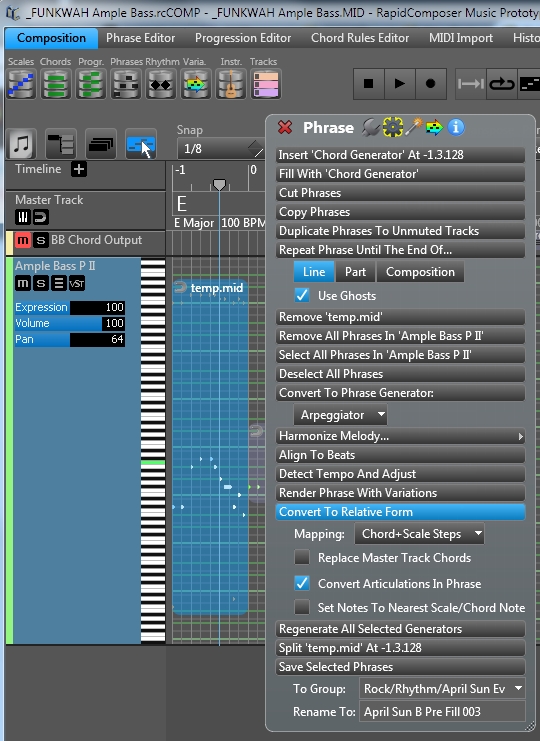
RapidComposer Beta now has a new added feature that allows you to convert a midi file with keyswitches into a Relative form Phrase with the keyswitches for the VSTi, this allows you to place the phrases over any key/scale/chord.
Trial Basses http://www.amplesound.net/en/download.asp#
Ample Bass Upright(Trial) v2.51 | Mac | Win
Ample Bass Precission(Trial) v2.51 | Mac | Win
The Ample Guitars will soon have the Riffer, so watch out.
Video Demo Mac/Win
https://www.dropbox.com/s/k7q8ikg7e3pgx ... s.mp4?dl=0 < Right click Open In New Tab
If it ask for Sign in click No Thanks Continue..at the bottom. Download if not playing clearly.
This is the Ample Bass Articulation Control file for RapidComposer Full (covers all the Ample Basses), place in Win/Mac Documents\RapidComposerV3\DB
EDIT:
Update Extra Basses
https://www.dropbox.com/s/ive32dtsemeao ... 1.zip?dl=1
EDIT:
Updated (correct StrMan C1 to C2 up 1 octave for RC)
Ample Guitars Controller Set
https://www.dropbox.com/s/5nxhzoiavl18j ... L.zip?dl=1
If it ask for Sign in click No Thanks Continue..at the bottom.
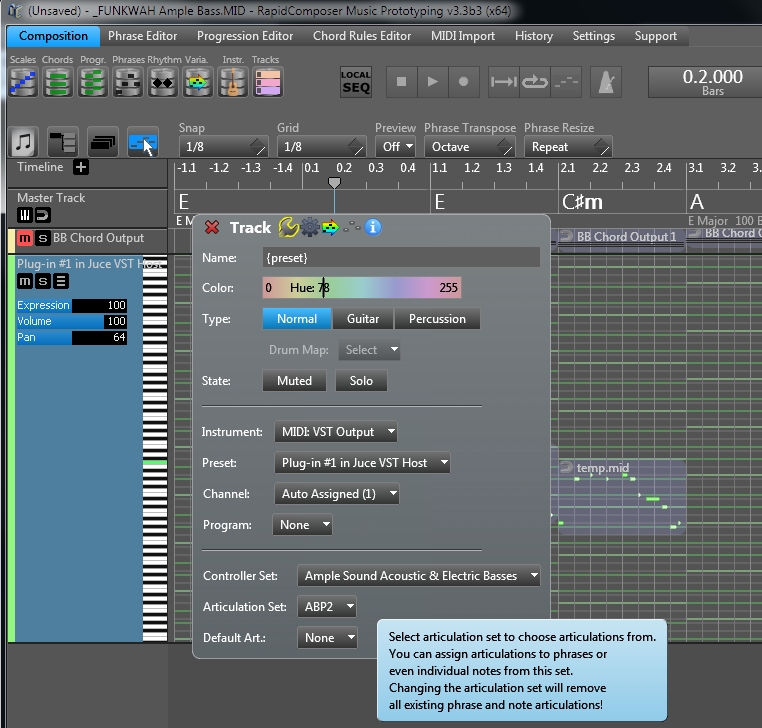
Set the track to Ample Bass Vsti
Set Controller Set to Ample Sound Electric & Acoustic Basses
Set Articulation Set to your Bass
Set the Midi Phrase with to: Convert To Relative Form > Convert Articulations In Phrase
Save to Phrase Library
If you don't have the Full RapidComposer version you can have two separate phrases, one with the keyswitches that stays as Absolute and another, the actual notes that are converted to Relative form.
**Remove the String keyswitches at the very top of the midi file, as they won't work because you are changing the Phrases across chords/keys/scales. Keep the keyswitches for the notes on the same notes across the chord track under the midi notes Phrases it belongs to.
If Ample implement Chord Track Riffer to work how RapidComposer works it'll be great !
More here Using Ample With A Chord Midi Track & This Is What You Need