


+1!pdxindy wrote:Also, it would also be useful if the Steps modulator had a mode where each note would make it step, like the modmappers increment in u-he synths. One of the most useful functions in any synth!
Your TOP 5 feature requests for Bitwig
-
- KVRist
- 229 posts since 1 Feb, 2013 from United States
-
- KVRist
- 151 posts since 11 Aug, 2016
I've tried them, full screen, device & inspector panel open, no browser.Enrize wrote:Have you compared side by side? Its exactly the same...re23071998 wrote:Still less spaces than version one.maki wrote:hm, since you can blend out most stuff in arrangement view ist plenty of space imo.re23071998 wrote:1. More space for arangement view

Bitwig 1.3.16 has 1541x686px arranger
Bitwig 2.1.1 has 1527x636px arranger
-
- KVRist
- 369 posts since 24 Mar, 2014
Taika-Kim wrote:Nothing that magical about the MPC grooves, they are just plain shuffle:
https://www.attackmagazine.com/features ... pc-timing/
if it is same, then i want to change shuffle rate and hear it in real time with "quantize time" at least.
i mean it is pain in the ass to "apply"-> undo -> change shuffle rate -> "apply"-> undo several times.
ableton's groove is also not a real time but at least i can pre-listen the feel of each swing midi clips.
i know i can change shuffle rate and hear it in real time with global shuffle.
but i tested with synth right now and
global shuffle (with no accent) sounds similar but different with same shuffle rate as "quantize time".
don't know why.
maybe global shuffle uses legato??
anyway, i'm using bitwig 1.
is shuffle rate of "quantize time" real time in bitwig2??
edit: never mind i just saw it on youtube that it is not real-time yet.
You do not have the required permissions to view the files attached to this post.
Last edited by nexttrack30 on Thu Jun 08, 2017 10:15 am, edited 5 times in total.
-
- KVRist
- 210 posts since 28 Mar, 2014 from Oslo
- 4 and 5 layer multi-band fx containers
- pitch correction
- Seeing and working with multiple takes on one track (the main reason I still do all my tracking of audio in Reaper.):
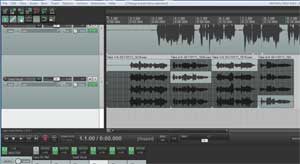
- pitch correction
- Seeing and working with multiple takes on one track (the main reason I still do all my tracking of audio in Reaper.):
-
- KVRist
- 151 posts since 11 Aug, 2016
I love bitwig 1 inspector panelnexttrack30 wrote:Taika-Kim wrote:Nothing that magical about the MPC grooves, they are just plain shuffle:
https://www.attackmagazine.com/features ... pc-timing/
if it is same, then i want to change shuffle rate and hear it in real time with "quantize time" at least.
i mean it is pain in the ass to "apply"-> undo -> change shuffle rate -> "apply"-> undo several times.
ableton's groove is also not a real time but at least i can pre-listen the feel of each swing midi clips.
i know i can change shuffle rate and hear it in real time with global shuffle.
but i tested with synth right now and
global shuffle (with no accent) sounds similar but different with same shuffle rate as "quantize time".
don't know why.
maybe global shuffle uses legato??
anyway, i'm using bitwig 1.
is shuffle rate of "quantize time" real time in bitwig2??
edit: never mind i just saw it on youtube that it is not real-time yet.

-
- KVRist
- 39 posts since 27 May, 2010 from Venice beach
I just have one.
1. The ability to drag-select audition notes the way Ableton does it.
Bitwig has zero way to audition a chord progression.
If you have a complex chord progression and you want to get a grasp of the progression without hitting play you're just screwed.
1. The ability to drag-select audition notes the way Ableton does it.
Bitwig has zero way to audition a chord progression.
If you have a complex chord progression and you want to get a grasp of the progression without hitting play you're just screwed.
-
- KVRAF
- 2140 posts since 16 Jan, 2013 from USA
This thread is two years old, but what the heck, yet another opportunity to speak up.
1. A viable way to zoom and scroll the arranger with one hand.
2. Real arranger loop recording that kills the last pass if there's nothing there, and only undoes one take at a time.
3. The ability to place stretch markers at every transient throughout a selection automatically, and or at least put three in place (the one to be moved and two to keep the other material in place) at one time. You used to be able to do the latter, but it was so finicky as to be useless.
1. A viable way to zoom and scroll the arranger with one hand.
2. Real arranger loop recording that kills the last pass if there's nothing there, and only undoes one take at a time.
3. The ability to place stretch markers at every transient throughout a selection automatically, and or at least put three in place (the one to be moved and two to keep the other material in place) at one time. You used to be able to do the latter, but it was so finicky as to be useless.
-

- KVRian
- 1200 posts since 10 Sep, 2014
Press mousewheel and dragjonljacobi wrote: Tue Jul 02, 2019 6:00 pm 1. A viable way to zoom and scroll the arranger with one hand.
-
- KVRist
- 335 posts since 10 Apr, 2002
I've mentioned that before. Wasn't happy for a reason I can't remember.stamp wrote: Tue Jul 02, 2019 9:26 pmPress mousewheel and dragjonljacobi wrote: Tue Jul 02, 2019 6:00 pm 1. A viable way to zoom and scroll the arranger with one hand.

-
- KVRAF
- 2140 posts since 16 Jan, 2013 from USA
Same overly sensitive behavior. I can't just zoom, and I can't just pan without being super slow with the mouse, touchpad, or whatever. They should just use the timeline to zoom and the scroll bar to scroll. Simple, foolproof (yes, and I may be the fool), faster, and far easier to implement. KISS.stamp wrote: Tue Jul 02, 2019 9:26 pmPress mousewheel and dragjonljacobi wrote: Tue Jul 02, 2019 6:00 pm 1. A viable way to zoom and scroll the arranger with one hand.
Note that I can do the scroll/zoom thing in Live just fine because it's not so sensitive to off-axis movement.
While I'm at it--normal sized menus for users who don't employ touch.
-
- KVRist
- 241 posts since 23 Aug, 2013 from berlin
I finally figured out how to get the 3 to drop, and it's insanely non-intuitive (OSX): you hold down alt (I think? or ctrl), 3 appear, you click+hold and move the mouse up (or down?)...maybe the least intuitive thing I've ever seen haha...for ever I could get the 3 to appear but was soooo frustrated to never get them to drop but I can consistently do it now...not at studio so can't verify exact technique sorryjonljacobi wrote: Tue Jul 02, 2019 6:00 pm
3. The ability to place stretch markers at every transient throughout a selection automatically, and or at least put three in place (the one to be moved and two to keep the other material in place) at one time. You used to be able to do the latter, but it was so finicky as to be useless.
Would be great to drop one instantly for ALL transients in a clip
-
- KVRist
- 241 posts since 23 Aug, 2013 from berlin
My one most desired feature, though...ok it's a tie
1. buffer midi pre-record like ableton–not sure what this is called but it's amazing. the thing where whatever you play
is already recorded without record being enabled (midi)
2. recording takes editing like studio one or logic
probably 1 is more important as I keep intending to export stems out of bws into studio one for mixing but have been lazy and
only recorded vocals in S1 to edit/melodyne and import back in bws for mixdown
1. buffer midi pre-record like ableton–not sure what this is called but it's amazing. the thing where whatever you play
is already recorded without record being enabled (midi)
2. recording takes editing like studio one or logic
probably 1 is more important as I keep intending to export stems out of bws into studio one for mixing but have been lazy and
only recorded vocals in S1 to edit/melodyne and import back in bws for mixdown
-
- KVRAF
- 2140 posts since 16 Jan, 2013 from USA
I wasn’t happy because it doesn’t work any different from simply clicking and dragging. Maybe something changed.arrakeen wrote: Tue Jul 02, 2019 10:27 pmI've mentioned that before. Wasn't happy for a reason I can't remember.stamp wrote: Tue Jul 02, 2019 9:26 pmPress mousewheel and dragjonljacobi wrote: Tue Jul 02, 2019 6:00 pm 1. A viable way to zoom and scroll the arranger with one hand.
-
- KVRist
- 335 posts since 10 Apr, 2002
Well, you don't have to click a toolbar, you can click pretty much anywhere and you can zoom and pan in arranger at same time.jonljacobi wrote: Wed Jul 03, 2019 4:07 pmI wasn’t happy because it doesn’t work any different from simply clicking and dragging. Maybe something changed.arrakeen wrote: Tue Jul 02, 2019 10:27 pmI've mentioned that before. Wasn't happy for a reason I can't remember.stamp wrote: Tue Jul 02, 2019 9:26 pmPress mousewheel and dragjonljacobi wrote: Tue Jul 02, 2019 6:00 pm 1. A viable way to zoom and scroll the arranger with one hand.
-
- KVRAF
- 2140 posts since 16 Jan, 2013 from USA
The algorithm is too sensitive to off axis movement for me. I simply cannot describe a straight enough line to do only one or the other and I rarely want to both. Actually never.
As to the transients. Glad to hear that’s still there, but unless I’m super careful I always wind up moving the marker. Again, another methodology made for those that are extraordinarily precise. That is not me.
I don’t want to learn a new skill set, I just want to scroll and time correct performances. As of now, whenever I have a long audio take to correct, I use Live because I can add markers to every transient with two keystrokes and then just stretch. Or Melodyne.
But I will thank Bitwig for one thing—it forced me to take a month off to work with a metronome so that I rarely need to edit transients in my performances anymore.
As to the transients. Glad to hear that’s still there, but unless I’m super careful I always wind up moving the marker. Again, another methodology made for those that are extraordinarily precise. That is not me.
I don’t want to learn a new skill set, I just want to scroll and time correct performances. As of now, whenever I have a long audio take to correct, I use Live because I can add markers to every transient with two keystrokes and then just stretch. Or Melodyne.
But I will thank Bitwig for one thing—it forced me to take a month off to work with a metronome so that I rarely need to edit transients in my performances anymore.