


tasmaniandevil wrote:The default GUI size is not being saved with individual presets.almazmusic wrote:A problem with zoom:
But I currently have no idea why it jumps to a different size when you select the same GUI size again. Might be a glitch in Komplete Kontrol in connection with the default GUI size. Wasn't able to reproduce this yet.
Latest Builds: Zebra 2.8 *beta*
-

- KVRist
- 122 posts since 14 Sep, 2017
TD, I noticed this happening one or twice early on, but haven't since.
-
- KVRist
- 122 posts since 14 Sep, 2017
At some point it would be useful to be able to have the option when you save please.
Acknowledgement wrote:Awesome, thanks Chapelle!Chapelle wrote:In the preferences, change the setting "Save Presets To" to "selected folder".Acknowledgement wrote:Stupid question probably but how do you save presets to your (sub)folder of choice instead of saving to default user folder?

-
- KVRist
- 51 posts since 2 Feb, 2016
Can't get an instance of Z2.8 up in Ableton. In either 9.7.1 or 10.01b6.
Dragging the plugin into the device window brings up an error message that says "A serious program error has occurred. Live will shut down after this message box is closed. Please restart Live and follow the instructions in the 'Report a Crash" lesson that will appear in Live's Help View."
The file Ableton creates is here (https://1drv.ms/u/s!Anuld2Y8aEhphc06457HWgiUF2JJwA) if it's of any use.
Running Windows 10.
Repro, Diva and Bazille are working fine.
Edit: Nevermind. Had my install directory for the 64 bit dlls pointing to the wrong directory. All good now.
Dragging the plugin into the device window brings up an error message that says "A serious program error has occurred. Live will shut down after this message box is closed. Please restart Live and follow the instructions in the 'Report a Crash" lesson that will appear in Live's Help View."
The file Ableton creates is here (https://1drv.ms/u/s!Anuld2Y8aEhphc06457HWgiUF2JJwA) if it's of any use.
Running Windows 10.
Repro, Diva and Bazille are working fine.
Edit: Nevermind. Had my install directory for the 64 bit dlls pointing to the wrong directory. All good now.
Last edited by bcm70 on Fri Dec 22, 2017 1:49 pm, edited 1 time in total.
-

- u-he
- Topic Starter
- 30253 posts since 8 Aug, 2002 from Berlin
Please send a message to support@u-he - it might be that one crash we still have, and Tas might have a remedy (we still have a few hours before x-mas holidays)bcm70 wrote:Can't get an instance of Z2.8 up in Ableton. In either 9.7.1 or 10.01b6.
Dragging the plugin into the device window brings up an error message that says "A serious program error has occurred. Live will shut down after this message box is closed. Please restart Live and follow the instructions in the 'Report a Crash" lesson that will appear in Live's Help View."
The file Ableton creates is here (https://1drv.ms/u/s!Anuld2Y8aEhphc06457HWgiUF2JJwA) if it's of any use.
Running Windows 10.
Repro, Diva and Bazille are working fine.
-
- KVRist
- 51 posts since 2 Feb, 2016
All good. It was my stuff up. Working fine now.Urs wrote:Please send a message to support@u-he - it might be that one crash we still have, and Tas might have a remedy (we still have a few hours before x-mas holidays)
The new skin looks fantastic. Great job by the UI guy.
-
- KVRist
- 122 posts since 14 Sep, 2017
Is it a nice GUI, even from someone who doesn't generally care for/use lighter skins. I could live without faux wood sides. Do miss faint stripes I think.
-

- KVRian
- 643 posts since 28 Oct, 2010
Thanks Urs and all the UHE team!
The new skins are fantastic and the new reverb and wavefolder modules are excellent.
On the dark skin it seems I can't open up the oscillator presets. Either the button is missing or I'm and idiot.
The new skins are fantastic and the new reverb and wavefolder modules are excellent.
On the dark skin it seems I can't open up the oscillator presets. Either the button is missing or I'm and idiot.
-

- KVRist
- 418 posts since 17 Oct, 2006 from Franche-Comté
When you click on the default preset, a window opens.pierb wrote:On the dark skin it seems I can't open up the oscillator presets. Either the button is missing or I'm and idiot.
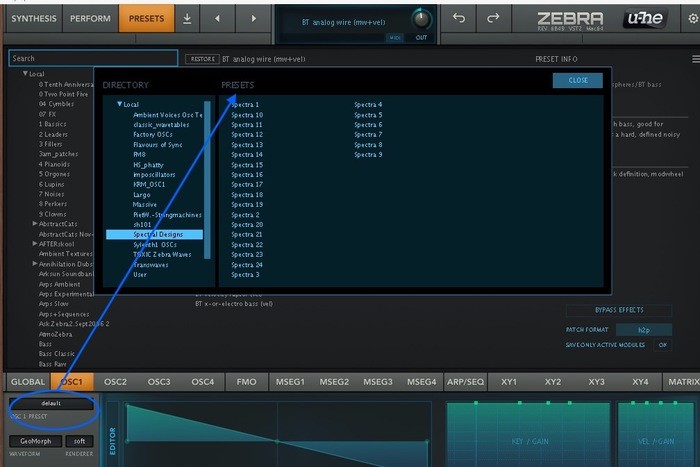
Imac M4 24" under Sequoia 15.7.7, D.P. 11.36 & Kontakt 8.10.2 _ Gibson ES 295 & Explorer _ FilterBank2 Sherman & PolyEvolver Keyboard _ Altiverb 8_ Explorer Loïc Le Pape
https://loiclepapesteelguitars.com/
https://loiclepapesteelguitars.com/
-

- KVRist
- 472 posts since 6 Apr, 2008
Two issues:
1) After re-importing my user preset library (~26000 presets), GUI start-up is seriously slowed down, i.e. takes ~5 secs to open everytime. I'm on Win10 64-bit, Haswell 3GHz, no Antivirus running. This wasn't an issue with Zebra 2.5.
2) In the VST3 version, the paramater names reported to the host are lacking the name of the module/section the parameter belongs to (e.g. "OSC1", "PCore",...)
1) After re-importing my user preset library (~26000 presets), GUI start-up is seriously slowed down, i.e. takes ~5 secs to open everytime. I'm on Win10 64-bit, Haswell 3GHz, no Antivirus running. This wasn't an issue with Zebra 2.5.
2) In the VST3 version, the paramater names reported to the host are lacking the name of the module/section the parameter belongs to (e.g. "OSC1", "PCore",...)
-

- KVRAF
- 24456 posts since 7 Jan, 2009 from Croatia
Yeah... I have 15k patches and opening presets it always updates the library. I kinda don't want this to happen every time... perhaps an option to always manually refresh library would be better?
-

- KVRAF
- 14499 posts since 16 Feb, 2005 from Planet Earth, Somewhere
Indeed.......for me the first refresh is exceedingly slow...... fine after that.EvilDragon wrote:Yeah... I have 15k patches and opening presets it always updates the library. I kinda don't want this to happen every time... perhaps an option to always manually refresh library would be better?
But again much faster on my mac than pc with the same presets (9406).
rsp
sound sculptist
-
- KVRer
- 10 posts since 19 Oct, 2009 from Florida
Ableton Live 9 Suite 9.7.4 running on a MacBook Pro and High Sierra 10.13.2. Ableton shuts down every time I try to put the new Zebra2 on a MIDI track. Not sure of a workaround.
Barefoot Sound Footprint 01 | Argosy Halo | GIK Treatment | MFB Dominion 1 | Fender Rhodes Mk I | Arturia KeyLab MKII | MOTU 624 | Ableton & Push 2 | TONS of plugins
-
- KVRer
- 10 posts since 19 Oct, 2009 from Florida
I just emailed my crash logs to support. Can't wait to see this thing in action!! Thank you!!!! Merry Christmas to us!!mcphable wrote:Ableton Live 9 Suite 9.7.4 running on a MacBook Pro and High Sierra 10.13.2. Ableton shuts down every time I try to put the new Zebra2 on a MIDI track. Not sure of a workaround.
Barefoot Sound Footprint 01 | Argosy Halo | GIK Treatment | MFB Dominion 1 | Fender Rhodes Mk I | Arturia KeyLab MKII | MOTU 624 | Ableton & Push 2 | TONS of plugins
-
- KVRer
- 10 posts since 19 Oct, 2009 from Florida
Tried the AU version and it works great! The VST is what's crashing. I replied to my email to support with the updated info. Thanks again! Now back to the Zebra2.8 AU!!
Barefoot Sound Footprint 01 | Argosy Halo | GIK Treatment | MFB Dominion 1 | Fender Rhodes Mk I | Arturia KeyLab MKII | MOTU 624 | Ableton & Push 2 | TONS of plugins
-

- KVRAF
- 2960 posts since 9 Dec, 2011 from falling
Running for hours in Ableton Live 10 Beta 6 on Mac OS 10.13.2. Working well so far.
The new interface and skins are just beautiful and a pleasure to work with.
The new interface and skins are just beautiful and a pleasure to work with.
Bitwig Certified Trainer