


Studio One 3.5.5 Update Released - 30 Jan 2018
-
- KVRist
- 104 posts since 26 Aug, 2014 from Australia
The "Crash when switching from song to start page" that they claim to have fixed.. well, maybe I'm just unlucky, but I never had crashes before, but in the latest version (3.5.5) all I get is regular crashes when switching back to the start page.
-
- KVRAF
- Topic Starter
- 3496 posts since 30 Dec, 2014
Studio One's Midi Editor is pretty good among today's daws to get work done actually, and whilst that's your opinion, it's not really true from my own experience. Because there's features it has that other daws simply don't have. Take Propellerheads Reason 10 for example, does that have Steptime Recording / Editing on the timeline? Nope. It might not have the depth of midi editing such as Cubase, but it's good enough for all but the most specialist of midi editing tasks imop..ls1xxx wrote:Let me tell you something about this here Studio One, this thing by far has the most worst Midi Editor I have ever used period! I mean it, absolutely Horrid!
KVR S1-Thread | The Intrancersonic-Design Source > Program Resource | Studio One Resource | Music Gallery | 2D / 3D Sci-fi Art | GUI Projects | Animations | Photography | Film Docs | 80's Cartoons | Games | Music Hardware |
-
Funkybot's Evil Twin Funkybot's Evil Twin https://www.kvraudio.com/forum/memberlist.php?mode=viewprofile&u=116627
- KVRAF
- 12458 posts since 16 Aug, 2006
Let me start by saying:
1. I really like Studio One. Came from Sonar. Loved the stability of S1 and most importantly the workflow and lack of clutter.
2. I missed some of the MIDI features of Sonar. I bought Cubase. I really like some things about Cubase, and I really dislike others.
3. This being an S1 point release, the criticism by another user is just completely unjustified. There have been MANY major features added to Studio One for free since version 3 was released two years ago.
4. But yeah...S1 development is slow in comparison to other companies. Version 3 came out almost 3 years ago. I suspect some of that is the result of shared development resources between the S1 team and other Presonus products like every new interface they need to incorporate into S1 and their StudioLive series (I have no inside knowledge - just a guess). Stienberg, by comparison, would be on the verge of their third major release in that period, but you'd pay for each (this includes the .5 updates). Sonar was good for a major release per year. Reaper, on the other hand, is also developed at a slower pace, but also has free updates over 1.99 versions which is nice.
As much as I like Studio One, the MIDI side of the house can definitely be considered under-developed for a lot of different workflows and setups. It does the basics pretty well, but the missing features can really be hinderance if you're expecting certain features to be there, or are just used to working with them.
Here are some examples of MIDI features that are missing or need improvement:
1. No Drum Editor
2. No Integrated staff editor (Notion still needs to be run as a separate app which is clumsy)
3. No List/Event Editor
4. No MIDI input transformer or Logical Editor
5. Can't transmit/Receive more than one MIDI channel per track
6. No polyphonic aftertouch (a necessary feature for choking cymbals on e-drum kits)
7. No Articulation Editor/Assistant (Expression Map in Cubase)
8. No Chord Tracks (could use marker) but no Chord Assitant either
9. No Smart Tool for MIDI
10. No Velocity shading in the PRV
11. No MIDI tempo detection functionaity
12. Tempo tracks are very clumsy (both an audio and MIDI feature)
13. Comparively weak built in MIDI effects (comparing to Cubase/Sonar)
14. MIDI controllers and instruments need to be separate devices (can't just create one MIDI device that treats my System 8 as a Controller and an Instrument - but neither does Cubase).
That's just stuff off the top of my head. Like I said, if you're not used to working with these features, you may not miss them. If you don't have an MPE instrument, some won't matter. If you don't have a Roland drum kit, some won't matter to you. But in the end, if you do more serious MIDI work, Studio One is very limited compared to Sonar/Cubase/(even) Reaper (to a degree).
Now...I fully expect the S1 4.0 lifecycle to be all about MIDI. I'm just hoping we see 4.0 later this year, and I'm right about it's focus.
1. I really like Studio One. Came from Sonar. Loved the stability of S1 and most importantly the workflow and lack of clutter.
2. I missed some of the MIDI features of Sonar. I bought Cubase. I really like some things about Cubase, and I really dislike others.
3. This being an S1 point release, the criticism by another user is just completely unjustified. There have been MANY major features added to Studio One for free since version 3 was released two years ago.
4. But yeah...S1 development is slow in comparison to other companies. Version 3 came out almost 3 years ago. I suspect some of that is the result of shared development resources between the S1 team and other Presonus products like every new interface they need to incorporate into S1 and their StudioLive series (I have no inside knowledge - just a guess). Stienberg, by comparison, would be on the verge of their third major release in that period, but you'd pay for each (this includes the .5 updates). Sonar was good for a major release per year. Reaper, on the other hand, is also developed at a slower pace, but also has free updates over 1.99 versions which is nice.
THE INTRANCER wrote:Studio One's Midi Editor is pretty good among today's daws to get work done actually, and whilst that's your opinion, it's not really true from my own experience. Because there's features it has that other daws simply don't have. Take Propellerheads Reason 10 for example, does that have Steptime Recording / Editing on the timeline? Nope. It might not have the depth of midi editing such as Cubase, but it's good enough for all but the most specialist of midi editing tasks imop..ls1xxx wrote:Let me tell you something about this here Studio One, this thing by far has the most worst Midi Editor I have ever used period! I mean it, absolutely Horrid!
As much as I like Studio One, the MIDI side of the house can definitely be considered under-developed for a lot of different workflows and setups. It does the basics pretty well, but the missing features can really be hinderance if you're expecting certain features to be there, or are just used to working with them.
Here are some examples of MIDI features that are missing or need improvement:
1. No Drum Editor
2. No Integrated staff editor (Notion still needs to be run as a separate app which is clumsy)
3. No List/Event Editor
4. No MIDI input transformer or Logical Editor
5. Can't transmit/Receive more than one MIDI channel per track
6. No polyphonic aftertouch (a necessary feature for choking cymbals on e-drum kits)
7. No Articulation Editor/Assistant (Expression Map in Cubase)
8. No Chord Tracks (could use marker) but no Chord Assitant either
9. No Smart Tool for MIDI
10. No Velocity shading in the PRV
11. No MIDI tempo detection functionaity
12. Tempo tracks are very clumsy (both an audio and MIDI feature)
13. Comparively weak built in MIDI effects (comparing to Cubase/Sonar)
14. MIDI controllers and instruments need to be separate devices (can't just create one MIDI device that treats my System 8 as a Controller and an Instrument - but neither does Cubase).
That's just stuff off the top of my head. Like I said, if you're not used to working with these features, you may not miss them. If you don't have an MPE instrument, some won't matter. If you don't have a Roland drum kit, some won't matter to you. But in the end, if you do more serious MIDI work, Studio One is very limited compared to Sonar/Cubase/(even) Reaper (to a degree).
Now...I fully expect the S1 4.0 lifecycle to be all about MIDI. I'm just hoping we see 4.0 later this year, and I'm right about it's focus.
-

- KVRAF
- 2960 posts since 9 Dec, 2011 from falling
snipped for brevity.Funkybot's Evil Twin wrote:
...
1. No Drum Editor
...
Forgive me if I'm missing something, however ...
There is a drum editor. You can select it directly above the keyboard in the midi editor.
Bitwig Certified Trainer
-
Funkybot's Evil Twin Funkybot's Evil Twin https://www.kvraudio.com/forum/memberlist.php?mode=viewprofile&u=116627
- KVRAF
- 12458 posts since 16 Aug, 2006
That just pulls in the articulation names from the drum map instead of showing a keyboard. Doesn't change anything else in the PRV. No drum specific note heads (that alone would be a start), no ability to hide certain (or unused) articulations, no ability to sort the note order, no lane solo/mute, no drum specific features in terms of drawing rudiments (thinking BFD3 here). Stuff like that.billcarroll wrote:snipped for brevity.Funkybot's Evil Twin wrote:
...
1. No Drum Editor
...
Forgive me if I'm missing something, however ...
There is a drum editor. You can select it directly above the keyboard in the midi editor.
-
- KVRist
- 105 posts since 16 Nov, 2016
What makes the musical (MIDI) editor in Studio One especially tedious and clumsy to work with, is its clunky behavior to open two or more parts simultaneously when the editor is closed. When you do it with the mouse, by double clicking, it always zooms out to full content (since version 3). When you do it with a keyboard shortcut (or menu or edit button) it simply does not open the right parts. You always have to fiddle with the track list.
And then there are the focus issues with the editor when editing multiple parts. This causes notes to land in parts that are not open for editing, or key commands being directed to the arrangement instead of the editor.
Just basic stuff, we do thousands of times per song, we should not have to think about.
Not even talking about the ability to easily switch parts for exclusive editing or keeping note and part automation data together.
And then there are the focus issues with the editor when editing multiple parts. This causes notes to land in parts that are not open for editing, or key commands being directed to the arrangement instead of the editor.
Just basic stuff, we do thousands of times per song, we should not have to think about.
Not even talking about the ability to easily switch parts for exclusive editing or keeping note and part automation data together.
-
- KVRian
- 591 posts since 10 Nov, 2005 from New York City
I’ve actually stopped using S1 due to the other DAW updates, specifically Logic and Pro Tools. I got S1 because it had better workflow, enough so I could tolerate the numerous shortcomings. However, as Logic and PT have been updated to fix their workflows or add very useful features, less of a need to use S1 for me. Ultimately they are the big two. S1 was trying to convert users from PT especially but if Avid releases big monthly updates (which is the plan), doesn’t seem like Presonus will be able to do that.
And it’s not about a crap ton of random features (like Cubase, which I also have but don’t like at all). It’s about refined and polished workflow, which S1 has in spades. Just wish they were faster at bringing out the updates - and improving that UI (hard to beat PT and Logic in my view).
And it’s not about a crap ton of random features (like Cubase, which I also have but don’t like at all). It’s about refined and polished workflow, which S1 has in spades. Just wish they were faster at bringing out the updates - and improving that UI (hard to beat PT and Logic in my view).
-

- KVRian
- 711 posts since 19 Jan, 2008
Yeah they just drink coffee /sAndreas71 wrote:If you compare S1 developement vs Reaper or Logic one must wonder what the hell those devs are doing. Drinking coffee maybe? I love S1 workflow but I don't trust the company anymore.
From Dec 04 2017 to today this is what they come up to:
Version 3.5.4 Release Notes (Dezember 04, 2017):
Improvements:
• Real Time Bounce Broken for Instrument Tracks
Version 3.5.5 Release Notes (January 30, 2018):
New features and improvements:
• Cakewalk SONAR keyboard shortcut template
The following issues have been fixed:
• Notes events disappearing when clicking on the Arranger Track
• Snap to grid in Scratchpad not working
• AU Plugin crash
• Crash when switching from song to start page
• [Project Page] Offline TP not exact
• Italian localization issues
• Crash after Drag and Drop with plugins
• Crash in Melodyne after "Restore"
I'll leave these here, maybe a video will help more than actual reading.
PS: Forgot to mention, both of these were FREE UPDATES.
-
- KVRAF
- 6159 posts since 4 Dec, 2004
That MIDI FR list from Funkybot is pretty accurate as relates to what many users want and would pretty much align with my own MIDI request list.
As to development speed, or the subjective impressions of it, imo anyway, they're in it for the long haul and maybe aren't really trying to keep up tit-for-tat with other companies updates or worrying about that, more just taking their time to try to make things fit, preserve the good workflow, and realize their vision.
I think end user patience will be rewarded. It's still only a version 3. You'll look up one day and it will have all of those MIDI things and the discussion will move to something else it doesn't have yet. It's a cycle.
As to development speed, or the subjective impressions of it, imo anyway, they're in it for the long haul and maybe aren't really trying to keep up tit-for-tat with other companies updates or worrying about that, more just taking their time to try to make things fit, preserve the good workflow, and realize their vision.
I think end user patience will be rewarded. It's still only a version 3. You'll look up one day and it will have all of those MIDI things and the discussion will move to something else it doesn't have yet. It's a cycle.
-
Funkybot's Evil Twin Funkybot's Evil Twin https://www.kvraudio.com/forum/memberlist.php?mode=viewprofile&u=116627
- KVRAF
- 12458 posts since 16 Aug, 2006
That's actually my take too. Yeah, it's missing MIDI features but I'm confident they're coming in due time and I'm confident they'll work great when they do appear.LawrenceF wrote:I think end user patience will be rewarded. It's still only a version 3. You'll look up one day and it will have all of those MIDI things and the discussion will move to something else it doesn't have yet. It's a cycle.
-

- vvvvvvv
- 2595 posts since 24 Oct, 2000 from skelmersdale, west lancs, uk
Riansky
What's Retrospective Midi?
....
Nice to see everyone else wants better midi editing (it's not just me)
I haven't used Cubase in years but remember their Logical Editor (the midi uber thing) was too difficult to use. I never seemed to get it right, so never saw it as an advantage.
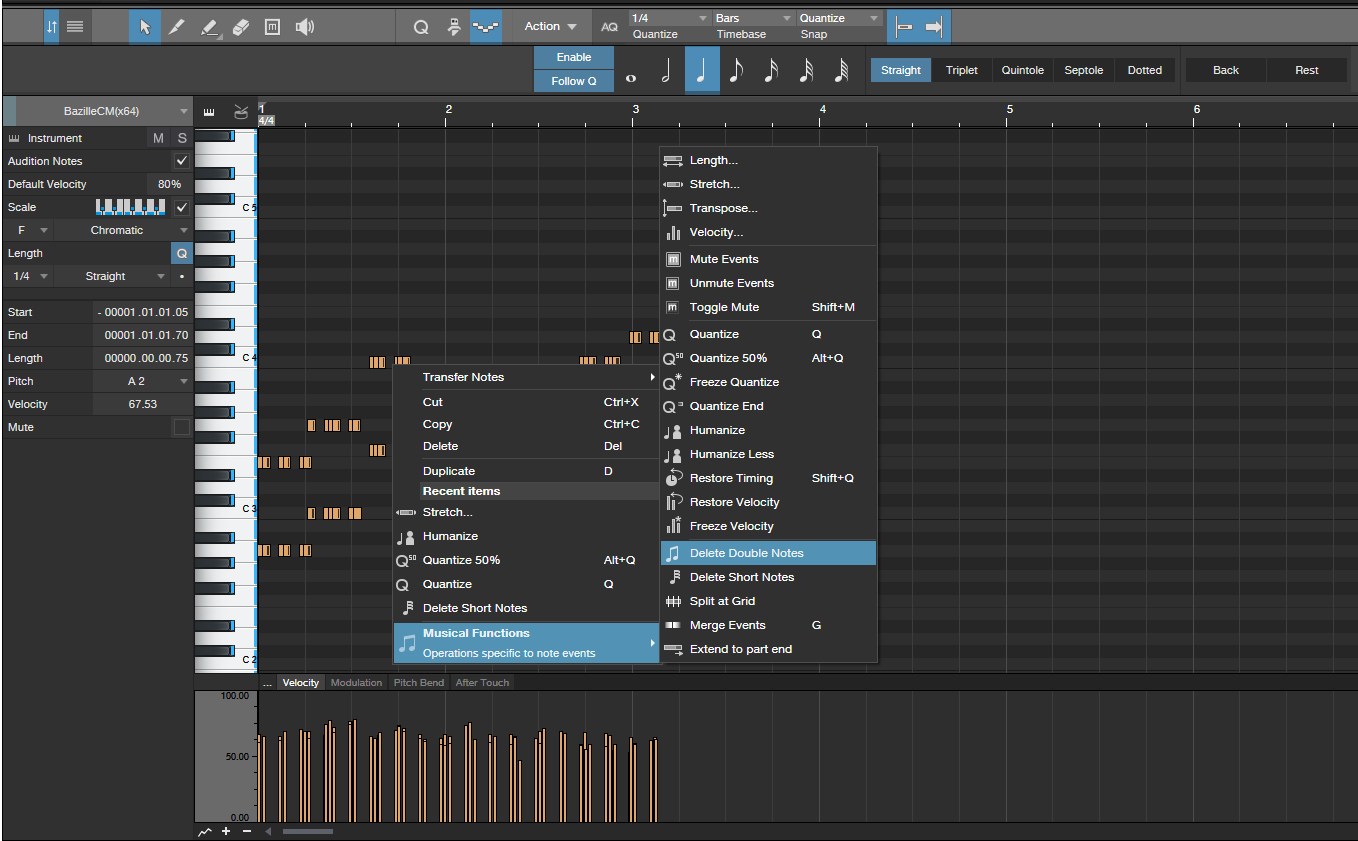
I'd like to see more midi edit features as right mouse click menu options, as trawling up to the top of the screen and back (or anywhere out of the midi edit F2 window) to get where I want is cumbersome.
But like many here I wouldn't trade the S1 workflow for anything else I've seen.
btw does anyone here ever use Mai Tai for anything more than the most preliminary of sketches?
Does it have any secret strengths I've missed?
What's Retrospective Midi?
....
Nice to see everyone else wants better midi editing (it's not just me)
I haven't used Cubase in years but remember their Logical Editor (the midi uber thing) was too difficult to use. I never seemed to get it right, so never saw it as an advantage.
I'd like to see more midi edit features as right mouse click menu options, as trawling up to the top of the screen and back (or anywhere out of the midi edit F2 window) to get where I want is cumbersome.
But like many here I wouldn't trade the S1 workflow for anything else I've seen.
btw does anyone here ever use Mai Tai for anything more than the most preliminary of sketches?
Does it have any secret strengths I've missed?
Member 12, Studio One Pro 7, VPS Avenger, Kontakt 8, Spitfire, Sonible, Baby Audio, CableGuys. Recent best buy - EZ Drummer 3 with Bandmate
-

- KVRian
- 667 posts since 27 Jul, 2010
I used it all over this particular track: MKUltrakevvvvv wrote: btw does anyone here ever use Mai Tai for anything more than the most preliminary of sketches?
Does it have any secret strengths I've missed?
It's biggest strengths for me, is the low cpu usage and the modulation matrix (self modulation is cool). Really nice for simple (but fat) analog sounds and fx.
-
- KVRist
- 43 posts since 26 Oct, 2014
Its basicly recording a MIDI without recording. Sometimes you jam out some ideas and forgot to record or whatever with retrospective MIDI you can recall whatever you played.kevvvvv wrote:Riansky
What's Retrospective Midi?
....
-
Funkybot's Evil Twin Funkybot's Evil Twin https://www.kvraudio.com/forum/memberlist.php?mode=viewprofile&u=116627
- KVRAF
- 12458 posts since 16 Aug, 2006
I watched a few YouTube videos on it and was off and running with the basics in no time. And I mean basic features like remapping MIDI CC's, compressing MIDI velocities, randomizing various things, etc. Just scratching the surface, but so useful.kevvvvv wrote:
I haven't used Cubase in years but remember their Logical Editor (the midi uber thing) was too difficult to use. I never seemed to get it right, so never saw it as an advantage
What makes it clumsy in Cubase is the the fact that things are named "event 1" and "event 2" and what those events represent changes based on your prior selections. It'd be so much more user friendly if they dynamically updated the wording used in the heading of those columns to say, "note", "velocity," or "control value" accordingly based on prior selections. Also, when you open it and even after loading a preset, it's actually turned off by default. I get tripped up by that all the time. You'd think loading a preset should turn it on. At least if the preset was saved in an on state.
-
- KVRAF
- 6159 posts since 4 Dec, 2004
The Logical Editors in Cubase are/were (been there since like way, way back), conceptually, a really brilliant idea, giving users some of the power of scripting but wrapping the complexity of scripting away from the user. For those who really use it, that middle ground is a really nice spot between power, flexibility, and ease of use, comparatively speaking. What they couldn't foresee and guessed wrong at is how many users just don't want to put in the effort, and just don't use it.
It's one of those situations where really good ideas come face to face with reality, when a good idea is only a good idea if people are willing to use it and engage with it, and if involves more work than clicking a dedicated function menu, some just won't.
It's one of those situations where really good ideas come face to face with reality, when a good idea is only a good idea if people are willing to use it and engage with it, and if involves more work than clicking a dedicated function menu, some just won't.