
Korg updates its Legacy Collection with a new Arp Odyssey emulation

VST, AU, AAX, CLAP, etc. Plugin Virtual Instruments Discussion
Post Reply New Topic
RELATED
PRODUCTS
ARP Odyssey M1 MDE-X: Software Effects Suite Mono/Poly MS-20 Polysix Wavestation

Post

T-CM11 wrote:
BONES wrote:
Correct but it will give you a far more accurate reading on your CPU use than your host software, which is what I thought you were asking for. Orion 64 bit shows up to 20% higher CPU use than I see in Task Manager most of the time.
I don't know about Orion or other DAW, but Cubase has an ASIO meter in stead of a CPU one. Maybe other DAW applications also take ASIO load in consideration?
https://www.soundonsound.com/sound-advi ... -i-believe
I don't need an other meter - its obvious that Odysseus causes overloading, you can hear it.
As obvious is in my case, that none other single plugin of 300 in my DAW laptop does cause such a peak.

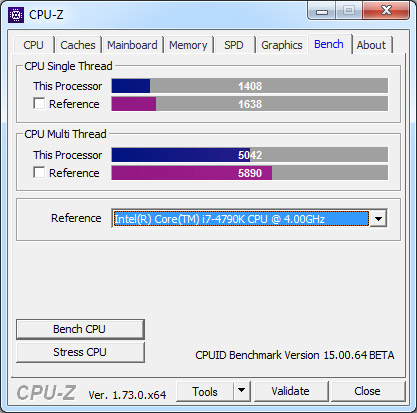
What could be useful, is to run some kind of test programm in the laptop, which produces indicators of the computet performance. Then we could compare these indicators and benchmark these to the target standard, by given processor/RAM type.

If the DAW performance is in a target level, it proves that guilty one is the plugin/plugin sequencer combination.
Post

Harry_HH wrote:What could be useful, is to run some kind of test programm in the laptop, which produces indicators of the computet performance. Then we could compare these indicators and benchmark these to the target standard, by given processor/RAM type.
This'll do exactly that - https://www.cpuid.com/softwares/cpu-z.html

Image

Post

mcbpete wrote:
Harry_HH wrote:What could be useful, is to run some kind of test programm in the laptop, which produces indicators of the computet performance. Then we could compare these indicators and benchmark these to the target standard, by given processor/RAM type.
This'll do exactly that - https://www.cpuid.com/softwares/cpu-z.html

Image
Looks interesting. Have you experience of this test, how realible experts find it? Is it danger, that running the programm does something to your computer you don´t wan´t to (e.g. puts sometings in your files whichs may slow down the computer, or creates security risk/virus)? Or collects data of your computer and sends it?

The specs say:
CPU-Z is a freeware that gathers information on some of the main devices of your system :

Processor name and number, codename, process, package, cache levels.
Mainboard and chipset.
Memory type, size, timings, and module specifications (SPD).
Real time measurement of each core's internal frequency, memory frequency.

Post

I'm not sure if there's something newer on the market but I've used that since the early 00s and it's always seemed really lightweight and unobtrusive and doesn't fill your system with crap/adware

Post

Harry_HH wrote:
What could be useful, is ....
More details about your setup!

What ASIO driver? Buffer size? Sample rate? What is your power options setup? Which preset you are using? How many instances before the CPU maxes. You can go several pages back and see a simple test I did with my system, so you can compare and post your result.
Using: Cubase Pro 15, Reason 13, Tascam US-4x4HR, MODX6, DM12D, LaunchKey 49, Yamaha guitar(Pacifica 612v) and bass (BB234) and some virtual instruments and synths.

Post

EnGee wrote:
Harry_HH wrote:
What could be useful, is ....
More details about your setup!

What ASIO driver? Buffer size? Sample rate? What is your power options setup? Which preset you are using? How many instances before the CPU maxes. You can go several pages back and see a simple test I did with my system, so you can compare and post your result.
Most of these are details I have reported earlier. You can see the presets I use in the video link I added.
Although made by the phone camera, qualitywise you should be able to see the presets I use in that example, but I can tell that I just browse the first 3-4 factory presets in order, when you open the plugin.

As reported, and also in the video demonstration, only one instance of Odyssey, no other plugins.

ASIO driver is the latest Win 10 64 bit for UA-25-EX, buffer size 800, sample rate 48 kHz.

But these may be not that important details, because no other problem or CPU overload with any other of about 300 plugins. The explanation is in the way the Odyssey is programmed. And it seems, that KORG is not interested in change that.

Post

Is the power options is set to “High Performance”? What about if you test Asio4All driver?
Using: Cubase Pro 15, Reason 13, Tascam US-4x4HR, MODX6, DM12D, LaunchKey 49, Yamaha guitar(Pacifica 612v) and bass (BB234) and some virtual instruments and synths.

Post

EnGee wrote:Is the power options is set to “High Performance”? What about if you test Asio4All driver?
Yes, I use power option "High Performance". I have not used other than the dedicated audio interface ASIO drivers. I´ve read somewhere, that the universal ASIO drivers may have problems after Windows 10 Creators Update. I have not seen any reason to change my own audio interface drivers, because not a single problem with these with the Win 10.

Post

Harry_HH wrote:
braj wrote:I´ve got a i7 4,8 kHz 16 RAM desktop, it runs the Odyssey, but my i7 2,5 kHz 8 RAM laptop can´t run the Odyssey. I´ve got about 300 plugins, including big libraries in laptop, and have no problem running any of those, the usual CPU hit per instance is 5-12 %, Odyssey goes up up 200 % with many of the presets.

It seems that the KORG policy is to neglect Win and put all effort to the Mac and iOS. What a drag. :evil:
Well, I've got a i5-2410M laptop (RME UC) and in Cubase 9.5.20 only a few presets go a bit over 100% when playing 8 voices. Maybe you already mentioned it, but which power profile are you using and what kind of laptop (maybe it's throttling because it can't handle a large CPU load (could be bad heat dissipation)?

Edit: I just read you're using Asio4All. I get a more performance from using dedicated ASIO drivers (MOTU (past)/RME).
Last edited by T-CM11 on Thu Apr 05, 2018 8:58 pm, edited 1 time in total.

Post

Harry_HH wrote:
EnGee wrote:Is the power options is set to “High Performance”? What about if you test Asio4All driver?
Yes, I use power option "High Performance". I have not used other than the dedicated audio interface ASIO drivers. I´ve read somewhere, that the universal ASIO drivers may have problems after Windows 10 Creators Update. I have not seen any reason to change my own audio interface drivers, because not a single problem with these with the Win 10.
Just for testing. Maybe it's your Asio driver? I don't have that interface, so I don't know.
Also, CPU-Z is almost a standard tool with any hardware tester.
What the name of your processor? i7-?
Which other heavy synths have you tested? Diva? RePro?
Using: Cubase Pro 15, Reason 13, Tascam US-4x4HR, MODX6, DM12D, LaunchKey 49, Yamaha guitar(Pacifica 612v) and bass (BB234) and some virtual instruments and synths.

Post

T-CM11 wrote:
Harry_HH wrote:
braj wrote:I´ve got a i7 4,8 kHz 16 RAM desktop, it runs the Odyssey, but my i7 2,5 kHz 8 RAM laptop can´t run the Odyssey. I´ve got about 300 plugins, including big libraries in laptop, and have no problem running any of those, the usual CPU hit per instance is 5-12 %, Odyssey goes up up 200 % with many of the presets.

It seems that the KORG policy is to neglect Win and put all effort to the Mac and iOS. What a drag. :evil:
Well, I've got a i5-2410M laptop (RME UC) and in Cubase 9.5.20 only a few presets go a bit over 100% when playing 8 voices. Maybe you already mentioned it, but which power profile are you using and what kind of laptop (maybe it's throttling because it can't handle a large CPU load (could be bad heat dissipation)?
Hmm, power profile: see previous 2 comments in this thread.
Laptop specs: see the video-link I sent in this thread.
I think the conclusion you mentioned "can´t handle large CPU load" is a bit strange.
No computer or DAW can handle CPU-load 250+ %
The core question is, why Odyssey, and ONLY Odyssey of about 300 plugins I use, generates this overload.

BTW - when you report above, that "only few presets go a bit over 100 %", I think tha´s an understatement.
NO plugin in single instance should go over about 40-50 % CPU, not even in the peaks.
No of my other about 300 plugins do.
There is something fundamental wrong in the way Odyssey is programmed, as seen in so many reports since the launch of it. The most sad part of the story is, that KORG doesn´t seem to be interested in fixing this issue. They have had several months to do that, and they even published an update for for the Odyssey, but not even mentioned of this issues, nor fixed it. :?

Post

Harry_HH wrote: NO plugin in single instance should go over about 40-50 % CPU, not even in the peaks.
Welcome to 2018! Diva, Repro 5, Kaivo, and (sometimes) even (Arturia)) Matrix 12 all can go over 100% on my setup. I'm pretty sure at one point in time people were saying that about their Pentium 4 when running some of the latest plugins.

Post

EnGee wrote:
Harry_HH wrote:
EnGee wrote:Is the power options is set to “High Performance”? What about if you test Asio4All driver?
Yes, I use power option "High Performance". I have not used other than the dedicated audio interface ASIO drivers. I´ve read somewhere, that the universal ASIO drivers may have problems after Windows 10 Creators Update. I have not seen any reason to change my own audio interface drivers, because not a single problem with these with the Win 10.
Just for testing. Maybe it's your Asio driver? I don't have that interface, so I don't know.
Also, CPU-Z is almost a standard tool with any hardware tester.
What the name of your processor? i7-?
Which other heavy synths have you tested? Diva? RePro?
For all my computer specs: see the video link I sent in this thread.
I have not "tested" any synths spesificly for this purpose, but e.g. Thorn may use quite a lot CPU,
and some bigger libraries. Modelling software such as AAS products, which I have all, use in some settings quite a lot CPU. I have about 30 synths in my laptop (I have not counted Kontakt or Reaktor synths to it), no Diva or RePro. Repro1 is in my shopping list, once it is on the sale, I buy it.
Of Arturia synths Matriz 12 V2 seems to be the most CPU-hungry (30-50 % in the laptop), but usually all the Arturia V collection synths use just 4-12 % CPU.
Last edited by Harry_HH on Thu Apr 05, 2018 10:38 pm, edited 1 time in total.

Post

T-CM11 wrote:
Harry_HH wrote: NO plugin in single instance should go over about 40-50 % CPU, not even in the peaks.
Welcome to 2018! Diva, Repro 5, Kaivo, and (sometimes) even (Arturia)) Matrix 12 all can go over 100% on my setup. I'm pretty sure at one point in time people were saying that about their Pentium 4 when running some of the latest plugins.
Sounds more like back in the 90´s to me... :clown:

Post

I have just seen your video. Yes man! You definitely have a problem! Your CPU is a very good one. I really suspect the Asio driver.
800 buffer is too low. What if you make it 256 with 44.1 khz?
I really encourage you to test Asio4all. You can uninstall it later.
Using: Cubase Pro 15, Reason 13, Tascam US-4x4HR, MODX6, DM12D, LaunchKey 49, Yamaha guitar(Pacifica 612v) and bass (BB234) and some virtual instruments and synths.

Post Reply

Return to “Instruments”