


I've been having fun with this plugin!
One thing I've noticed: When you freeze the delay, you essentially have a repeating sample playing, right? I think it would be fun if we could drag that sample (the current buffer contents) out of Colour Copy and use it on its own. Would be a fun way to do sound design I think! (and also sort of function as a way to save frozen buffers)
u-he Colour Copy - public beta!
-
- KVRer
- 28 posts since 23 Dec, 2017
I have bought this to use on Linux. Thanks for the ports and this delay is real tasty!
-
- KVRian
- 874 posts since 28 Nov, 2016
it's a little roundabout, but i've already considered doing that by bouncing the frozen output to a file and then trimming it by handeasynam wrote:I've been having fun with this plugin!
One thing I've noticed: When you freeze the delay, you essentially have a repeating sample playing, right? I think it would be fun if we could drag that sample (the current buffer contents) out of Colour Copy and use it on its own. Would be a fun way to do sound design I think! (and also sort of function as a way to save frozen buffers)
-
- KVRAF
- 9526 posts since 6 Oct, 2004
Wow, Abique was fast on the linux update!!! He had mentionedJack Winter wrote:I have bought this to use on Linux. Thanks for the ports and this delay is real tasty!
'next week'

I've been using the win version with my Fender Mustang amp
and various ampsims in wine, so I'll grab the new linux release next.
ColourCopy has a great fun-per-$ ratio.
Cheers
-
- KVRAF
- 9526 posts since 6 Oct, 2004
I changed the LED to blue, as I'll be using ColourCopy a lot
hosted in BlueCat's Axiom amp-sim, which sounds fantastic,
but the traditional green LED clashes a tiny bit with Axiom's
colours, and it's a good graphics learning experience.
In GIMP,
tools menu -->selection tools-->rectangle-select
click and hold in the upper left corner of the LED graphic,
drag to lower right corner and release
colors menu --> hue-chroma
drag the hue slider to the right
to get blue. Adjust brightness etc
There are many green indiviual elements in the CC images folders
to turn blue (or whatever choice) one by one, as desired
Cheers
hosted in BlueCat's Axiom amp-sim, which sounds fantastic,
but the traditional green LED clashes a tiny bit with Axiom's
colours, and it's a good graphics learning experience.
In GIMP,
tools menu -->selection tools-->rectangle-select
click and hold in the upper left corner of the LED graphic,
drag to lower right corner and release
colors menu --> hue-chroma
drag the hue slider to the right
to get blue. Adjust brightness etc
There are many green indiviual elements in the CC images folders
to turn blue (or whatever choice) one by one, as desired
Cheers
-

- KVRist
- 417 posts since 17 Oct, 2006 from Franche-Comté
If someone was bothered by the wooden sides, here is an example of a modification with GIMP.
https://medias.audiofanzine.com/images/ ... 296052.jpg
https://medias.audiofanzine.com/images/ ... 296052.jpg
Imac M4 24" under Sequoia 15.7.7, D.P. 11.36 & Kontakt 8.10.2 _ Gibson ES 295 & Explorer _ FilterBank2 Sherman & PolyEvolver Keyboard _ Altiverb 8_ Explorer Loïc Le Pape
https://loiclepapesteelguitars.com/
https://loiclepapesteelguitars.com/
-
 dlarseninclusive dlarseninclusive https://www.kvraudio.com/forum/memberlist.php?mode=viewprofile&u=408358
 - KVRist
- 295 posts since 19 Nov, 2017 from Los Angeles
This is entertaining, you can color code your Colour Copy presets by Colour Type.
Can you save favorites with a sound bank?
Can you save favorites with a sound bank?
You do not have the required permissions to view the files attached to this post.
-
- KVRAF
- 9526 posts since 6 Oct, 2004
Here's my mod of ColourCopy:
You do not have the required permissions to view the files attached to this post.
-
- KVRAF
- 9526 posts since 6 Oct, 2004
geronimo wrote:If someone was bothered by the wooden sides, here is an example of a modification with GIMP.
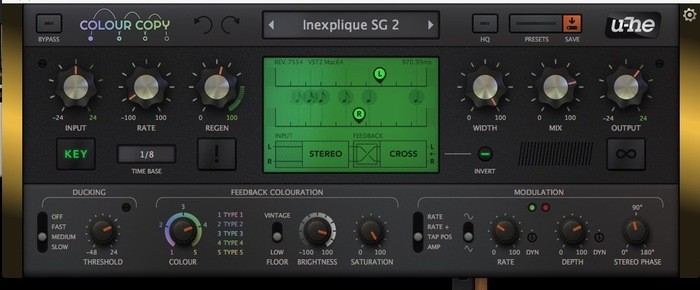
I like the gold! It goes well with the overall blend of gui elements
as well as with the standard LED.
Cheers
-
- KVRAF
- 2430 posts since 11 Jan, 2009 from Portland, OR, USA
easynam wrote:I've been having fun with this plugin!
One thing I've noticed: When you freeze the delay, you essentially have a repeating sample playing, right? I think it would be fun if we could drag that sample (the current buffer contents) out of Colour Copy and use it on its own. Would be a fun way to do sound design I think! (and also sort of function as a way to save frozen buffers)
But how long would it be?
Also, you should probably just learn your DAW's resampling method
 I don't think we'll be seeing this feature added, but it should be easily done with your DAW.
-
- KVRer
- 7 posts since 27 Sep, 2015
It's easy enough in DAW yeah, not quite as immediate though.
Also, it would make it much easier to get a perfectly looping sample.
It's not a feature I'm expecting to see but it would be nice I think, just a dumb idea I had
Also, it would make it much easier to get a perfectly looping sample.
It's not a feature I'm expecting to see but it would be nice I think, just a dumb idea I had
-
experimental.crow experimental.crow https://www.kvraudio.com/forum/memberlist.php?mode=viewprofile&u=6258
- KVRAF
- 6895 posts since 9 Mar, 2003 from the bridge of sighs
quick alt ...
just some overlays ...
just some overlays ...
You do not have the required permissions to view the files attached to this post.

-
- Banned
- 3889 posts since 3 Feb, 2010
Thanks for giving more info in whats happening with the delayUrs wrote:Woah, thank you!
I don't know how those other delays work, but if they use the classic approach and if they have modulation, the modulation of delay time imprints on the feedback. This is like a doppler effect which can get pretty chaotic with some feedback. I'd say close to 100% of delay plug-ins work like that, including most of ours. In Colour Copy the content of the delay line is always untampered by such, no matter what the modulation. So once audio has entered the delay line, the modulation is synchonous for each feedback iteration to come. No randomly drifting doppler effects.
Also of course, the bucket brigade approach requires very steep filtering. Part of why CoCo isn't exactly a "crunchy" delay is its restricted bandwidth, as result of the filtering. The algorithms are very modern, but I guess this makes its tone rather vintage.
The ducking thing is as I said... if you duck a delay that gives room to a monophonic signal, you also duck the room away. In CoCo we leave the first taps unducked. This preserves the impression of space, while at the same time containing much of the mudd.
 i think it sums up well why it sounds different comparing to the others
 Also is there a though for an update in the future to make delay filter/eq transparent or more controlable instead of picking colors? like a custom color with an EQ
-

- KVRAF
- 5440 posts since 4 Aug, 2006 from Helsinki
Once I´ve started, an other suggestion for naming the colors - this time with the music-connection:
Type 1: Deep Purple
Type 2: Blueberry Hill
Type 3: Poison Ivy
Type 4: Green Day
Type 5: Sandstorm

Type 1: Deep Purple
Type 2: Blueberry Hill
Type 3: Poison Ivy
Type 4: Green Day
Type 5: Sandstorm
-
- KVRist
- 417 posts since 17 Oct, 2006 from Franche-Comté
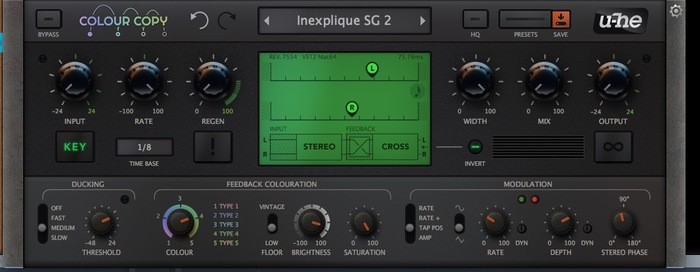
With darker knobs and other sides .
Imac M4 24" under Sequoia 15.7.7, D.P. 11.36 & Kontakt 8.10.2 _ Gibson ES 295 & Explorer _ FilterBank2 Sherman & PolyEvolver Keyboard _ Altiverb 8_ Explorer Loïc Le Pape
https://loiclepapesteelguitars.com/
https://loiclepapesteelguitars.com/