


Hi!
Problem: I like the basically same sound for open and closed highhat. No problem with MDrummer, I have a long sound for open hh and cut it for the closed hh with this ADSR, very comfortable.
But how can I make the chh cut the ohh when playing ohh > chh???
This is how it is programmed normally.
MDrummer: Closed HH kill Open HH?
-
- KVRAF
- 2332 posts since 24 Jun, 2006 from London, England
On the Drumset Edit tab, Drum List section (should be on the left section of that tab) -
(taken from p.72 of https://www.meldaproduction.com/downloa ... rummer.pdf )Each drum list item has a checkbox next to it. The checks change depending on the selected drum and control which drums are "closed" by it "Choke groups"). This is mostly useful for hi-hats, where the closed hi-hat stops the open hi-hat from playback. In this case you should select closed hi-hat and check open hi-hat, which will ensure that every hi-hat hit will close the open hi-hat sound if present, hence it will simulate closing the hi-hat.
-
 MeldaProduction MeldaProduction https://www.kvraudio.com/forum/memberlist.php?mode=viewprofile&u=176122
 - KVRAF
- 14339 posts since 15 Mar, 2008 from Czech republic
Look at the drum list, preferrably first load some factory acoustic drumset. Select closed hihat. One the left side of the drum icons in the list there are small checkboxes and the closed HH will probably have check both itself and the open HH, which means "if closed HH is played, open HH should be closed".
-
- KVRAF
- 2332 posts since 24 Jun, 2006 from London, England
I'm wondering if it would be clearer from a user POV that if those ' ' boxes were actually ' ' boxes - Kinda makes it look more 'this shouldn't play at the same time when activated'
EDIT: Damnit looks like some ascii characters are unprintable here. To clarify I meant, at the moment it's using the symbol 'ascii 254' (tick in a box) but wonder if it'd look clearer using 'ascii 253' (cross in a box):
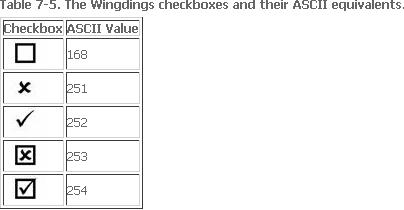
EDIT: Damnit looks like some ascii characters are unprintable here. To clarify I meant, at the moment it's using the symbol 'ascii 254' (tick in a box) but wonder if it'd look clearer using 'ascii 253' (cross in a box):
-
- KVRAF
- 10376 posts since 2 Sep, 2003 from Surrey, UK
I can''t see the "ticked" boxes clearly, either, especially in the parameter lists.
I tried modifying those images in the Style Editor (checkboxon) but could not see any change. Methinks they may be hard-coded.
I tried modifying those images in the Style Editor (checkboxon) but could not see any change. Methinks they may be hard-coded.
-
MeldaProduction MeldaProduction https://www.kvraudio.com/forum/memberlist.php?mode=viewprofile&u=176122
- KVRAF
- 14339 posts since 15 Mar, 2008 from Czech republic
I actually don't know, but I agree they are not exactly "awesome"  . I didn't really took much time with that, because it is generally a very rare function, one generally only needs to set it up for hihats... I'll check about making them bigger / different... no promises.
. I didn't really took much time with that, because it is generally a very rare function, one generally only needs to set it up for hihats... I'll check about making them bigger / different... no promises.-
- KVRAF
- 10376 posts since 2 Sep, 2003 from Surrey, UK
I was slightly off- topic. I was referring to the ticked boxes in lists like this one:

The right-hand side is a mock-up, which I think is easier to read, but I cannot find how to do it in the Style Editor.
The right-hand side is a mock-up, which I think is easier to read, but I cannot find how to do it in the Style Editor.
-
- KVRist
- Topic Starter
- 168 posts since 9 Oct, 2004 from Germany
Found it. Works but the boxes do not remain crossed. And if both are crossed - does that mean chh stopps open hh and also vice versa?MeldaProduction wrote:Look at the drum list, preferrably first load some factory acoustic drumset. Select closed hihat. One the left side of the drum icons in the list there are small checkboxes and the closed HH will probably have check both itself and the open HH, which means "if closed HH is played, open HH should be closed".